

Workbench#
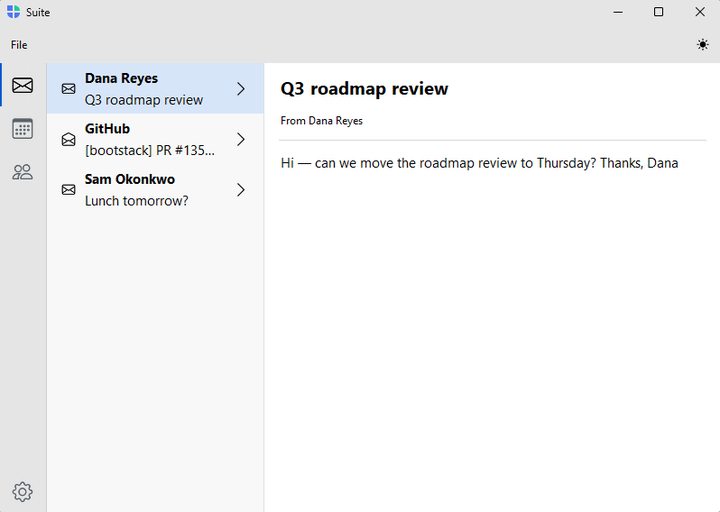
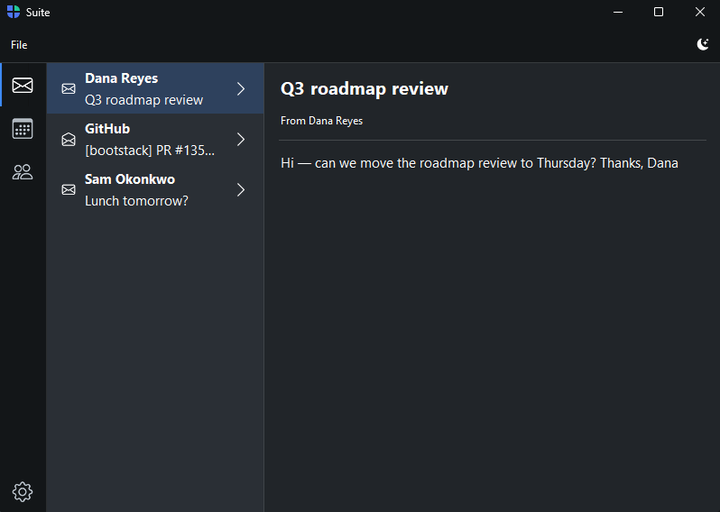
A two-tier application scaffold: a VS Code-style icon rail of workspaces down
the far left, each revealing its own navigation sidebar and content area, plus an
optional toolbar stack and status band. Use it when an app has several distinct
sections — Mail, Calendar, Contacts — each with its own navigation. For a single
sidebar with no rail, use AppShell instead.
Usage#
Think of a Workbench as several AppShell sidebars behind one rail: you add each section as a workspace with its own navigation and content, and the rail switches between them.
Workspaces#
Add a workspace with add_workspace(key, text=, icon=). Each returns a
Workspace — a sidebar host
authored with the exact same front doors as a single-tier AppShell:
page_nav() / list_nav() / tree_nav() / custom_nav(). The rail appears once
there is more than one workspace, and each workspace can use a different
provider.
with bs.Workbench(title="Console", size=(960, 600)) as shell:
    # An authored page nav.
    with shell.add_workspace("acquire", text="Acquire", icon="cpu") as ws:
        with ws.page_nav() as nav:
            with nav.add_page("sensors", text="Sensors", icon="thermometer-half", padding=20):
                bs.Label("Sensors", font="heading-lg")
            nav.add_header("Hardware")
            with nav.add_page("ports", text="Ports", icon="usb-symbol", padding=20):
                bs.Label("Ports", font="heading-lg")

    # A data-bound master–detail list.
    with shell.add_workspace("devices", text="Devices", icon="hdd-stack") as ws:
        ws.list_nav(devices)

        @ws.detail
        def show(record):
            bs.Label(record["title"], font="heading-lg")

    shell.navigate("acquire", "sensors")   # workspace first, then page
shell.run()
Rail labels#
By default the rail shows icons only. Pass rail_labels=True to caption each
icon (this widens the rail); rail_width sets the width explicitly.
bs.Workbench(rail_labels=True)
Toolbars, status bar, and configuration#
A Workbench shares the rest of its surface with AppShell — add_toolbar(), shell.statusbar, the flat
configuration kwargs and live shell.* properties, from_store(), and the
window options all work identically. See the AppShell guide
for those.
Styling#
Kwarg |
Default |
Region |
|---|---|---|
|
|
The workspace rail. |
|
|
The per-workspace navigation sidebar. |
|
|
The bottom status band. |
nav_accent colors the rail indicator bar and the sidebar selection wash
(None keeps it neutral). Under-rail sidebars always use the subtle wash — the
filled solid selection is reserved for the standalone AppShell page nav.
Events#
In addition to the shell events (on_page_change / on_sidebar_toggle /
on_sidebar_mode_change), a Workbench fires on_workspace_change when
the rail switches workspace.
Shorthand |
Handler receives |
|---|---|
|
|
|
|
|
|
|
shell.on_workspace_change(lambda e: print("workspace:", e.workspace))
See also#
AppShell —
the single-tier shell: one navigation sidebar, no rail.
PageStack —
page navigation without a built-in sidebar.
API#
The complete reference for Workbench lives on the
Application API page. At a glance:
Two-tier application window: a workspace rail plus per-workspace sidebars. |
Full Example#
 1from bootstack.data import MemoryDataSource
 2
 3inbox = MemoryDataSource().load([
 4    {"id": 1, "title": "Dana Reyes", "text": "Q3 roadmap review", "icon": "envelope", "body": "Can we move it to Thursday?"},
 5    {"id": 2, "title": "Billing", "text": "Your receipt for June", "icon": "envelope-open", "body": "Thanks for your payment."},
 6])
 7contacts = MemoryDataSource().load([
 8    {"id": 1, "title": "Dana Reyes", "text": "dana@acme.io", "icon": "person-circle", "phone": "555-0142"},
 9    {"id": 2, "title": "Sam Okonkwo", "text": "sam@acme.io", "icon": "person-circle", "phone": "555-0177"},
10])
11
12with bs.Workbench(title="Workspace", size=(980, 620)) as shell:
13    with shell.add_toolbar() as bar:
14        with bar.add_menu("File") as file:
15            file.add_action("New", shortcut="Mod+N", on_click=lambda: None)
16            file.add_action("Open", shortcut="Mod+O", on_click=lambda: None)
17            file.add_divider()
18            file.add_action("Quit", shortcut="Mod+Q", on_click=shell.close)
19        with bar.add_menu("View") as view:
20            view.add_action("Refresh", shortcut="Mod+R", on_click=lambda: None)
21        bar.add_spacer()
22        bar.add_button(icon="search", on_click=lambda: None)
23        bar.add_theme_toggle()
24
25    # Mail — a master–detail list.
26    with shell.add_workspace("mail", text="Mail", icon="envelope") as ws:
27        ws.list_nav(inbox, chevron=True)
28
29        @ws.detail
30        def read(message):
31            with bs.Column(horizontal_items="left", gap=12, padding=(16, 10)):
32                bs.Label(message["text"], font="heading-lg")
33                bs.Label(f"From {message['title']}", font="caption")
34                bs.Divider()
35                bs.Label(message["body"])
36
37    # Calendar — a page nav (authored pages).
38    with shell.add_workspace("calendar", text="Calendar", icon="calendar3") as ws:
39        with ws.page_nav() as nav:
40            with nav.add_page("today", text="Today", icon="calendar-day", padding=20, gap=8):
41                bs.Label("Today", font="heading-lg")
42                bs.Label("No events.")
43            with nav.add_page("week", text="Week", icon="calendar-week", padding=20, gap=8):
44                bs.Label("This week", font="heading-lg")
45
46    # Contacts — another list.
47    with shell.add_workspace("contacts", text="Contacts", icon="people") as ws:
48        ws.list_nav(contacts, chevron=True)
49
50        @ws.detail
51        def card(person):
52            with bs.Column(grow=True, horizontal="stretch", gap=12, padding=20):
53                bs.Label(person["title"], font="heading-lg")
54                bs.Label(person["text"], font="caption")
55                bs.Label(f"Phone: {person['phone']}")
56
57    with shell.add_workspace("settings", text="Settings", icon="gear", pin_to_footer=True) as ws:
58        with ws.page_nav() as nav:
59            with nav.add_page("general", text="General", icon="sliders", padding=20, gap=8):
60                bs.Label("Settings", font="heading-lg")
61
62    # Mail is the first workspace, so it opens active with its first message
63    # selected — no explicit navigate needed.
64
65shell.run()