

Checkbox#
A labelled checkbox for binary on/off input.


Usage#
A checkbox holds a boolean checked state — read it with .value or bind a
Signal with signal=, and on_change fires each
time it toggles. Pass tristate=True for a third, indeterminate state.
Basic#
bs.Checkbox("Accept terms",    value=False)
bs.Checkbox("Send newsletter", value=True)
Accent colors#
bs.Checkbox("Primary",   accent="primary",   value=True)
bs.Checkbox("Secondary", accent="secondary", value=True)
bs.Checkbox("Info",      accent="info",      value=True)
bs.Checkbox("Success",   accent="success",   value=True)
bs.Checkbox("Warning",   accent="warning",   value=True)
bs.Checkbox("Danger",    accent="danger",    value=True)


Custom state icons#
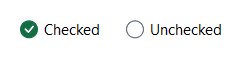
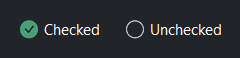
Use on_icon= and off_icon= to show different icons for the checked
and unchecked states. Set show_indicator=False to replace the box
entirely with the icon pair.
bs.Checkbox("Checked",
    on_icon="check-circle-fill", off_icon="circle",
    show_indicator=False, accent="success", value=True)
bs.Checkbox("Unchecked",
    on_icon="check-circle-fill", off_icon="circle",
    show_indicator=False, accent="success", value=False)
Tristate#
Set tristate=True to enable a third indeterminate state (dash indicator).
When no value= is given, the checkbox starts indeterminate. value
returns None in that state.
bs.Checkbox("Indeterminate", tristate=True)
bs.Checkbox("Checked",       tristate=True, value=True)
bs.Checkbox("Unchecked",     tristate=True, value=False)

chk = bs.Checkbox("Option", tristate=True)
print(chk.value)   # → None (indeterminate)
chk.checked = True
print(chk.value)   # → True
Reactive binding#
Bind a Signal with signal=. The checkbox and signal stay in sync.
When signal= is provided, value= is ignored — seed the Signal
directly.
agreed = bs.Signal(False)
bs.Checkbox("I agree to the terms", signal=agreed)
agreed.subscribe(lambda v: submit_btn.disabled = not v)
A bound signal carries True or False. tristate=True combines with
signal= — the checkbox starts at the signal’s value and reports every change
back — but the indeterminate state itself does not travel. It is held by the
checkbox, so a signal bound to an indeterminate checkbox reads False; read
that state from the checkbox’s value, which is None there. Only code can
put a checkbox into it, since clicking cycles between checked and unchecked, so
this comes up in the “select all” pattern where indeterminate is computed from
other boxes. For the same reason a signal created with
allow_empty=True is refused at the binding.
Custom values#
Use checked_value= and unchecked_value= when the logical values
are not True/False.
bs.Checkbox("Theme", checked_value="dark", unchecked_value="light")
Disabled#
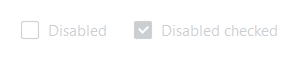
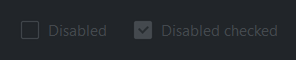
bs.Checkbox("Disabled",         disabled=True)
bs.Checkbox("Disabled checked", value=True, disabled=True)
Events#
chk = bs.Checkbox("Option")

# Fires on every toggle
chk.on_change(lambda e: print("changed:", chk.checked))

# Fires only when checked
chk.on_check(lambda e: print("checked"))

# Fires only when unchecked
chk.on_uncheck(lambda e: print("unchecked"))

# As a Stream
chk.on_change().debounce(200).listen(lambda e: save())
Widget sizing#
All widgets accept self-placement kwargs via **kwargs. The parent
container determines which options apply — Column / Row parents use
the layout kwargs below, grid-based parents use grid kwargs.
Column (vertical layout)
Used inside a Column, App, or any other container with a column layout.
Children are arranged top-to-bottom, so horizontal aligns each child across
the width and grow shares the vertical space. (vertical does not apply —
the order of the children sets their top-to-bottom position.)
|
Cross-axis placement of the widget: |
|
Claim and fill a share of the leftover vertical space (the layout
direction). |
|
External spacing in pixels. Accepts an integer (equal on all
sides), a 2-tuple |
|
Horizontal external spacing (left and right). Accepts an integer
or a 2-tuple |
|
Vertical external spacing (top and bottom). Accepts an integer
or a 2-tuple |
Row (horizontal layout)
Used inside a Row or any other container with a row layout. Children are
arranged left-to-right, so vertical aligns each child across the height and
grow shares the horizontal space. (horizontal does not apply — the order
of the children sets their left-to-right position.)
|
Cross-axis placement of the widget: |
|
Claim and fill a share of the leftover horizontal space (the layout
direction). |
|
External spacing in pixels. Accepts an integer (equal on all
sides), a 2-tuple |
|
Horizontal external spacing (left and right). Accepts an integer
or a 2-tuple |
|
Vertical external spacing (top and bottom). Accepts an integer
or a 2-tuple |
Grid
Used inside a Grid container.
|
Zero-based row and column indices. |
|
Number of rows or columns to span. |
|
Horizontal placement within the grid cell: |
|
Vertical placement within the grid cell: |
|
External spacing in pixels. Accepts an integer, a 2-tuple
|
|
Horizontal external spacing. Accepts an integer or |
|
Vertical external spacing. Accepts an integer or |
API#
The complete reference for Checkbox lives on the
Widgets API page. At a glance:
A labeled checkbox — checked or unchecked. |
Full Example#
 1
 2with bs.App(title="Checkbox Demo", padding=20, gap=16) as app:
 3
 4    # Basic
 5    bs.Label("Basic", font="heading-sm")
 6    bs.Checkbox("Unchecked", value=False)
 7    bs.Checkbox("Checked",   value=True)
 8
 9    # Tristate — a third, indeterminate state (value is None)
10    bs.Label("Tristate", font="heading-sm")
11    with bs.Row(gap=16):
12        bs.Checkbox("Indeterminate", tristate=True)
13        bs.Checkbox("Checked",       tristate=True, value=True)
14        bs.Checkbox("Unchecked",     tristate=True, value=False)
15
16    # Accent colors
17    bs.Label("Accent Colors", font="heading-sm")
18    with bs.Row(gap=16):
19        for accent in ("primary", "secondary", "info", "success", "warning", "danger"):
20            bs.Checkbox(accent.title(), accent=accent, value=True)
21
22    # Custom state icons
23    bs.Label("Custom State Icons", font="heading-sm")
24    with bs.Row(gap=24):
25        bs.Checkbox("Checked",
26            on_icon="check-circle-fill", off_icon="circle",
27            show_indicator=False, accent="success", value=True)
28        bs.Checkbox("Unchecked",
29            on_icon="check-circle-fill", off_icon="circle",
30            show_indicator=False, accent="success", value=False)
31        bs.Checkbox("Favorite",
32            on_icon="star-fill", off_icon="star",
33            accent="warning", value=True)
34
35    # Reactive binding
36    bs.Label("Reactive Binding", font="heading-sm")
37    with bs.Column(gap=6):
38        agreed = bs.Signal(False)
39        bs.Checkbox("I agree to the terms", signal=agreed)
40        status_lbl = bs.Label("Status: not agreed", accent="secondary", font="caption")
41
42        def _update_status(v):
43            status_lbl.text = "Status: agreed" if v else "Status: not agreed"
44
45        agreed.subscribe(_update_status)
46
47    # Custom values
48    bs.Label("Custom Values", font="heading-sm")
49    with bs.Column(gap=6):
50        theme_sig = bs.Signal("light")
51        bs.Checkbox(
52            "Dark mode",
53            signal=theme_sig,
54            checked_value="dark",
55            unchecked_value="light",
56        )
57        theme_lbl = bs.Label("Theme: light", accent="secondary", font="caption")
58        def _update_theme(v):
59            theme_lbl.text = f"Theme: {v}"
60
61        theme_sig.subscribe(_update_theme)
62
63    # Disabled
64    bs.Label("Disabled", font="heading-sm")
65    with bs.Row(gap=16):
66        bs.Checkbox("Disabled unchecked", disabled=True)
67        bs.Checkbox("Disabled checked", value=True, disabled=True)
68
69    # Events
70    bs.Label("Events", font="heading-sm")
71    with bs.Column(gap=6):
72        event_lbl = bs.Label("Toggle the checkbox…", accent="secondary", font="caption")
73        event_chk = bs.Checkbox("Toggle me")
74
75        def _on_change(e):
76            state = "checked" if event_chk.checked else "unchecked"
77            event_lbl.text = f"State: {state}"
78
79        event_chk.on_change(_on_change)
80
81app.run()