

Card#
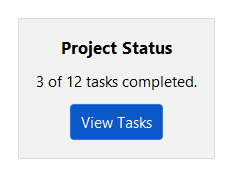
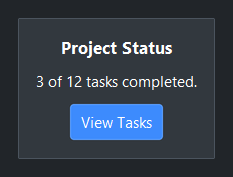
A container that groups related content with an elevated background and border.
Cards automatically step the background surface at each nesting level,
alternating between card and card_raised to keep adjacent levels
visually distinct without runaway drift.
Usage#
A card is a layout container with a raised, bordered surface — it takes the same
layout=, gap=, and padding= as a Column. Add an
accent= to tint the border when a card needs emphasis.
Accents#
Pass an accent= token to tint the card border and give the interior a
subtle accent wash. Without accent= the card renders with a neutral border
and the next surface step.
for accent in ("primary", "secondary", "info", "success", "warning", "danger"):
    with bs.Card(accent=accent, padding=24, gap=4):
        bs.Label(accent.title(), accent=accent, font="heading-sm")
        bs.Label("Card content")


Layout modes#
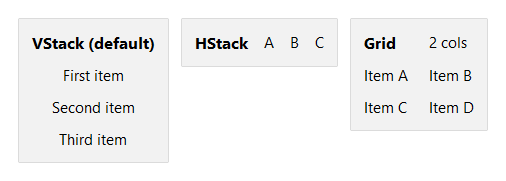
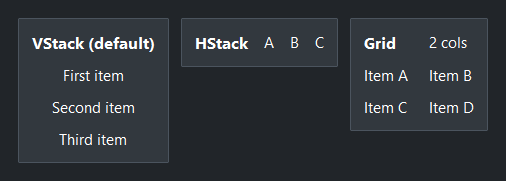
layout='column' (default) stacks children vertically. 'row' places
them side by side. 'grid' arranges children in a column-row grid.
# Default vertical stack
with bs.Card(padding=12, gap=8):
    bs.Label("Column (default)", font="heading-sm")
    bs.Label("First item")
    bs.Label("Second item")
    bs.Label("Third item")

# Horizontal row
with bs.Card(layout="row", padding=12, gap=12, vertical_items="center"):
    bs.Label("Row", font="heading-sm")
    bs.Label("A")
    bs.Label("B")
    bs.Label("C")

# Grid - two equally weighted columns
with bs.Card(layout="grid", columns=2, padding=12, gap=8, horizontal_items="stretch"):
    bs.Label("Grid", font="heading-sm")
    bs.Label("2 cols")
    bs.Label("Item A")
    bs.Label("Item B")
    bs.Label("Item C")
    bs.Label("Item D")
Child defaults#
Use horizontal_items, vertical_items, and grow_items to set a
default layout behavior for all children without repeating it on each widget.
with bs.Card(gap=8, horizontal_items="stretch"):
    bs.TextField()   # fills horizontally — no horizontal="stretch" needed
    bs.TextField()
Nested cards#
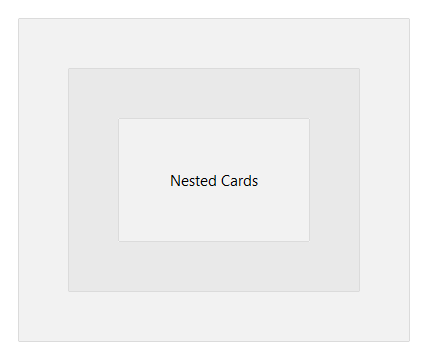
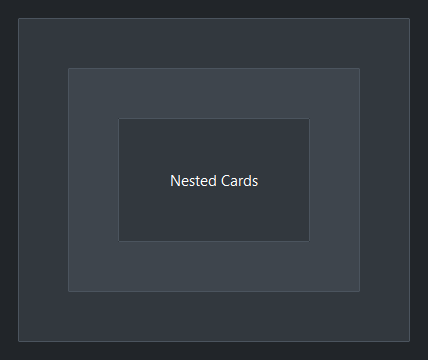
Neutral cards alternate between the card and card_raised surface tokens
at each nesting level — the first card steps to card, the next to
card_raised, the next back to card, and so on. Every level is visually
distinct from its parent regardless of nesting depth.
Accent cards behave differently: the accent[subtle] tint is fixed and does
not change with depth. The accent color is the identity signal — elevation
stepping is not applied.
with bs.Card(padding=50):
    with bs.Card(padding=50):
        with bs.Card(padding=50):
            bs.Label("Nested Cards")
Widget sizing#
All widgets accept self-placement kwargs via **kwargs. The parent
container determines which options apply — Column / Row parents use
the layout kwargs below, grid-based parents use grid kwargs.
Column (vertical layout)
Used inside a Column, App, or any other container with a column layout.
Children are arranged top-to-bottom, so horizontal aligns each child across
the width and grow shares the vertical space. (vertical does not apply —
the order of the children sets their top-to-bottom position.)
|
Cross-axis placement of the widget: |
|
Claim and fill a share of the leftover vertical space (the layout
direction). |
|
External spacing in pixels. Accepts an integer (equal on all
sides), a 2-tuple |
|
Horizontal external spacing (left and right). Accepts an integer
or a 2-tuple |
|
Vertical external spacing (top and bottom). Accepts an integer
or a 2-tuple |
Row (horizontal layout)
Used inside a Row or any other container with a row layout. Children are
arranged left-to-right, so vertical aligns each child across the height and
grow shares the horizontal space. (horizontal does not apply — the order
of the children sets their left-to-right position.)
|
Cross-axis placement of the widget: |
|
Claim and fill a share of the leftover horizontal space (the layout
direction). |
|
External spacing in pixels. Accepts an integer (equal on all
sides), a 2-tuple |
|
Horizontal external spacing (left and right). Accepts an integer
or a 2-tuple |
|
Vertical external spacing (top and bottom). Accepts an integer
or a 2-tuple |
Grid
Used inside a Grid container.
|
Zero-based row and column indices. |
|
Number of rows or columns to span. |
|
Horizontal placement within the grid cell: |
|
Vertical placement within the grid cell: |
|
External spacing in pixels. Accepts an integer, a 2-tuple
|
|
Horizontal external spacing. Accepts an integer or |
|
Vertical external spacing. Accepts an integer or |
See also#
Column,
Row, and
Grid are the plain (no border, no
surface) layout containers. Use Card when you want an elevated
background and border around a group of content.
API#
The complete reference for Card lives on the
Widgets API page. At a glance:
A card-surface container that groups content with an elevated background and border. |
Full Example#
 1
 2with bs.App(title="Card Demo", padding=20, gap=16) as app:
 3
 4    # Accent colors
 5    bs.Label("Accent Borders", font="heading-sm")
 6    with bs.Row(gap=12):
 7        for accent in ("primary", "secondary", "info", "success", "warning", "danger"):
 8            with bs.Card(accent=accent, padding=12, gap=4):
 9                bs.Label(accent.title(), font="heading-sm", accent=accent)
10                bs.Label("Card content", font="caption")
11
12    # Layout modes
13    bs.Label("Layout Modes", font="heading-sm")
14    with bs.Row(gap=12):
15
16        with bs.Card(padding=12, gap=8):
17            bs.Label("Column (default)", font="heading-sm")
18            bs.Label("First item")
19            bs.Label("Second item")
20            bs.Label("Third item")
21
22        with bs.Card(layout="row", padding=12, gap=12, vertical_items="center"):
23            bs.Label("Row", font="heading-sm")
24            bs.Label("A")
25            bs.Label("B")
26            bs.Label("C")
27
28        with bs.Card(layout="grid", columns=[1, 1], padding=12, gap=8):
29            bs.Label("Grid", font="heading-sm")
30            bs.Label("2 cols")
31            bs.Label("Item A")
32            bs.Label("Item B")
33            bs.Label("Item C")
34            bs.Label("Item D")
35
36    # Nested surface stepping
37    bs.Label("Nested Cards", font="heading-sm")
38    with bs.Card(padding=12, gap=8):
39        bs.Label("Outer (card surface)", font="heading-sm")
40        with bs.Row(gap=8):
41            with bs.Card(padding=10, gap=4):
42                bs.Label("Inner A", font="heading-sm")
43                bs.Label("Overlay surface", font="caption")
44            with bs.Card(padding=10, gap=4):
45                bs.Label("Inner B", font="heading-sm")
46                bs.Label("Overlay surface", font="caption")
47            with bs.Card(accent="primary", padding=10, gap=4):
48                bs.Label("Inner C", font="heading-sm", accent="primary")
49                bs.Label("Accent tint", font="caption")
50
51app.run()