

ContextMenu#
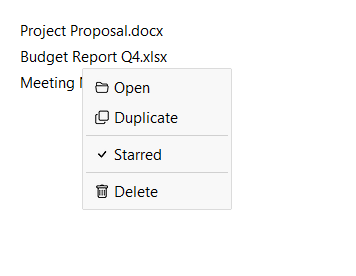
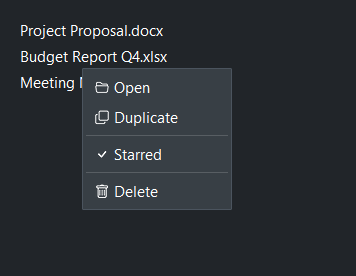
A themed floating popup menu that attaches to any widget and opens on a
right-click, left-click, or a programmatic show() call.
Usage#
A context menu is a right-click (or programmatic) popup bound to a target widget
— the on-demand counterpart to a MenuButton, which shows its
menu from a visible button. You populate both the same way, with add_item()
and friends.
Basic#
Pass a target= widget and trigger= to auto-bind the open gesture.
The default trigger is 'right_click'. Use add_item() to populate
the menu.
with bs.Card(horizontal="stretch") as card:
    bs.Label("Right-click here")

menu = bs.ContextMenu(card)
menu.add_item("Edit",      icon="pencil",  on_click=edit)
menu.add_item("Duplicate", icon="copy",    on_click=duplicate)
menu.add_divider()
menu.add_item("Delete",    icon="trash",   on_click=delete)
Item types#
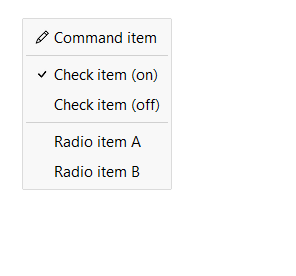
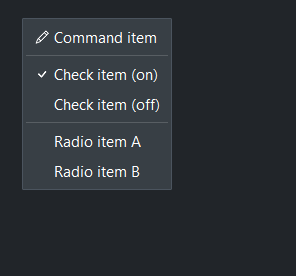
Four item types are available: command items, checkbutton items, radiobutton items, and separators.
menu = bs.ContextMenu(target)
menu.add_item("Command item", icon="pencil")          # command
menu.add_divider()
menu.add_check_item("Check item (on)", value=True)    # checkbutton
menu.add_check_item("Check item (off)")
menu.add_divider()
menu.add_radio_item("Radio item A", value="a")        # radiobutton
menu.add_radio_item("Radio item B", value="b")
Global callback#
Pass on_select= to register a single handler for all item activations.
The callback receives a MenuSelectEvent with
type, text, and value attributes.
def on_action(event):
    print("selected:", event.text)

menu = bs.ContextMenu(card, on_select=on_action)
menu.add_item("Archive")
menu.add_item("Export")
menu.add_item("Delete")
Manual show#
Pass trigger=None to disable auto-binding. Call show() yourself,
passing the cursor position from a mouse event.
menu = bs.ContextMenu(trigger=None)
menu.add_item("Cut",   icon="scissors")
menu.add_item("Copy",  icon="copy")
menu.add_item("Paste", icon="clipboard")

def on_right_click(event):
    menu.show(position=(event.x_root, event.y_root))

some_widget.tk.bind("<Button-3>", on_right_click)
Keyboard shortcuts#
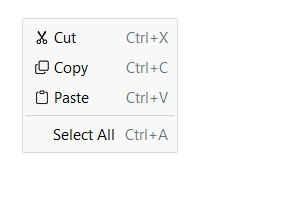
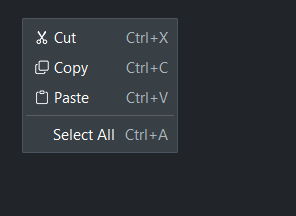
Pass shortcut= to display a key hint on the right side of an item.
This is a display label only — it does not bind a keyboard handler.
Three forms are accepted:
Modifier pattern —
"Mod+S","Mod+Shift+N","F5"— translated to the platform-correct string automatically ("Ctrl+S"on Windows,"⌘S"on macOS).Registered key — a name previously passed to
get_shortcuts().register(). Resolved to the platform display string automatically.Literal string — anything else is shown as-is (e.g.
"Ctrl+S").
menu = bs.ContextMenu(target)
menu.add_item("Cut",        icon="scissors",  shortcut="Mod+X")
menu.add_item("Copy",       icon="copy",      shortcut="Mod+C")
menu.add_item("Paste",      icon="clipboard", shortcut="Mod+V")
menu.add_divider()
menu.add_item("Select All",                   shortcut="Mod+A")
See also#
MenuButton —
a button that opens a dropdown menu on click.
Toolbar —
horizontal strip for grouping buttons and menus.
API#
The complete reference for ContextMenu and its
ContextMenuItem entries lives on the
Widgets API page. At a glance:
A popup menu that attaches to a target widget and opens on a gesture or manual call. |
|
Data class for context menu items. |
Full Example#
 1
 2
 3with bs.App(title="ContextMenu Demo", padding=20, gap=16) as app:
 4
 5    # Basic — right-click trigger
 6    bs.Label("Basic (right-click the card)", font="heading-sm")
 7    with bs.Card(horizontal="stretch", padding=12) as card:
 8        bs.Label("Right-click anywhere in this card to open the menu.")
 9
10    menu = bs.ContextMenu(card, trigger="right_click")
11    menu.add_item("Edit",      icon="pencil",  on_click=lambda: print("Edit"))
12    menu.add_item("Duplicate", icon="copy",    on_click=lambda: print("Duplicate"))
13    menu.add_divider()
14    menu.add_item("Delete",    icon="trash",   on_click=lambda: print("Delete"))
15
16    # Global on_select callback
17    bs.Label("Global callback (right-click)", font="heading-sm")
18    with bs.Card(horizontal="stretch", padding=12) as card2:
19        bs.Label("Right-click for a menu with a shared callback.")
20
21    def on_action(event):
22        print("selected:", event.text)
23
24    menu2 = bs.ContextMenu(card2, on_select=on_action)
25    menu2.add_item("Archive")
26    menu2.add_item("Export")
27    menu2.add_item("Delete")
28
29    # Check and radio items
30    bs.Label("Check and radio items (right-click)", font="heading-sm")
31    with bs.Card(horizontal="stretch", padding=12) as card3:
32        bs.Label("Right-click for a menu with toggleable and selectable items.")
33
34    menu3 = bs.ContextMenu(card3)
35    menu3.add_check_item("Bold",   value=True, on_click=lambda: print("Bold toggled"))
36    menu3.add_check_item("Italic",             on_click=lambda: print("Italic toggled"))
37    menu3.add_divider()
38    menu3.add_radio_item("Small",  value="sm", on_click=lambda: print("Small"))
39    menu3.add_radio_item("Medium", value="md", on_click=lambda: print("Medium"))
40    menu3.add_radio_item("Large",  value="lg", on_click=lambda: print("Large"))
41
42    # Keyboard shortcuts
43    bs.Label("Keyboard shortcuts (right-click)", font="heading-sm")
44    with bs.Card(horizontal="stretch", padding=12) as card4:
45        bs.Label("Shortcut labels are display-only — bind handlers separately.")
46
47    menu4 = bs.ContextMenu(card4)
48    menu4.add_item("Cut",   icon="scissors",  shortcut="Mod+X")
49    menu4.add_item("Copy",  icon="copy",      shortcut="Mod+C")
50    menu4.add_item("Paste", icon="clipboard", shortcut="Mod+V")
51
52    # Disabled items
53    bs.Label("Disabled items (right-click)", font="heading-sm")
54    with bs.Card(horizontal="stretch", padding=12) as card5:
55        bs.Label("Items can be disabled at construction.")
56
57    menu5 = bs.ContextMenu(card5)
58    menu5.add_item("Save",    icon="floppy",       on_click=lambda: print("Save"))
59    menu5.add_item("Publish", icon="cloud-upload", disabled=True)
60    menu5.add_divider()
61    menu5.add_item("Delete",  icon="trash",        disabled=True)
62
63    # Dynamic item management
64    bs.Label("Dynamic management (manual show button)", font="heading-sm")
65    with bs.Row(gap=8, vertical_items="center"):
66        menu6 = bs.ContextMenu(trigger=None)
67        menu6.add_item("Option A", key="a")
68        menu6.add_item("Option B", key="b")
69        key_c = menu6.add_item("Option C", key="c")
70        menu6.remove_item(key_c)
71
72        def _open_manual():
73            btn_root = btn.tk
74            x = btn_root.winfo_rootx()
75            y = btn_root.winfo_rooty() + btn_root.winfo_height()
76            menu6.show(position=(x, y))
77
78        btn = bs.Button("Open menu", on_click=_open_manual)
79
80app.run()