

App#
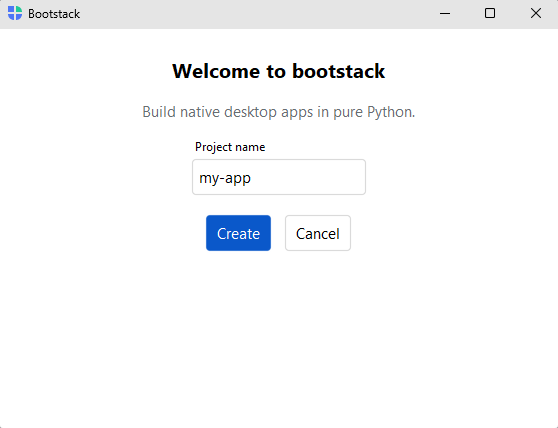
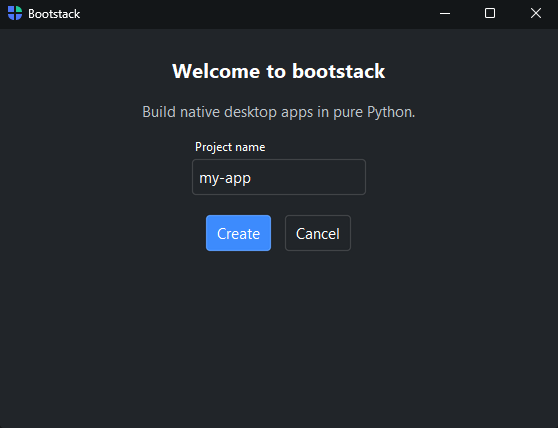
The application window — the root of every bootstack program. App behaves
as an implicit vertical stack: widgets created inside its with block are
placed top-to-bottom in its content area. Build the window, then call run()
to show it and start the event loop.
Usage#
Beyond hosting the UI, the App is your configuration home — set the theme,
locale, size, and window-state persistence as constructor kwargs, then read or
change them live through app.* properties (app.theme, app.title, …).
Building the window#
Open an App as a context manager, add content inside the block, and call
run() afterwards. run() shows the window and blocks until it closes.
import bootstack as bs

with bs.App(title="Notes", size=(800, 600), padding=16, gap=8) as app:
    bs.Label("Hello!", font="heading-lg")
    bs.Button("Quit", on_click=app.close)
app.run()
close() ends the program from code — the natural action for a Quit command
or menu item. It always closes (it does not run the on_close veto handlers
below).
Window controls#
The window’s show-state is controlled with these methods. They work the same on
App, AppShell, and Window.
Method |
Effect |
|---|---|
|
Close the window and end |
|
Hide the window without destroying it, and bring it back. |
|
Minimize to the taskbar/dock, or maximize where supported. |
|
Enter or leave fullscreen. |
|
Keep the window above all others, or release it. |
app.set_fullscreen(True)     # kiosk / presentation mode
app.minimize()
app.hide()                   # later: app.show()
Closing and cleanup#
Two hooks fire around the window going away, and they are distinct:
on_closeguards the window’s close button. It runs before the window closes and can veto it — returnFalseto keep the window open, orNone/Trueto allow it.on_destroyfires once when the window (or any widget) is actually torn down — the place for cleanup. It cannot be canceled. See Events.
with bs.App(title="Editor") as app:
    def confirm_quit():
        if document.modified and not bs.confirm("Discard unsaved changes?"):
            return False           # veto — the window stays open

    app.on_close(confirm_quit)
app.run()
The handler can also be passed at construction with on_close=. The
programmatic close() does not run these handlers — it always closes.
Window options#
Size and placement are constructor options:
bs.App(
    title="Notes",
    size=(800, 600),
    min_size=(480, 360),
    resizable=(True, True),
)
Theme, locale, and configuration#
An App is configured through flat constructor keyword arguments
(theme, locale, …), and the same options are read and changed at runtime
through matching app.* properties — assigning app.theme or app.locale
takes effect live.
with bs.App(title="Notes", theme="bootstrap-dark", locale="de_DE") as app:
    bs.ThemeToggle()
app.run()
See App Configuration for the full configuration reference — every
option, the locale-derived read-only properties, persisting state across
launches with a Store, and App.from_store().
Toolbars#
The window’s top region is a stack of Toolbar bands
you add with app.add_toolbar(). A toolbar holds buttons, labels, widgets,
and menus — a menu (File / Edit / …) is just another item, added with
toolbar.add_menu(...). Each add_toolbar() call stacks a new full-width
band, top to bottom.
with bs.App(title="Editor") as app:
    with app.add_toolbar() as bar:
        with bar.add_menu("File") as file:
            file.add_action("Quit", shortcut="Mod+Q", on_click=app.close)
        bar.add_spacer()                  # push trailing items to the right
        bar.add_theme_toggle()
app.run()
For a separate command row beneath the menus, just add a second toolbar:
with app.add_toolbar() as menus:
    menus.add_menu("File")
    menus.add_menu("Edit")
with app.add_toolbar(divider=True) as commands:
    commands.add_button("Run", icon="play", accent="primary")
Each toolbar takes the usual Toolbar options — surface (default
'chrome'), density, button_variant — so you control each band’s look
independently. On macOS, a toolbar’s menus bridge to the native global menu bar
(opt out per toolbar with use_macos_menus=False).
Undecorated window#
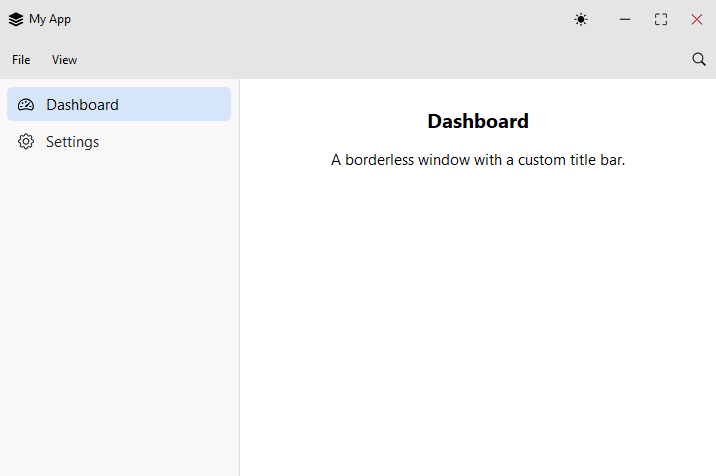
undecorated=True removes the OS title bar and border (ignored on macOS). The
window is not left stranded: it gets a built-in title bar with minimize /
maximize / close at the right edge and window dragging (double-click maximizes),
labeled with the window title. The same applies to
Window and AppShell
(Window can opt out with window_controls=False
for a chromeless splash or popover).
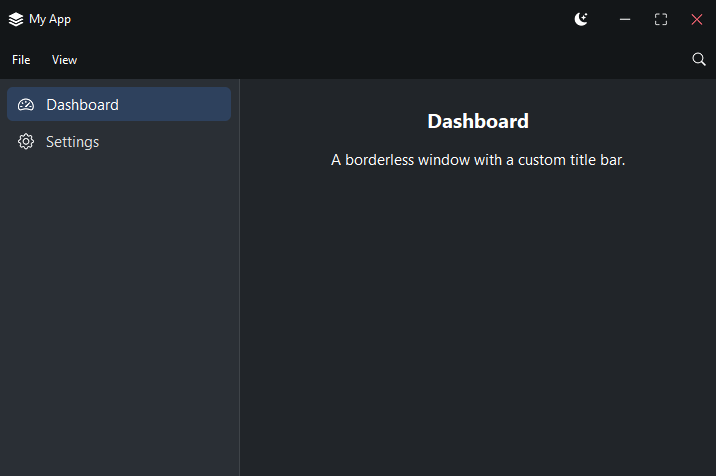
To take over the chrome — add a logo, menus, a theme toggle — build your own
title bar instead: make the first toolbar an
add_toolbar(show_window_controls=True). Adding any chrome toolbar suppresses
the built-in one, so you keep full control of the bar’s contents.
with bs.AppShell(title="My App", size=(720, 480), undecorated=True) as shell:
    with shell.add_toolbar(show_window_controls=True) as title:
        title.add_label("My App", icon="stack", font="caption")
        title.add_spacer()
        title.add_theme_toggle()
    with shell.add_toolbar() as bar:
        with bar.add_menu("File") as file:
            file.add_action("Quit", shortcut="Mod+Q", on_click=shell.close)
    ...
shell.run()
See also#
AppShell — an App with sidebar navigation and a page
stack: the standard desktop-app scaffold (and the same add_toolbar() chrome).
Window — a secondary window opened from a running app.
API#
The complete reference for App lives on the
Application API page. At a glance:
The application window. |
Full Example#
 1
 2with bs.App(title="Bootstack", padding=24, gap=14, size=(400, 350)) as app:
 3    with app.add_toolbar() as bar:
 4        with bar.add_menu("File") as file:
 5            file.add_action("New", shortcut="Mod+N", on_click=lambda: bs.toast("New"))
 6            file.add_divider()
 7            file.add_action("Quit", shortcut="Mod+Q", on_click=app.close)
 8
 9    bs.Label("Welcome to bootstack", font="heading-lg")
10    bs.Label(
11        "Build native desktop apps in pure Python.",
12        font="body",
13        accent="secondary",
14    )
15    bs.TextField(label="Project name", value="my-app")
16    with bs.Row(gap=8):
17        bs.Button("Cancel", variant="outline", on_click=app.close)
18        bs.Button("Create", accent="primary")
19app.run()