

Window#
A secondary top-level window, opened from a running app — a settings window, a
tool palette, a custom prompt. Like App, it behaves as an
implicit vertical stack: widgets created inside its with block are placed
top-to-bottom in its content area.
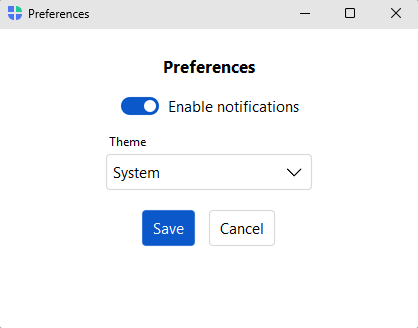
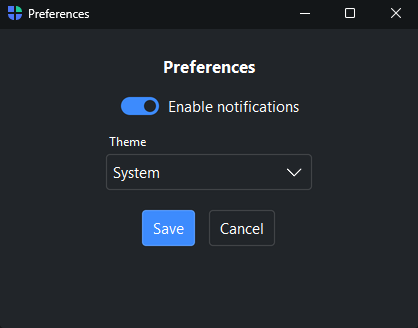
Usage#
Reach for a Window when you need a non-modal secondary surface that coexists
with the main window — a settings panel, a tool palette, a live preview. For a
modal prompt that blocks until answered, use a dialog instead.
Opening a window#
Build a Window like an App, then call show() to display it. Unlike
App, there is no run() — the window rides the app’s existing event loop.
def open_preferences():
    win = bs.Window(title="Preferences", size=(420, 300), padding=24, gap=14)
    with win:
        bs.Label("Preferences", font="heading-md")
        bs.Switch("Enable notifications", value=True)
        bs.Button("Close", on_click=win.close)
    win.show()
Modal windows and results#
Pass modal=True to grab input until the window closes, and
block_until_closed() to wait for it and read back a result. Set
win.result before closing to choose what it returns.
win = bs.Window(title="Rename", modal=True)
with win:
    field = bs.TextField(label="New name", value=current)
    def commit():
        win.result = field.value
        win.close()
    bs.Button("Rename", accent="primary", on_click=commit)

new_name = win.block_until_closed()    # blocks; returns win.result
if new_name:
    rename(new_name)
For the common prompts — text, numbers, dates, confirmation — reach for the
ready-made dialogs instead of building a
Window by hand.
Live title#
title is a live property — assign to it to update the title bar at runtime
(for example to reflect the document being edited).
win.title = f"Editing — {filename}"
Window controls and lifecycle#
Window shares the show-state controls (hide/show, minimize,
maximize, set_fullscreen, set_topmost) and the close hooks
(on_close to veto the close button, on_destroy for cleanup) with
App — see that page for the full set. close() closes
the window immediately, bypassing the on_close veto.
win.on_close(lambda: bs.confirm("Close without saving?"))
Toolbars#
Window has the same chrome as App: a stack of toolbars
added with window.add_toolbar(), each holding buttons, widgets, and menus.
See the App page’s Toolbars section for details.
win = bs.Window(title="Settings")
with win.add_toolbar() as bar:
    with bar.add_menu("File") as file:
        file.add_action("Close", shortcut="Mod+W", on_click=win.close)
    bar.add_spacer()
    bar.add_theme_toggle()
See also#
App — the main application window and the full window-control
reference.
Dialogs — ready-made modal prompts (alert, confirm, ask) for the common cases.
API#
The complete reference for Window lives on the
Application API page. At a glance:
A secondary top-level window. |
Full Example#
 1
 2with bs.App(title="Window demo", size=(360, 220), padding=24, gap=12) as app:
 3
 4    def open_preferences():
 5        win = bs.Window(title="Preferences", size=(420, 300), padding=24, gap=14)
 6        with win:
 7            bs.Label("Preferences", font="heading-md")
 8            bs.Switch("Enable notifications", value=True)
 9            bs.Select(label="Theme", options=["System", "Light", "Dark"], value="System")
10            with bs.Row(gap=8):
11                bs.Button("Cancel", variant="outline", on_click=win.close)
12                bs.Button("Save", accent="primary", on_click=win.close)
13        win.show()
14
15    bs.Label("Settings", font="heading-lg")
16    bs.Button("Open preferences…", accent="primary", on_click=open_preferences)
17app.run()