

Calendar#
An inline calendar for single-date or date-range selection.
Usage#
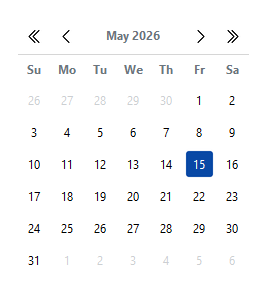
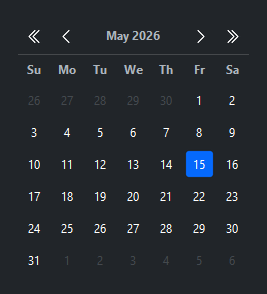
A calendar picks a single date or a range inline — .value is a date (or a
(start, end) tuple in range mode), and on_select fires on selection. For a
compact field that opens a calendar on demand, reach for a DateField.
Basic#
The calendar is always visible — it is not a popup. Pass a
datetime.date, datetime.datetime, or an ISO string
as value=.
from datetime import date

bs.Calendar()                            # today's month, nothing selected
bs.Calendar(value=date(2026, 5, 15))     # specific date pre-selected
bs.Calendar(value="2026-05-15")          # ISO string accepted
Range selection#
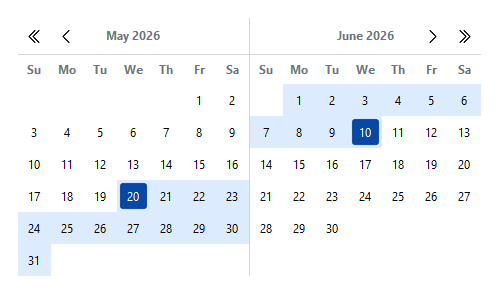
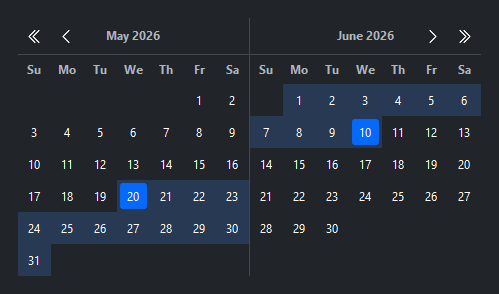
Set selection_mode='range' to select a start–end span. The calendar
shows two months side by side. The first click sets the start date;
the second click sets the end date.
bs.Calendar(
    selection_mode="range",
    start_date=date(2026, 5, 20),
    end_date=date(2026, 6, 10),
)
Accent colors#
accent= controls the color of selected dates and range highlights.
bs.Calendar(accent="primary")    # default
bs.Calendar(accent="success")
bs.Calendar(accent="danger")
Min / max bounds#
Dates outside the bounds are disabled and month navigation is blocked at the limits.
bs.Calendar(
    min_date=date(2026, 5, 1),
    max_date=date(2026, 5, 31),
)
min_date and max_date are also live properties — assign to them to move
the selectable window as availability changes (set either to None to clear
that bound):
cal = bs.Calendar()
cal.min_date = date.today()        # no dates before today
Disabled dates#
Individual dates can be disabled regardless of the min/max range.
bs.Calendar(disabled_dates=[date(2026, 5, 4), date(2026, 5, 11)])
disabled_dates is a live property too — assign a new iterable to replace the
disabled set at runtime (for example as booked dates load in):
cal.disabled_dates = booked_dates
Week numbers#
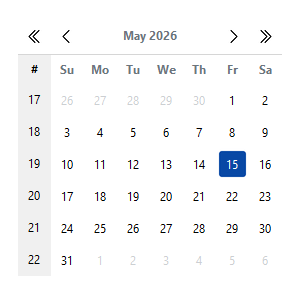
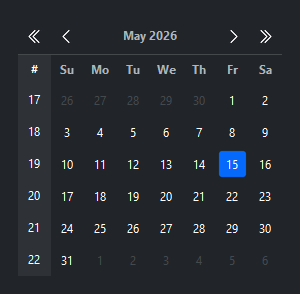
Display ISO 8601 week numbers in the leftmost column.
bs.Calendar(value=date(2026, 5, 15), show_week_numbers=True)
First weekday#
Override the locale default for the first column (0=Monday, 6=Sunday).
bs.Calendar(first_weekday=6) # week starts on Sunday
Events#
on_select() fires after every click. In range mode it fires
twice — once when the start is set (end is None) and again when
the end is set.
cal = bs.Calendar()

# Single mode
cal.on_select(lambda e: print("selected:", cal.value))

# Range mode — wait for a complete range
cal = bs.Calendar(selection_mode="range")
def _on_select(e):
    start, end = cal.range
    if end is not None:
        print(f"range: {start} → {end}")
cal.on_select(_on_select)

# As a Stream
cal.on_select().listen(lambda e: refresh(cal.value))
Programmatic control#
cal = bs.Calendar()

cal.value = date(2026, 6, 1)        # set selected date
cal.get()                            # → date(2026, 6, 1)
cal.set(date(2026, 6, 15))          # set without firing event

# Range mode
cal.range = (date(2026, 6, 1), date(2026, 6, 14))
cal.get_range()                      # → (date(...), date(...))
cal.set_range(date(2026, 6, 1), date(2026, 6, 14))
Widget sizing#
All widgets accept self-placement kwargs via **kwargs. The parent
container determines which options apply — Column / Row parents use
the layout kwargs below, grid-based parents use grid kwargs.
Column (vertical layout)
Used inside a Column, App, or any other container with a column layout.
Children are arranged top-to-bottom, so horizontal aligns each child across
the width and grow shares the vertical space. (vertical does not apply —
the order of the children sets their top-to-bottom position.)
|
Cross-axis placement of the widget: |
|
Claim and fill a share of the leftover vertical space (the layout
direction). |
|
External spacing in pixels. Accepts an integer (equal on all
sides), a 2-tuple |
|
Horizontal external spacing (left and right). Accepts an integer
or a 2-tuple |
|
Vertical external spacing (top and bottom). Accepts an integer
or a 2-tuple |
Row (horizontal layout)
Used inside a Row or any other container with a row layout. Children are
arranged left-to-right, so vertical aligns each child across the height and
grow shares the horizontal space. (horizontal does not apply — the order
of the children sets their left-to-right position.)
|
Cross-axis placement of the widget: |
|
Claim and fill a share of the leftover horizontal space (the layout
direction). |
|
External spacing in pixels. Accepts an integer (equal on all
sides), a 2-tuple |
|
Horizontal external spacing (left and right). Accepts an integer
or a 2-tuple |
|
Vertical external spacing (top and bottom). Accepts an integer
or a 2-tuple |
Grid
Used inside a Grid container.
|
Zero-based row and column indices. |
|
Number of rows or columns to span. |
|
Horizontal placement within the grid cell: |
|
Vertical placement within the grid cell: |
|
External spacing in pixels. Accepts an integer, a 2-tuple
|
|
Horizontal external spacing. Accepts an integer or |
|
Vertical external spacing. Accepts an integer or |
API#
The complete reference for Calendar lives on the
Widgets API page. At a glance:
An inline calendar for single-date or date-range selection. |
Full Example#
 1
 2with bs.App(title="Calendar Demo", padding=20, gap=16) as app:
 3
 4    # Single mode
 5    bs.Label("Single Select", font="heading-sm")
 6    bs.Calendar(value=date(2026, 5, 15))
 7
 8    # Range mode
 9    bs.Label("Range Select", font="heading-sm")
10    bs.Calendar(
11        selection_mode="range",
12        start_date=date(2026, 5, 8),
13        end_date=date(2026, 5, 22),
14    )
15
16app.run()