

Message Dialogs#
bs.alert() and bs.confirm() open modal windows for notifications and
yes/no decisions. Both are one-liners — no setup required.
Usage#
Both are blocking one-liners — call one, and it opens a modal, waits, and
returns: alert() returns nothing, confirm() returns True/False.
To collect a value, see input dialogs; for anything
custom, a Dialog.
Alert#
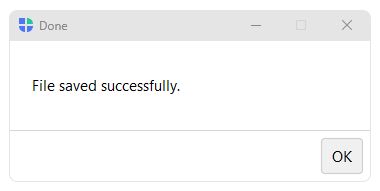
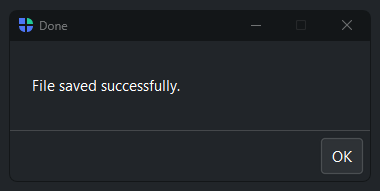
bs.alert() shows a message with an OK button. It returns None when the
user dismisses it.
bs.alert("File saved successfully.", title="Done")
Customize the button label or add an icon:
bs.alert("Session expired.", ok_text="Sign in again", icon="exclamation-circle")
Alert sound#
severity="warning" and severity="danger" ring the system bell by
default. All other severities are silent. Override with sound=:
bs.alert("Low battery.", severity="warning")        # rings bell
bs.alert("File saved.", severity="success")         # silent
bs.alert("Background sync done.", sound=False)      # force silent
bs.alert("Critical failure!", sound=True)           # force bell
Confirm#
bs.confirm() shows a question with Confirm and Cancel buttons. Returns
True when the user confirms, False when they cancel or close the dialog.
if bs.confirm("Overwrite existing file?"):
    save_file()
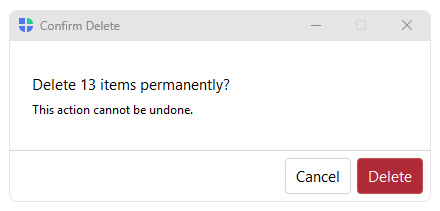
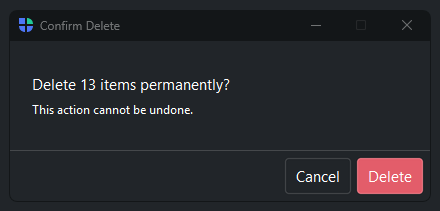
For destructive actions, use confirm_role="danger" — the button turns red
and is not focused by default, so Enter does not accidentally trigger it:
if bs.confirm(
    "Delete 3 items permanently?",
    title="Confirm Delete",
    confirm_text="Delete",
    confirm_role="danger",
    icon="trash",
):
    delete_items()
The severity= parameter auto-derives the confirm button color:
# danger severity → red Confirm button
bs.confirm("Remove all data?", severity="danger", confirm_text="Remove")

# warning severity → warning-tinted Confirm button
bs.confirm("This will close all tabs.", severity="warning")
See also#
Input Dialogs — dialogs that collect text, numbers, dates, and list selections.
Dialog — Dialog class for fully custom layouts and button sets.
API#
The complete reference for alert() and
confirm() lives on the
Dialogs API page. At a glance:
Full Example#
 1
 2with bs.App(title="Message Dialogs", size=(680, 300), padding=20, gap=16) as app:
 3
 4    # ── Alert ──────────────────────────────────────────────────────────────
 5    bs.Label("Alert", font="heading-sm")
 6    with bs.Row(gap=8):
 7        bs.Button("Alert (info)",    on_click=lambda: bs.alert("File saved.", severity="info"))
 8        bs.Button("Alert (success)", on_click=lambda: bs.alert("Upload complete.", severity="success"))
 9        bs.Button("Alert (warning)", on_click=lambda: bs.alert("Disk space low.", severity="warning"))
10        bs.Button("Alert (danger)",  on_click=lambda: bs.alert("Connection lost.", severity="danger"))
11
12    bs.Divider(horizontal="stretch")
13
14    # ── Confirm ────────────────────────────────────────────────────────────
15    bs.Label("Confirm", font="heading-sm")
16    with bs.Row(gap=8):
17        bs.Button("Confirm",           on_click=lambda: bs.confirm("Overwrite the existing file?"))
18        bs.Button("Confirm (danger)",  on_click=lambda: bs.confirm(
19            "Delete 3 items permanently?",
20            title="Confirm Delete",
21            confirm_text="Delete",
22            severity="danger"
23        ))
24        bs.Button("Confirm (warning)", on_click=lambda: bs.confirm(
25            "This will close all open tabs.",
26            severity="warning",
27        ))
28
29app.run()