

DateField#
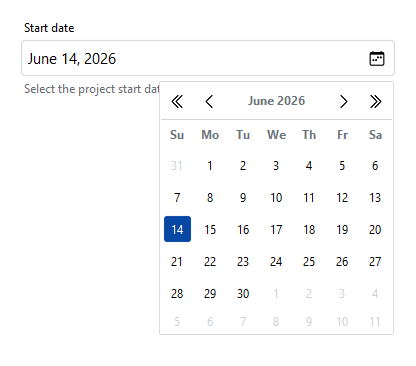
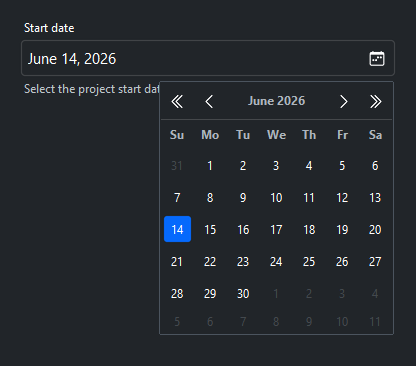
A date input field with locale-aware display formatting and an optional calendar picker button. Supports single-date and date-range selection modes.
Usage#
A date field reads and writes a real date through
field.value — None when empty, or a (start, end) tuple in range mode —
never a string. Users type a date or pick one from the calendar button;
value_format controls only how it is displayed. Restrict what the picker
offers with min_date / max_date / disabled_dates, and validate the
chosen date with rules.
Basic usage#
bs.DateField(label="Select a date")
Display formats#
The value_format= parameter controls how dates are displayed in the field.
Any ICU date format pattern or named preset is accepted.
bs.DateField(value=today, value_format="longDate")     # January 15, 2025
bs.DateField(value=today, value_format="shortDate")    # 1/15/25
bs.DateField(value=today, value_format="monthAndYear") # January 2025


Range mode#
Set selection_mode='range' to let the user pick a start and end date.
The entry becomes read-only in this mode — dates must be chosen via the picker.
value returns a (start, end) tuple of date objects.
df = bs.DateField(
    selection_mode="range",
    range_start=date(2025, 1, 1),
    range_end=date(2025, 1, 31),
    label="Date range",
)
start, end = df.value  # tuple[date, date]


Date constraints#
Use min_date=, max_date=, or disabled_dates= to restrict which
dates the picker shows as selectable.
from datetime import date, timedelta

today = date.today()
bs.DateField(
    label="Booking date",
    min_date=today,
    max_date=today + timedelta(days=30),
    disabled_dates=[today + timedelta(days=7)],
)
min_date, max_date, and disabled_dates are also live properties —
assign to them to update the constraints (the change takes effect the next time
the picker opens):
df.min_date = date.today()          # no past dates
df.disabled_dates = booked_dates
Reactive binding#
Pass a Signal via signal= to two-way bind the field’s date value to
application state. The signal carries the date object itself — not its text —
so reading it back gives you a date. Seed it with a date to set the
initial value.
from datetime import date

date_sig = bs.Signal(date.today())
bs.DateField(label="Pick a date", signal=date_sig)

# Derive a text signal for display
date_text = date_sig.map(lambda d: d.strftime("%B %d, %Y") if d else "")
bs.Label(textsignal=date_text, accent="secondary")
Handling changes#
on_change() fires when the user commits a new date — by typing one and
pressing Return or leaving the field, or by choosing one in the picker.
df = bs.DateField(label="Appointment")
df.on_change(lambda e: print("Selected:", e.value))
Assigning value in code does not fire it, since nothing was committed. To
observe both, bind a Signal with signal= — it receives
programmatic writes as well as user edits.
Validation#
Attach rules with add_validation_rule(); they validate the field’s typed
value — a date, or None when empty. The range rule
checks date bounds with a message. This is distinct from min_date /
max_date, which restrict what the picker offers: a rule also catches an
out-of-range date the user types, and surfaces a message.
from datetime import date

field = bs.DateField(label="Appointment")
field.add_validation_rule(
    "range", max=date.today(),
    message="The date can't be in the future.",
    trigger="blur",
)

is_valid = field.validate()   # run every rule on demand


Validity is reactive state. field.valid is a Signal[bool] and
field.error a Signal[str] (the current message, "" when valid) — bind
the error straight to a label and it keeps itself in sync:
bs.Label(textsignal=field.error, accent="danger") # shows and clears itself
Note
The full rule taxonomy, the range rule, and aggregating a whole form’s
validity live in the Validation guide.
States#
bs.DateField(value=today, label="Normal")
bs.DateField(value=today, label="Read only", read_only=True)
bs.DateField(value=today, label="Disabled",  disabled=True)


Widget sizing#
All widgets accept self-placement kwargs via **kwargs. The parent
container determines which options apply — Column / Row parents use
the layout kwargs below, grid-based parents use grid kwargs.
Column (vertical layout)
Used inside a Column, App, or any other container with a column layout.
Children are arranged top-to-bottom, so horizontal aligns each child across
the width and grow shares the vertical space. (vertical does not apply —
the order of the children sets their top-to-bottom position.)
|
Cross-axis placement of the widget: |
|
Claim and fill a share of the leftover vertical space (the layout
direction). |
|
External spacing in pixels. Accepts an integer (equal on all
sides), a 2-tuple |
|
Horizontal external spacing (left and right). Accepts an integer
or a 2-tuple |
|
Vertical external spacing (top and bottom). Accepts an integer
or a 2-tuple |
Row (horizontal layout)
Used inside a Row or any other container with a row layout. Children are
arranged left-to-right, so vertical aligns each child across the height and
grow shares the horizontal space. (horizontal does not apply — the order
of the children sets their left-to-right position.)
|
Cross-axis placement of the widget: |
|
Claim and fill a share of the leftover horizontal space (the layout
direction). |
|
External spacing in pixels. Accepts an integer (equal on all
sides), a 2-tuple |
|
Horizontal external spacing (left and right). Accepts an integer
or a 2-tuple |
|
Vertical external spacing (top and bottom). Accepts an integer
or a 2-tuple |
Grid
Used inside a Grid container.
|
Zero-based row and column indices. |
|
Number of rows or columns to span. |
|
Horizontal placement within the grid cell: |
|
Vertical placement within the grid cell: |
|
External spacing in pixels. Accepts an integer, a 2-tuple
|
|
Horizontal external spacing. Accepts an integer or |
|
Vertical external spacing. Accepts an integer or |
See also#
TimeField — time input with clock picker
TextField — plain single-line text input
Validation — the full rule set and form-level validity
Customizing Fields — add buttons or icons inside a field
Signals — reactive binding for fields
API#
The complete reference for DateField lives on the
Widgets API page. At a glance:
A date input field with an optional calendar picker button. |
Full Example#
 1
 2with bs.App(title="DateField Demo", padding=20, gap=16) as app:
 3
 4    # Basic usage
 5    bs.Label("Basic", font="heading-sm")
 6    bs.DateField(label="Select a date")
 7
 8    # Date format presets
 9    bs.Label("Display Formats", font="heading-sm")
10    today = date.today()
11    bs.DateField(value=today, label="Long date (default)",   value_format="longDate")
12    bs.DateField(value=today, label="Short date",            value_format="shortDate")
13    bs.DateField(value=today, label="Month and year",        value_format="monthAndYear")
14
15    # Range mode
16    bs.Label("Range Mode", font="heading-sm")
17    bs.DateField(
18        selection_mode="range",
19        range_start=date(today.year, today.month, 1),
20        range_end=today,
21        label="Date range",
22        message="Select a start and end date.",
23    )
24
25    # Min / max date constraints
26    bs.Label("Constrained Dates", font="heading-sm")
27    from datetime import timedelta
28    bs.DateField(
29        label="Booking date",
30        message="Must be within the next 30 days.",
31        min_date=today,
32        max_date=today + timedelta(days=30),
33    )
34
35    # Reactive binding — the signal carries the date object
36    bs.Label("Reactive Binding", font="heading-sm")
37    date_sig = bs.Signal(today)
38    bs.DateField(label="Pick a date", signal=date_sig)
39    date_text = date_sig.map(lambda d: d.strftime("%B %d, %Y") if d else "")
40    bs.Label(textsignal=date_text, accent="secondary")
41
42    # States
43    bs.Label("States", font="heading-sm")
44    bs.DateField(value=today, label="Normal")
45    bs.DateField(value=today, label="Read only", read_only=True)
46    bs.DateField(value=today, label="Disabled",  disabled=True)
47
48    # Handling changes
49    bs.Label("Handling Changes", font="heading-sm")
50    last = bs.Signal("(none)")
51    picker = bs.DateField(label="Choose a date")
52    picker.on_change(lambda e: last.set(str(picker.value)))
53    bs.Label(textsignal=last, accent="secondary")
54
55    # Validation
56    bs.Label("Validation", font="heading-sm")
57    validated = bs.DateField(label="Required date", required=True)
58    with bs.Row(gap=8):
59        bs.Button("Validate", on_click=lambda: validated.validate())
60
61app.run()