

Gauge#
A circular arc gauge for displaying a value within a range. Supports full-circle and semicircle layouts, solid and segmented arc styles, optional center text with prefix/suffix formatting, and an interactive drag mode.
Usage#
A gauge draws a value within a min_value/max_value range as a circular
arc, with optional center text. It is a display by default; pass
interactive=True to let the user set the value by dragging the arc.
Variants#
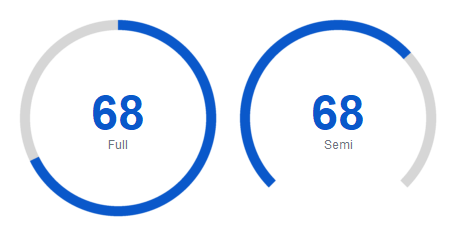
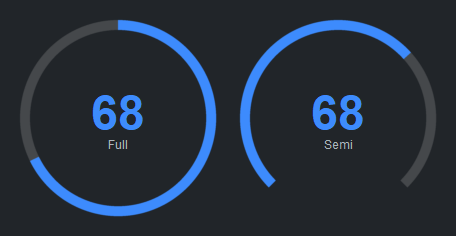
'full' (default) draws a complete 360° ring. 'semi' draws a half-circle
arc along the bottom, useful for dashboards.
bs.Gauge(value=68, variant="full", subtitle="Full")
bs.Gauge(value=68, variant="semi", subtitle="Semi")
Value range#
Set min_value and max_value to match your data’s natural scale:
bs.Gauge(value=750, min_value=0, max_value=1000, subtitle="Requests/s")
Update the value at runtime via the value property. min_value and
max_value are live properties too — assign to them to rescale the gauge as
your data’s range changes:
gauge = bs.Gauge(value=0, max_value=100)
gauge.value = 65
gauge.max_value = 2000     # rescale the arc
Labels and formatting#
subtitle appears below the value. value_prefix and value_suffix flank
the number. value_template is a Python format string applied to the raw value.
bs.Gauge(value=4200, max_value=10000,
         value_prefix="$", value_template="{:.0f}",
         subtitle="Revenue", accent="success")

bs.Gauge(value=72, value_suffix="%", subtitle="Disk Used", accent="warning")

bs.Gauge(value=3.7, max_value=5.0, value_template="{:.1f}",
         subtitle="Rating", accent="primary")
Update the subtitle at runtime via the subtitle property:
gauge = bs.Gauge(value=50, subtitle="Loading…")
gauge.subtitle = "Ready"
Accent colors#
for accent in ("primary", "secondary", "info", "success", "warning", "danger"):
    bs.Gauge(value=65, accent=accent, size=140, thickness=14,
             subtitle=accent.title())


Segmented arc#
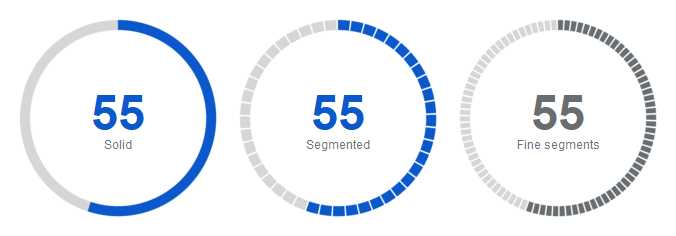
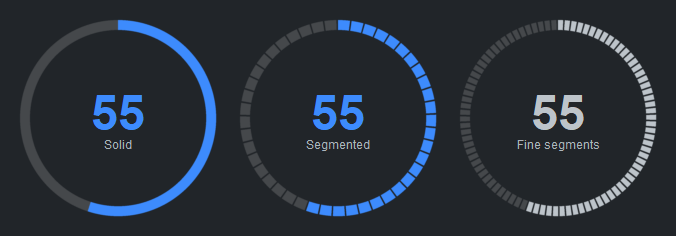
Set segment_width to a positive integer to draw a dashed arc. Smaller values
produce finer dashes:
bs.Gauge(value=55, subtitle="Solid", accent="primary")           # solid arc
bs.Gauge(value=55, segment_width=8, subtitle="Segmented",        # coarse segments
         accent="primary")
bs.Gauge(value=55, segment_width=4, subtitle="Fine segments",    # fine segments
         accent="secondary")
Arc thickness#
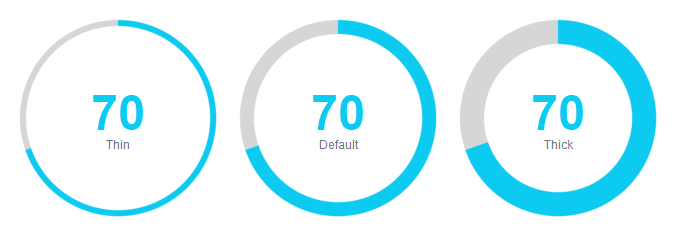
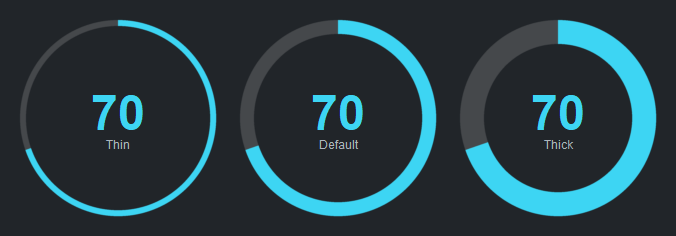
thickness controls the stroke width in pixels:
bs.Gauge(value=70, thickness=6,  subtitle="Thin",    accent="info")
bs.Gauge(value=70, thickness=14, subtitle="Default", accent="info")
bs.Gauge(value=70, thickness=24, subtitle="Thick",   accent="info")
Size#
size sets the diameter in pixels (default 200):
bs.Gauge(value=60, size=120)   # compact
bs.Gauge(value=60, size=200)   # default
bs.Gauge(value=60, size=300)   # large
Interactive mode#
interactive=True lets the user click or drag the arc to change the value.
step controls how much each drag step changes the value:
bs.Gauge(value=50, interactive=True, step=5, accent="primary")
Listen for changes via on_change:
gauge = bs.Gauge(value=50, interactive=True)
gauge.on_change(lambda e: print("value:", gauge.value))
Widget sizing#
All widgets accept self-placement kwargs via **kwargs. The parent
container determines which options apply — Column / Row parents use
the layout kwargs below, grid-based parents use grid kwargs.
Column (vertical layout)
Used inside a Column, App, or any other container with a column layout.
Children are arranged top-to-bottom, so horizontal aligns each child across
the width and grow shares the vertical space. (vertical does not apply —
the order of the children sets their top-to-bottom position.)
|
Cross-axis placement of the widget: |
|
Claim and fill a share of the leftover vertical space (the layout
direction). |
|
External spacing in pixels. Accepts an integer (equal on all
sides), a 2-tuple |
|
Horizontal external spacing (left and right). Accepts an integer
or a 2-tuple |
|
Vertical external spacing (top and bottom). Accepts an integer
or a 2-tuple |
Row (horizontal layout)
Used inside a Row or any other container with a row layout. Children are
arranged left-to-right, so vertical aligns each child across the height and
grow shares the horizontal space. (horizontal does not apply — the order
of the children sets their left-to-right position.)
|
Cross-axis placement of the widget: |
|
Claim and fill a share of the leftover horizontal space (the layout
direction). |
|
External spacing in pixels. Accepts an integer (equal on all
sides), a 2-tuple |
|
Horizontal external spacing (left and right). Accepts an integer
or a 2-tuple |
|
Vertical external spacing (top and bottom). Accepts an integer
or a 2-tuple |
Grid
Used inside a Grid container.
|
Zero-based row and column indices. |
|
Number of rows or columns to span. |
|
Horizontal placement within the grid cell: |
|
Vertical placement within the grid cell: |
|
External spacing in pixels. Accepts an integer, a 2-tuple
|
|
Horizontal external spacing. Accepts an integer or |
|
Vertical external spacing. Accepts an integer or |
API#
The complete reference for Gauge lives on the
Widgets API page. At a glance:
A circular gauge for displaying a value within a range. |
Full Example#
 1
 2with bs.App(title="Gauge Demo", padding=20, gap=16) as app:
 3
 4    # Full vs semi meter types
 5    bs.Label("Variants", font="heading-sm")
 6    with bs.Row(gap=20):
 7        bs.Gauge(value=68, variant="full", subtitle="Full")
 8        bs.Gauge(value=68, variant="semi", subtitle="Semi")
 9
10    # Accent colors
11    bs.Label("Accent Colors", font="heading-sm")
12    with bs.Row(gap=12):
13        for accent in ("primary", "secondary", "info", "success", "warning", "danger"):
14            bs.Gauge(value=65, accent=accent, size=140, thickness=14, subtitle=accent.title())
15
16    # Prefix / suffix / subtitle
17    bs.Label("Labels and Formatting", font="heading-sm")
18    with bs.Row(gap=20):
19        bs.Gauge(value=4200, max_value=10000, value_prefix="$", value_template="{:.0f}",
20                 subtitle="Revenue", accent="success")
21        bs.Gauge(value=72, value_suffix="%", subtitle="Disk Used", accent="warning")
22        bs.Gauge(value=3.7, max_value=5.0, value_template="{:.1f}", subtitle="Rating",
23                 accent="primary")
24
25    # Segmented / dashed arc
26    bs.Label("Segmented Arc", font="heading-sm")
27    with bs.Row(gap=20):
28        bs.Gauge(value=55, segment_width=8, subtitle="Segmented", accent="primary")
29        bs.Gauge(value=55, segment_width=4, thickness=12, subtitle="Fine segments",
30                 accent="secondary")
31
32    # Thickness variants
33    bs.Label("Thickness", font="heading-sm")
34    with bs.Row(gap=20):
35        bs.Gauge(value=70, thickness=6,  subtitle="Thin",   accent="info")
36        bs.Gauge(value=70, thickness=14, subtitle="Default", accent="info")
37        bs.Gauge(value=70, thickness=24, subtitle="Thick",  accent="info")
38
39app.run()