

Select#
A single-selection dropdown field with optional search filtering.
Usage#
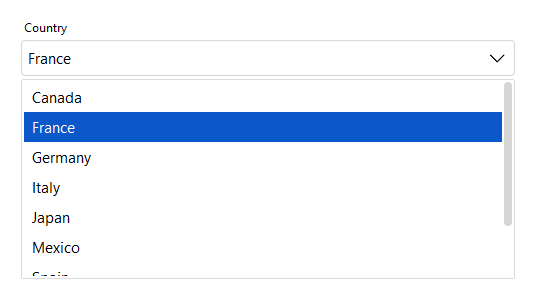
A select is a single-choice dropdown — .value is the chosen option’s value,
and typing filters the list.
Basic#
bs.Select(["Red", "Green", "Blue"])
bs.Select(["Red", "Green", "Blue"], value="Green")
Option values#
An option’s displayed label can differ from its stored value. Each option is a
plain string, a (text, value) tuple, or a {"text": ..., "value": ...}
dict. value=, .value, and the change event all work in value-space —
the value, not the label. The label currently shown is available as .text.
theme = bs.Select(
    [("Light theme", "light"), ("Dark theme", "dark"), {"text": "Follow system", "value": "auto"}],
    value="dark",
)
theme.value            # -> "dark"          (the value)
theme.text             # -> "Dark theme"    (the displayed label)
theme.value = "auto"   # selects "Follow system"
theme.on_change(lambda e: apply_theme(e.value))

theme.options          # -> [{"text": "Light theme", "value": "light"}, ...]
The option list controls what a user can pick — it is not a schema for the
data you supply. Setting .value to something outside the list displays it
without adding it to the list, so a stored record whose option has since been
retired still opens in an editor, and reads back as the value you set (an
int stays an int). Once the user picks something else the old value is
gone, and it was never in the list to pick again. One edge: if the retired
value renders as the same text as a live option’s label, that option wins —
the two are indistinguishable on screen. Use a validation rule to report a
retired value:
country.add_validation_rule(
    "custom",
    func=lambda v: not v or v in current_codes,
    message="That option is no longer available.",
)
Rules run against the value, not the label shown for it, so on a decoupled
option list a rule sees "US" rather than "United States". A 'custom'
rule runs on validate() and on form submit; pass trigger="always" to
have it report as soon as the value changes. See Validation.
Validity is reactive state. select.valid is a Signal[bool] and
select.error a Signal[str] (the current message, "" when valid) —
bind the error straight to a label and it keeps itself in sync:
bs.Label(textsignal=country.error, accent="danger") # shows and clears itself
With allow_custom_values=True the user may also type a value of their own.
Carrying extra data (the data bag)#
The dict form is a data bag — alongside the recognized keys (text,
value, and the per-option icon/disabled), any other key you add rides
along as carried data. Read the whole selected record, indexed by key, via
.selection:
country = bs.Select(options=[
    {"text": "Canada", "value": "CA", "phone": "+1"},
    {"text": "Japan",  "value": "JP", "phone": "+81"},
], value="JP")

country.value             # -> "JP"
country.selection         # -> {"text": "Japan", "value": "JP", "phone": "+81"}
country.selection["phone"]  # -> "+81"

country.on_change(lambda e: dial(country.selection["phone"]))
.selection is the selected option’s full dict (the same shape you’d get from a
ListView row), or None when nothing is selected. Unrecognized keys are
accepted, not validated — the dict route is opt-in, so a mistyped key rides
along silently rather than raising.
Two of the recognized keys change how an option is presented: icon renders a
glyph beside the option’s label in the popup, and disabled greys the row out
and makes it non-selectable (keyboard navigation and search auto-select skip it
too). Per-option disabled is independent of the widget-level disabled=
that locks the whole control:
bs.Select(options=[
    {"text": "Free",       "value": "free",  "icon": "gift"},
    {"text": "Pro",        "value": "pro",   "icon": "star"},
    {"text": "Enterprise", "value": "ent",   "icon": "buildings", "disabled": True},
], value="free")
Setting a disabled option’s value programmatically still works — disabled only
blocks user selection.
Grouping#
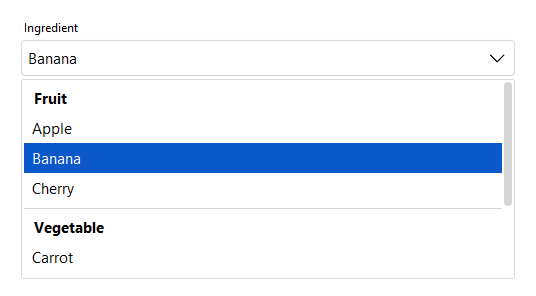
Pass group_by="field" to cluster the popup under section headers, where
field is any key your options carry — often a category that already lives in
your data. Grouping is purely presentational: value, .selection, and
.options are unaffected, and the grouping field rides along in the data bag.
bs.Select(
    options=[
        {"text": "Apple",    "value": "apple",    "category": "Fruit"},
        {"text": "Banana",   "value": "banana",   "category": "Fruit"},
        {"text": "Cherry",   "value": "cherry",   "category": "Fruit"},
        {"text": "Carrot",   "value": "carrot",   "category": "Vegetable"},
        {"text": "Broccoli", "value": "broccoli", "category": "Vegetable"},
        {"text": "Basil",    "value": "basil",    "category": "Herb"},
        {"text": "Mint",     "value": "mint",     "category": "Herb"},
    ],
    group_by="category",
    label="Ingredient",
    value="banana",
)
Groups appear in first-appearance order; an option that lacks the field renders
without a header. Header text is shown verbatim — it is never re-cased or
otherwise transformed, so .selection still returns the original value
({..., "category": "Fruit"}).
Limiting the popup height#
The popup grows to fit its options up to a built-in cap, then scrolls. Set
max_visible_items= to cap it at roughly that many option rows — handy for long
lists. Group headers and separators count toward the height, so the number is
approximate.
countries = ["Canada", "France", "Germany", "Japan", "United States", "..."]
bs.Select(countries, label="Country", max_visible_items=8)
Label and message#
bs.Select(
    ["Option A", "Option B", "Option C"],
    label="Choose an option",
    message="Select the option that best applies.",
)
Required#
bs.Select(["Red", "Green", "Blue"], label="Color", required=True)
Searchable#
Set searchable=True to filter options as the user types.
countries = ["Canada", "France", "Germany", "Japan", "United States"]
bs.Select(countries, label="Country", searchable=True)
Custom values#
Set allow_custom_values=True to accept typed values not in the list. A typed value takes the type the option values share: when every option value is an int, or every one a float, a typed number is read as that type, and validation rules judge the number. Any other text, and any other option list, gives the text as typed.
bs.Select(["Red", "Green", "Blue"], allow_custom_values=True)
States#
bs.Select(["A", "B", "C"], value="A", label="Normal")
bs.Select(["A", "B", "C"], value="A", label="Read only",  read_only=True)
bs.Select(["A", "B", "C"], value="A", label="Disabled",   disabled=True)


Reactive binding#
Bind a Signal with signal=. The field and signal stay in sync.
color = bs.Signal("Red")
bs.Select(["Red", "Green", "Blue"], signal=color)
color.subscribe(lambda v: apply_color(v))
The signal carries the option’s value, not the label shown for it. When the two differ, seed the signal with a value and the field displays the matching label:
size = bs.Signal("m")
bs.Select([("Small", "s"), ("Medium", "m")], signal=size)
# the field shows "Medium"

size.set("s")     # the field shows "Small"
size()            # -> 's'
Setting the signal selects the matching option and raises a change event, and choosing an option writes that option’s value back.
Updating options at runtime#
Assign to .options to replace the list dynamically.
sel = bs.Select(["A", "B", "C"])
sel.options = ["X", "Y", "Z"]
Widget sizing#
All widgets accept self-placement kwargs via **kwargs. The parent
container determines which options apply — Column / Row parents use
the layout kwargs below, grid-based parents use grid kwargs.
Column (vertical layout)
Used inside a Column, App, or any other container with a column layout.
Children are arranged top-to-bottom, so horizontal aligns each child across
the width and grow shares the vertical space. (vertical does not apply —
the order of the children sets their top-to-bottom position.)
|
Cross-axis placement of the widget: |
|
Claim and fill a share of the leftover vertical space (the layout
direction). |
|
External spacing in pixels. Accepts an integer (equal on all
sides), a 2-tuple |
|
Horizontal external spacing (left and right). Accepts an integer
or a 2-tuple |
|
Vertical external spacing (top and bottom). Accepts an integer
or a 2-tuple |
Row (horizontal layout)
Used inside a Row or any other container with a row layout. Children are
arranged left-to-right, so vertical aligns each child across the height and
grow shares the horizontal space. (horizontal does not apply — the order
of the children sets their left-to-right position.)
|
Cross-axis placement of the widget: |
|
Claim and fill a share of the leftover horizontal space (the layout
direction). |
|
External spacing in pixels. Accepts an integer (equal on all
sides), a 2-tuple |
|
Horizontal external spacing (left and right). Accepts an integer
or a 2-tuple |
|
Vertical external spacing (top and bottom). Accepts an integer
or a 2-tuple |
Grid
Used inside a Grid container.
|
Zero-based row and column indices. |
|
Number of rows or columns to span. |
|
Horizontal placement within the grid cell: |
|
Vertical placement within the grid cell: |
|
External spacing in pixels. Accepts an integer, a 2-tuple
|
|
Horizontal external spacing. Accepts an integer or |
|
Vertical external spacing. Accepts an integer or |
API#
The complete reference for Select lives on the
Widgets API page. At a glance:
A single-selection dropdown field. |
Full Example#
 1
 2COUNTRIES = [
 3    "Canada", "France", "Germany", "Italy", "Japan",
 4    "Mexico", "Spain", "United Kingdom", "United States",
 5]
 6
 7with bs.App(title="Select Demo", padding=20, gap=16) as app:
 8
 9    # Basic
10    bs.Label("Basic", font="heading-sm")
11    bs.Select(["Red", "Green", "Blue"], horizontal="stretch")
12    bs.Select(["Red", "Green", "Blue"], value="Green", horizontal="stretch")
13
14    # Label and message
15    bs.Label("Label and Message", font="heading-sm")
16    bs.Select(
17        ["Option A", "Option B", "Option C"],
18        label="Choose an option",
19        message="Select the option that best applies.",
20        horizontal="stretch",
21    )
22
23    # Required
24    bs.Label("Required", font="heading-sm")
25    bs.Select(["Red", "Green", "Blue"], label="Color", required=True, horizontal="stretch")
26
27    # Searchable
28    bs.Label("Searchable", font="heading-sm")
29    bs.Select(COUNTRIES, label="Country", searchable=True, horizontal="stretch")
30
31    # Custom values
32    bs.Label("Custom Values", font="heading-sm")
33    bs.Select(
34        ["Red", "Green", "Blue"],
35        label="Color (custom allowed)",
36        allow_custom_values=True,
37        horizontal="stretch",
38    )
39
40    # Grouping — cluster the popup under headers by an option field
41    bs.Label("Grouping", font="heading-sm")
42    bs.Select(
43        options=[
44            {"text": "Apple",    "value": "apple",    "category": "Fruit"},
45            {"text": "Banana",   "value": "banana",   "category": "Fruit"},
46            {"text": "Carrot",   "value": "carrot",   "category": "Vegetable"},
47            {"text": "Broccoli", "value": "broccoli", "category": "Vegetable"},
48            {"text": "Basil",    "value": "basil",    "category": "Herb"},
49        ],
50        group_by="category",
51        label="Ingredient",
52        horizontal="stretch",
53    )
54
55    # Capped popup height — long list scrolls after ~6 rows
56    bs.Label("Limited Popup Height", font="heading-sm")
57    bs.Select(COUNTRIES, label="Country (max 6 visible)", max_visible_items=6, horizontal="stretch")
58
59    # States
60    bs.Label("States", font="heading-sm")
61    with bs.Row(gap=8, horizontal="stretch", grow_items=True):
62        bs.Select(["A", "B", "C"], value="A", label="Normal")
63        bs.Select(["A", "B", "C"], value="A", label="Read only",  read_only=True)
64        bs.Select(["A", "B", "C"], value="A", label="Disabled",   disabled=True)
65
66    # Reactive binding
67    bs.Label("Reactive Binding", font="heading-sm")
68    with bs.Column(gap=6, horizontal="stretch", horizontal_items="stretch"):
69        color = bs.Signal("Red")
70        bs.Select(["Red", "Green", "Blue"], label="Color", signal=color)
71        color_lbl = bs.Label("Selected: Red", accent="secondary", font="caption")
72        def _update_color(v):
73            color_lbl.text = f"Selected: {v}"
74
75        color.subscribe(_update_color)
76
77    # Runtime option updates
78    bs.Label("Runtime Updates", font="heading-sm")
79    with bs.Column(gap=6, horizontal="stretch", horizontal_items="stretch"):
80        sel = bs.Select(["Alpha", "Beta", "Gamma"])
81        with bs.Row(gap=8):
82            def _set_abc():
83                sel.options = ["A", "B", "C"]
84
85            def _set_123():
86                sel.options = ["1", "2", "3"]
87
88            bs.Button("Set ABC", variant="outline", on_click=_set_abc)
89            bs.Button("Set 1-2-3", variant="outline", on_click=_set_123)
90
91app.run()