

Input Dialogs#
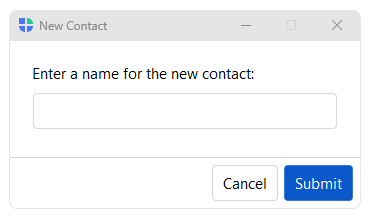
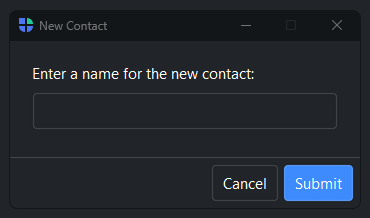
Convenience functions for collecting a single value from the user. Each opens
a modal dialog, waits for input, and returns the value (or None if canceled).
Usage#
Each ask_* opens a modal, blocks, and returns the entered value (or None
on cancel) — ask_string / ask_integer / ask_date and friends, one per
common type. For a yes/no or a bare message, see message dialogs; for several fields at once, a FormDialog.
Ask for text#
bs.ask_string() shows a text field. Returns the entered string, or None
if canceled.
name = bs.ask_string("Enter your name:", title="Name")
if name:
    greet(name)
Pass value= to pre-fill the field:
new_name = bs.ask_string("Rename:", value=current_name)
Ask for a number#
bs.ask_integer() and bs.ask_float() show a numeric field with an
optional stepper, range validation, and display format. Both return None
if canceled.
age   = bs.ask_integer("Enter age:", min_value=0, max_value=120)
price = bs.ask_float("Enter price:", min_value=0.0, step=0.5)
Ask from a list#
bs.ask_item() shows a searchable dropdown. Returns the selected string,
or None if canceled.
country = bs.ask_item(
    "Select your country:",
    ["Canada", "UK", "USA", "Other"],
    title="Country",
)
Ask for a date#
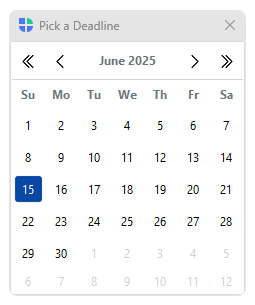
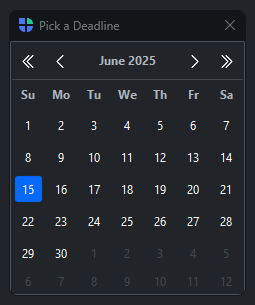
bs.ask_date() opens a calendar picker. Returns a datetime.date, or
None if canceled.
from datetime import date

picked = bs.ask_date(title="Select date", value=date.today())
Restrict the selectable range with min_date= and max_date=:
deadline = bs.ask_date(title="Pick a deadline", min_date=date.today())
Ask for a date range#
bs.ask_date_range() opens the calendar in range-selection mode. Returns a
(start, end) tuple of date objects, or None if canceled.
result = bs.ask_date_range(title="Report period")
if result:
    start, end = result
See also#
Message Dialogs — alert() and confirm() for notifications and yes/no prompts.
Color Dialog — ask_color() for choosing a color.
Font Dialog — ask_font() for selecting a font.
Filter Dialog — ask_filter() for multi-select from a list.
API#
The complete reference for the ask_* input verbs lives on the
Dialogs API page. At a glance:
Show a text-input dialog. |
|
Show an integer-input dialog with optional range validation. |
|
Show a float-input dialog with optional range validation. |
|
Show a dropdown-selection dialog. |
|
Show a calendar date-picker dialog. |
|
Show a calendar dialog for selecting a start and end date range. |
Full Example#
 1
 2with bs.App(title="Input Dialogs", size=(680, 250), padding=20, gap=16) as app:
 3
 4    # ── Text and Number ────────────────────────────────────────────────────
 5    bs.Label("Text and Number", font="heading-sm")
 6    with bs.Row(gap=8):
 7        bs.Button("Text",     on_click=lambda: bs.ask_string("Enter your name:", title="Name"))
 8        bs.Button("Integer",  on_click=lambda: bs.ask_integer("Enter age:", min_value=0, max_value=120))
 9        bs.Button("Float",    on_click=lambda: bs.ask_float("Enter price:", min_value=0.0, step=0.5))
10        bs.Button("From list", on_click=lambda: bs.ask_item(
11            "Select country:", ["Canada", "UK", "USA", "Australia", "Other"],
12        ))
13
14    bs.Divider(horizontal="stretch")
15
16    # ── Date ──────────────────────────────────────────────────────────────
17    bs.Label("Date", font="heading-sm")
18    with bs.Row(gap=8):
19        bs.Button("Date",       on_click=lambda: bs.ask_date(title="Select Date", value=date.today()))
20        bs.Button("Date range", on_click=lambda: bs.ask_date_range(title="Report Period"))
21
22app.run()