

Label#
Static text display with optional icon, semantic font tokens, and accent colors. The display text is the first positional argument.
Usage#
A label is static, display-only text — pass the text as the first argument, then
shape it with a font= token, an icon=, and an accent= color. Bind a
Signal with textsignal= to update it live.
Font tokens#
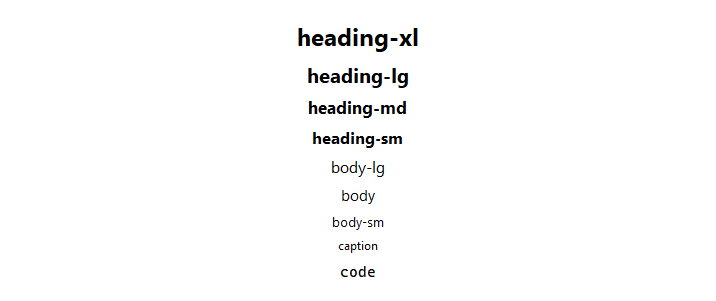
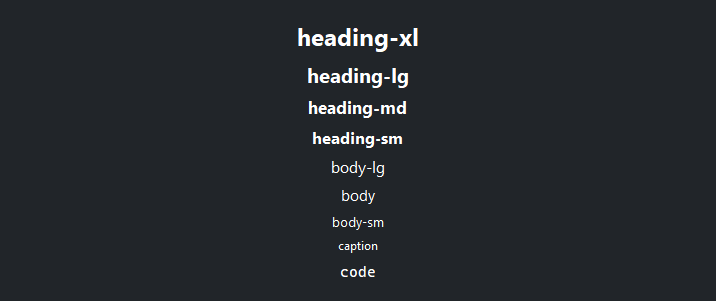
Use the font= token string to apply semantic typography. Modifiers like
[bold], [italic], and [underline] can be chained. For the full
token list and modifier reference see Typography.
bs.Label("Display",  font="display-xl")
bs.Label("Heading",  font="heading-lg")
bs.Label("Body",     font="body")
bs.Label("Caption",  font="caption")
bs.Label("Code",     font="code")

# Modifiers
bs.Label("Bold",        font="body[bold]")
bs.Label("Bold Italic", font="heading-md[italic]")

# Size adjustment relative to base
bs.Label("Larger",  font="body[+2]")
bs.Label("Smaller", font="body[-1]")
Accent colors#
Use accent= to apply a semantic text color that adapts to the active theme.
bs.Label("Primary",   accent="primary",   font="body[bold]")
bs.Label("Secondary", accent="secondary", font="body[bold]")
bs.Label("Info",      accent="info",      font="body[bold]")
bs.Label("Success",   accent="success",   font="body[bold]")
bs.Label("Warning",   accent="warning",   font="body[bold]")
bs.Label("Danger",    accent="danger",    font="body[bold]")


Icons#
Pass a Bootstrap Icons name to icon=. When text is empty the icon
displays alone. Use icon_position= to control placement when both are
present.
bs.Label("Home",     icon="house")
bs.Label("Settings", icon="gear",      icon_position="right")
bs.Label("Warning",  icon="exclamation-triangle", accent="warning")

# Icon-only — auto-detected when text is empty
bs.Label(icon="heart-fill", accent="danger")


Text wrapping#
Set wrap_width= (in pixels) to enable multi-line wrapping.
bs.Label(
    "A longer label that wraps automatically once it exceeds the "
    "specified pixel width.",
    wrap_width=400,
    accent="secondary",
)
Reactive text#
Bind a Signal[str] to textsignal= so the label updates automatically.
count      = bs.Signal(0)
count_text = bs.Signal("Count: 0")
count.subscribe(lambda v: count_text.set(f"Count: {v}"))

bs.Label(textsignal=count_text, font="heading-md", accent="primary")
bs.Button("+1", on_click=lambda: count.set(count() + 1))
Widget sizing#
All widgets accept self-placement kwargs via **kwargs. The parent
container determines which options apply — Column / Row parents use
the layout kwargs below, grid-based parents use grid kwargs.
Column (vertical layout)
Used inside a Column, App, or any other container with a column layout.
Children are arranged top-to-bottom, so horizontal aligns each child across
the width and grow shares the vertical space. (vertical does not apply —
the order of the children sets their top-to-bottom position.)
|
Cross-axis placement of the widget: |
|
Claim and fill a share of the leftover vertical space (the layout
direction). |
|
External spacing in pixels. Accepts an integer (equal on all
sides), a 2-tuple |
|
Horizontal external spacing (left and right). Accepts an integer
or a 2-tuple |
|
Vertical external spacing (top and bottom). Accepts an integer
or a 2-tuple |
Row (horizontal layout)
Used inside a Row or any other container with a row layout. Children are
arranged left-to-right, so vertical aligns each child across the height and
grow shares the horizontal space. (horizontal does not apply — the order
of the children sets their left-to-right position.)
|
Cross-axis placement of the widget: |
|
Claim and fill a share of the leftover horizontal space (the layout
direction). |
|
External spacing in pixels. Accepts an integer (equal on all
sides), a 2-tuple |
|
Horizontal external spacing (left and right). Accepts an integer
or a 2-tuple |
|
Vertical external spacing (top and bottom). Accepts an integer
or a 2-tuple |
Grid
Used inside a Grid container.
|
Zero-based row and column indices. |
|
Number of rows or columns to span. |
|
Horizontal placement within the grid cell: |
|
Vertical placement within the grid cell: |
|
External spacing in pixels. Accepts an integer, a 2-tuple
|
|
Horizontal external spacing. Accepts an integer or |
|
Vertical external spacing. Accepts an integer or |
API#
The complete reference for Label lives on the
Widgets API page. At a glance:
Static text display with optional icon, semantic styling, and font tokens. |
Full Example#
 1
 2with bs.App(title="Label Demo", padding=20, gap=16) as app:
 3
 4    # Font tokens
 5    bs.Label("Font Tokens", font="heading-sm")
 6    with bs.Column(gap=4):
 7        for token in ("heading-xl", "heading-lg", "heading-md", "heading-sm",
 8                      "body-lg", "body", "body-sm", "caption", "code"):
 9            bs.Label(token, font=token)
10
11    # Font modifiers
12    bs.Label("Font Modifiers", font="heading-sm")
13    with bs.Row(gap=16):
14        bs.Label("Bold",        font="body[bold]")
15        bs.Label("Italic",      font="body[italic]")
16        bs.Label("Bold Italic", font="body[bold][italic]")
17        bs.Label("Underline",   font="body[underline]")
18
19    # Accent colors
20    bs.Label("Accent Colors", font="heading-sm")
21    with bs.Row(gap=16):
22        for accent in ("primary", "secondary", "info", "success", "warning", "danger"):
23            bs.Label(accent.title(), accent=accent, font="body[bold]")
24
25    # Icons
26    bs.Label("With Icons", font="heading-sm")
27    with bs.Row(gap=16):
28        bs.Label("Home",    icon="house")
29        bs.Label("Right",   icon="gear",                 icon_position="right")
30        bs.Label("Warning", icon="exclamation-triangle", accent="warning")
31        bs.Label(icon="heart-fill", accent="danger")
32
33    # Text wrapping
34    bs.Label("Text Wrapping", font="heading-sm")
35    bs.Label(
36        "This label wraps automatically once it exceeds the specified "
37        "wrap_width in pixels. Useful for descriptive text and help copy.",
38        wrap_width=400,
39        accent="secondary",
40    )
41
42    # Reactive text
43    bs.Label("Reactive Text", font="heading-sm")
44    with bs.Row(gap=12, vertical_items="center"):
45        count      = bs.Signal(0)
46        count_text = bs.Signal("Count: 0")
47        count.subscribe(lambda v: count_text.set(f"Count: {v}"))
48        bs.Label(textsignal=count_text, font="heading-md", accent="primary")
49        bs.Button("+1", accent="primary",
50                  on_click=lambda: count.set(count() + 1))
51
52app.run()