

TextArea#
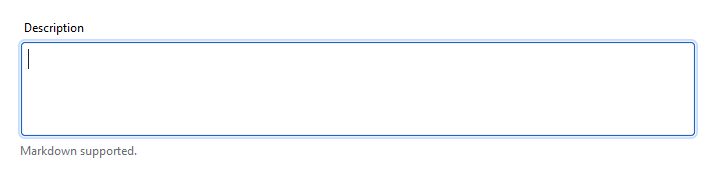
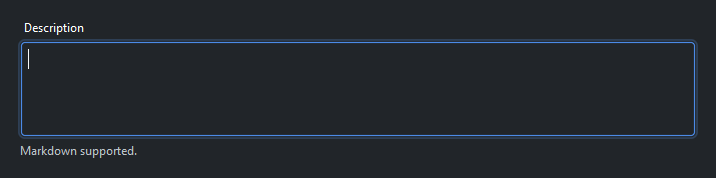
A multi-line text input with optional label, placeholder, scrollbars, and undo/redo support.
Usage#
The content is the value (read or set it directly, or bind a Signal with
textsignal=). Listen as the user types with on_input, or once they leave
the field with on_change — that input-vs-commit choice is the main decision
you make. Everything else (validation, undo/redo, dirty tracking) layers on top
for richer editor-like fields.
Basic usage#
bs.TextArea(placeholder="Start typing…")
Height#
Use height= to set the visible row count (default 4).
bs.TextArea(height=6)
Label and message#
Use label= for a field title and message= for helper text below.
bs.TextArea(
    label="Description",
    message="Markdown supported.",
    placeholder="Write a short description…",
    height=4,
)
Max length#
Set max_length= to cap the number of characters the user can type.
bs.TextArea(
    label="Bio",
    placeholder="Tell us about yourself…",
    max_length=200,
    message="Maximum 200 characters.",
)
Scrollbars#
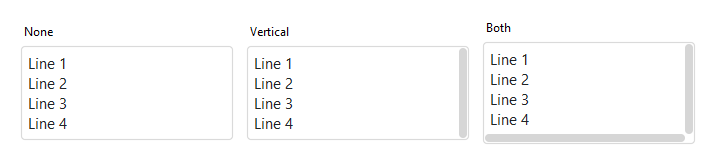
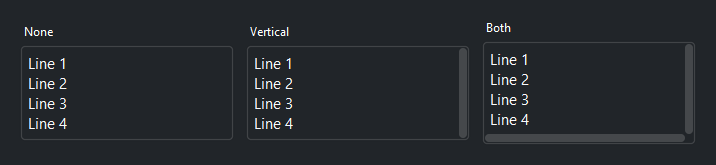
Control when scrollbars appear with scrollbars=. The default 'auto'
shows scrollbars only when content overflows.
bs.TextArea(scrollbars="none")      # never shown
bs.TextArea(scrollbars="vertical")  # always visible
bs.TextArea(scrollbars="both")      # horizontal + vertical, always
# 'auto' (the default) shows scrollbars only when content overflows
States#
bs.TextArea(value="Editable content.",  label="Normal")
bs.TextArea(value="Read-only content.", label="Read only", read_only=True)


Reactive binding#
Bind a Signal[str] with textsignal=. The field and signal stay in
sync automatically.
content = bs.Signal("")
bs.TextArea(label="Notes", textsignal=content)
bs.Label(textsignal=content, accent="secondary")
Handling changes#
Use on_input() for real-time keystroke feedback or on_change() for
commit-on-blur behaviour (fires when the user leaves the field).
ta = bs.TextArea(label="Notes")

# Fires on every edit
ta.on_input(lambda e: print(len(ta.value), "chars"))

# Fires on blur
ta.on_change(lambda e: save(ta.value))

# As a debounced Stream
ta.on_input().debounce(500).listen(lambda e: autosave(ta.value))
Note
on_input fires on every edit (it runs often — keep the handler cheap or
debounce it); on_change fires once on blur. See
Events for the full event model.
Validation#
Mark the field required, cap its length with max_length, or attach rules
with add_validation_rule(); validate() runs them and the error shows
below the field. Listen with on_valid / on_invalid.
ta = bs.TextArea(label="Bio", required=True, max_length=200)
ta.add_validation_rule("stringLength", min=20, message="At least 20 characters.")

ta.on_invalid(lambda e: print("invalid:", e))
ta.validate()
For reactive binding — for example, disabling a submit button until the field is
valid — read the valid and error Signals. They update automatically after
every validation run (on blur or an explicit validate() call).
ta = bs.TextArea(required=True)
btn = bs.Button("Submit", accent="primary")
err_label = bs.Label("")

def on_validity_change(ok):
    btn.disabled = not ok

def on_error_change(msg):
    err_label.text = msg

ta.valid.subscribe(on_validity_change)
ta.error.subscribe(on_error_change)
See Validation for the full rule set and the typed-value model.
Undo and redo#
TextArea maintains a built-in undo/redo stack. Call undo() and redo()
programmatically, or let the user use the platform’s standard undo/redo
shortcuts (Ctrl+Z / Ctrl+Y on Windows and Linux, ⌘Z / ⌘⇧Z on macOS).
ta = bs.TextArea()
bs.Button("Undo", on_click=lambda: ta.undo())
bs.Button("Redo", on_click=lambda: ta.redo())
Dirty tracking#
is_dirty is True after any edit since the last mark_saved() call.
Use it to show unsaved-change indicators.
ta = bs.TextArea()
ta.on_modified(lambda e: print("dirty:", ta.is_dirty))

# After saving
ta.mark_saved()
Keyboard#
Tab / Shift+Tab — move focus to the next/previous widget. A TextArea is a form field, so Tab leaves it rather than inserting a tab character (use CodeEditor when you want Tab to indent).
Undo / redo — the platform’s standard shortcuts (Ctrl+Z / Ctrl+Y on Windows and Linux, ⌘Z / ⌘⇧Z on macOS).
Standard text editing and selection (arrows, Home/End, Shift+arrows) apply within the field.
Widget sizing#
All widgets accept self-placement kwargs via **kwargs. The parent
container determines which options apply — Column / Row parents use
the layout kwargs below, grid-based parents use grid kwargs.
Column (vertical layout)
Used inside a Column, App, or any other container with a column layout.
Children are arranged top-to-bottom, so horizontal aligns each child across
the width and grow shares the vertical space. (vertical does not apply —
the order of the children sets their top-to-bottom position.)
|
Cross-axis placement of the widget: |
|
Claim and fill a share of the leftover vertical space (the layout
direction). |
|
External spacing in pixels. Accepts an integer (equal on all
sides), a 2-tuple |
|
Horizontal external spacing (left and right). Accepts an integer
or a 2-tuple |
|
Vertical external spacing (top and bottom). Accepts an integer
or a 2-tuple |
Row (horizontal layout)
Used inside a Row or any other container with a row layout. Children are
arranged left-to-right, so vertical aligns each child across the height and
grow shares the horizontal space. (horizontal does not apply — the order
of the children sets their left-to-right position.)
|
Cross-axis placement of the widget: |
|
Claim and fill a share of the leftover horizontal space (the layout
direction). |
|
External spacing in pixels. Accepts an integer (equal on all
sides), a 2-tuple |
|
Horizontal external spacing (left and right). Accepts an integer
or a 2-tuple |
|
Vertical external spacing (top and bottom). Accepts an integer
or a 2-tuple |
Grid
Used inside a Grid container.
|
Zero-based row and column indices. |
|
Number of rows or columns to span. |
|
Horizontal placement within the grid cell: |
|
Vertical placement within the grid cell: |
|
External spacing in pixels. Accepts an integer, a 2-tuple
|
|
Horizontal external spacing. Accepts an integer or |
|
Vertical external spacing. Accepts an integer or |
See also#
TextField — single-line text input
CodeEditor — syntax-highlighted code editor
API#
The complete reference for TextArea lives on the
Widgets API page. At a glance:
A multi-line text input with optional label, placeholder, and scrollbars. |
Full Example#
 1
 2with bs.App(title="TextArea Demo", padding=20, gap=16) as app:
 3
 4    # Basic usage
 5    bs.Label("Basic", font="heading-sm")
 6    bs.TextArea(placeholder="Start typing…", height=3)
 7
 8    # Label and message
 9    bs.Label("Label and Message", font="heading-sm")
10    bs.TextArea(
11        label="Description",
12        message="Markdown supported.",
13        placeholder="Write a short description…",
14        height=4,
15    )
16
17    # Max length
18    bs.Label("Max Length", font="heading-sm")
19    bs.TextArea(
20        label="Bio",
21        placeholder="Tell us about yourself…",
22        max_length=200,
23        message="Maximum 200 characters.",
24        height=3,
25    )
26
27    # Scrollbars
28    bs.Label("Scrollbars", font="heading-sm")
29    with bs.Row(gap=8):
30        bs.TextArea(label="auto",     scrollbars="auto",     height=3)
31        bs.TextArea(label="vertical", scrollbars="vertical", height=3)
32        bs.TextArea(label="none",     scrollbars="none",     height=3)
33
34    # Reactive binding
35    bs.Label("Reactive Binding", font="heading-sm")
36    content = bs.Signal("")
37    bs.TextArea(label="Notes", textsignal=content, height=3)
38    bs.Label(textsignal=content, accent="secondary")
39
40    # States
41    bs.Label("States", font="heading-sm")
42    bs.TextArea(value="Editable content.", label="Normal",    height=3)
43    bs.TextArea(value="Read-only content.", label="Read only", height=3, read_only=True)
44
45    # Undo / redo
46    bs.Label("Undo / Redo", font="heading-sm")
47    ta = bs.TextArea(label="Try editing, then click Undo", height=3)
48    with bs.Row(gap=8):
49        bs.Button("Undo", on_click=lambda: ta.undo())
50        bs.Button("Redo", on_click=lambda: ta.redo())
51
52    # Dirty tracking
53    bs.Label("Dirty Tracking", font="heading-sm")
54    dirty_sig = bs.Signal("not modified")
55    ta2 = bs.TextArea(label="Edit me", height=3)
56    ta2.on_input(lambda e: dirty_sig.set("modified" if ta2.is_dirty else "not modified"))
57    bs.Label(textsignal=dirty_sig, accent="secondary")
58
59    # Handling changes
60    bs.Label("Handling Changes", font="heading-sm")
61    last = bs.Signal("(none)")
62    ta3 = bs.TextArea(label="Type and blur to commit", height=3)
63    ta3.on_change(lambda e: last.set(f"{len(ta3.value)} chars"))
64    bs.Label(textsignal=last, accent="secondary")
65
66app.run()