

CodeEditor#
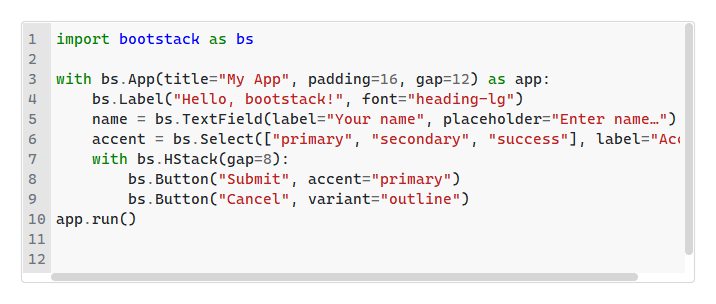
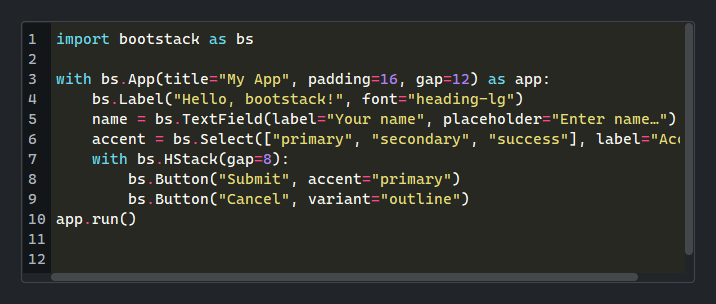
A full-featured code editor with syntax highlighting, line numbers, bracket matching, smart indent, and built-in search/replace.
Usage#
Think of it as a standalone editing surface, not a form input: it ships the
editor behaviors (a gutter, a search bar, undo grouping) built in, and it is
not Field-wrapped — there is no label or disabled state.
Reach for TextArea when you want a labeled multi-line field in a form.
Basic usage#
bs.CodeEditor()
Syntax highlighting#
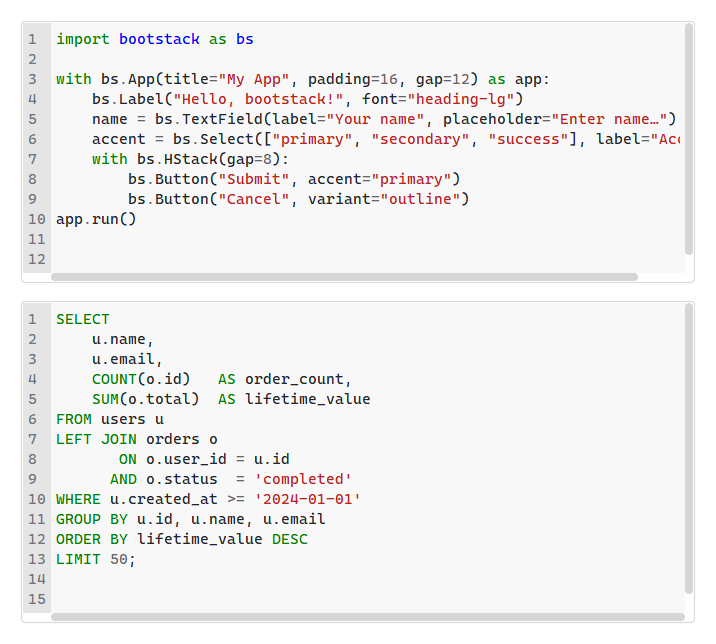
Pass language= to enable Pygments syntax highlighting. Any Pygments lexer
name is accepted.
bs.CodeEditor(value=python_source, language="python")
bs.CodeEditor(value=sql_source,    language="sql")
# Any Pygments lexer name works — "javascript", "html", "yaml", …
Color themes#
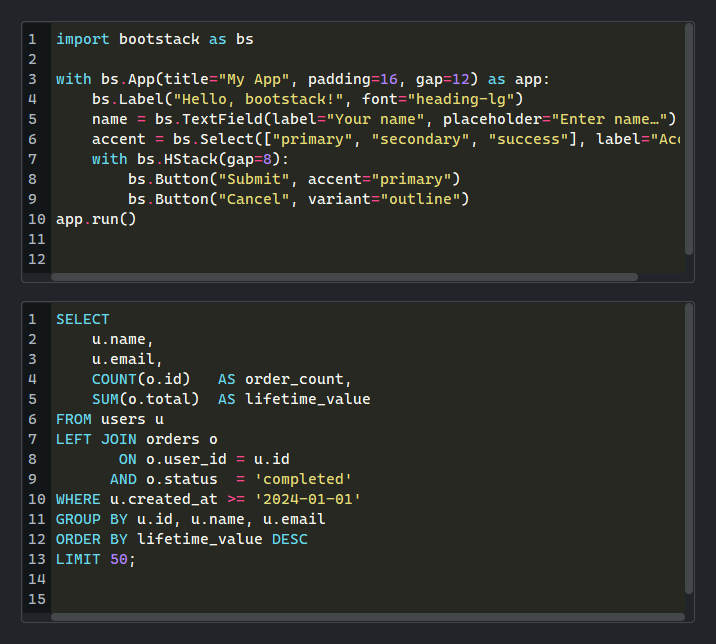
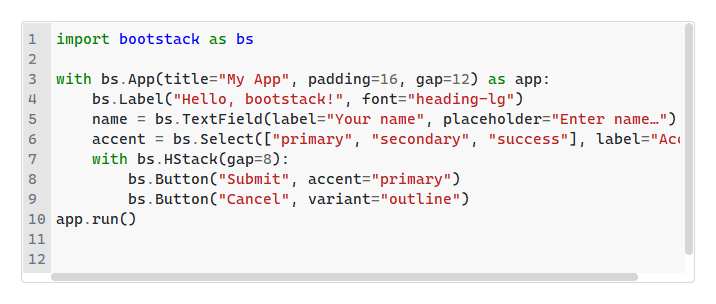
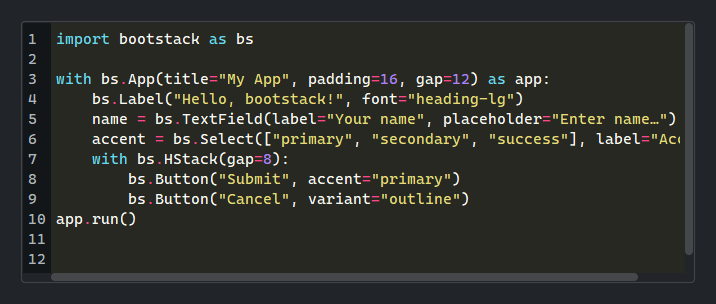
By default (theme='auto'), the editor switches between light_theme
and dark_theme to match the active bootstack theme. Pass an explicit
Pygments style name to pin the scheme.
bs.CodeEditor(language="python", theme="auto")           # follows app theme
bs.CodeEditor(language="python", theme="monokai")        # always dark
bs.CodeEditor(language="python", theme="default")        # always light
bs.CodeEditor(language="python",
              light_theme="friendly",
              dark_theme="dracula")                      # custom pair
Read-only state#
bs.CodeEditor(value=code, language="python")                   # editable
bs.CodeEditor(value=code, language="python", read_only=True)   # read-only
Read-only blocks typing, not programmatic edits: editor.value = ...,
editor.insert(...), and editor.clear() all still apply, leaving the
editor read-only afterward.
Editor options#
bs.CodeEditor(
    language="python",
    tab_width=4,           # spaces per tab stop (default 4)
    insert_spaces=True,    # Tab inserts spaces (default True)
    auto_indent=True,      # match indentation on Return (default True)
    show_line_numbers=True,  # line-number gutter (default True)
    show_indent_guides=False,  # vertical guide marks (default False)
    wrap=False,            # horizontal scroll (default; True to wrap)
)
Handling changes#
on_change() fires on every edit, delivering a
ChangeEvent whose value is the editor text. Use
on_input() for keystroke-level feedback before the change is committed. See
Events for the full event model.
editor = bs.CodeEditor(language="python")

editor.on_change(lambda e: autosave(editor.value))

# Debounced Stream — save 500ms after the last keystroke
editor.on_change().debounce(500).listen(lambda e: autosave(editor.value))
Cursor position#
on_cursor_move() fires after any key press or mouse click that moves the
insertion cursor. Read cursor_position — a 1-indexed (line, column)
tuple — to drive a status-bar readout.
editor = bs.CodeEditor(language="python")

def show_pos(e):
    line, col = editor.cursor_position
    status.text = f"Ln {line}, Col {col}"

editor.on_cursor_move(show_pos)
Text positions#
Positions are 1-indexed line and col numbers — (1, 1) is the
start of the content. The same coordinates flow through every position method:
insert() accepts them, cursor_position reports them, and goto() moves
to them. Omit col to mean the start of the line. Most edits need no position
at all — insert() defaults to the cursor, and append() adds to the end.
editor.insert("snippet")               # at the cursor (the common case)
editor.append("\n# appended")          # add a trailing line
editor.insert("#!/usr/bin/env python\n", 1, 1)  # prepend at the start
editor.insert(">>> ", 3)               # at the start of line 3
editor.goto(42)                        # jump to the start of line 42
editor.goto(42, 8)                      # jump to line 42, column 8

line, col = editor.cursor_position     # e.g. (42, 8) for a status bar
For a live readout, drive a Signal from the
on_cursor_move event stream. cursor_position is a point-in-time tuple,
so map the stream — not the property — and read the position inside the map:
status = bs.Signal("Ln 1, Col 1")
bs.Label(textsignal=status)

(
    editor.on_cursor_move()
        .map(lambda e: "Ln {}, Col {}".format(*editor.cursor_position))
        .listen(status.set)
)
Selection and block indent#
selection reads and writes the selected range as a pair of 1-indexed
(line, col) tuples — the same coordinates the position methods use — or
None when nothing is selected. selected_text returns the selected string.
editor = bs.CodeEditor(value="line one\nline two\nline three")

sel = editor.selection          # e.g. ((1, 1), (2, 5)), or None
text = editor.selected_text     # the selected text, or ""

editor.selection = ((2, 1), (3, 1))  # select line 2
editor.selection = None              # clear the selection
indent() and dedent() shift whole lines by one tab stop. With a
selection they act on every selected line and leave those lines selected;
with no selection indent() inserts a tab stop at the cursor and
dedent() outdents the current line. They are the programmatic form of
pressing Tab / Shift+Tab (see Keyboard).
editor.selection = ((2, 1), (3, 1))
editor.indent()    # indent lines 2–3 by one tab stop
editor.dedent()    # and back out again
Validation#
Attach rules with add_validation_rule(); validate() runs them
immediately. Validation also runs automatically on blur. Listen for results with
on_valid / on_invalid, or read the reactive valid and error
signals for binding.
editor = bs.CodeEditor(language="python")
editor.add_validation_rule("required", message="Content is required.")
editor.add_validation_rule("stringLength", min=10)

btn = bs.Button("Run", accent="primary")

def on_validity_change(ok):
    btn.disabled = not ok

editor.valid.subscribe(on_validity_change)
editor.on_invalid(lambda e: print("invalid:", e.message))
See Validation for the full rule set.
Undo and redo#
The editor maintains a built-in undo/redo stack. Use undo_block() to
group multiple programmatic edits into a single undo step.
editor = bs.CodeEditor(language="python")
editor.undo()
editor.redo()

# Group edits into one undo step
with editor.undo_block():
    editor.insert("# Auto-generated\\n", 1, 1)
    editor.value = reformatted
Dirty tracking#
is_dirty is True after any edit since the last mark_saved() call.
editor = bs.CodeEditor(language="python")
editor.on_modified(lambda e: update_title(editor.is_dirty))

# After saving
editor.mark_saved()
Search and replace#
editor.show_search()   # open find bar
editor.show_replace()  # open find/replace bar
editor.hide_search()   # close the bar
Keyboard#
The editor uses editor-grade key bindings rather than form-field traversal.
Undo and redo bind to the platform’s native shortcuts (Ctrl+Z / Ctrl+Y
on Windows and Linux, Cmd+Z / Cmd+Shift+Z on macOS).
Key |
Action |
|---|---|
|
Indent the selected lines, or insert a tab stop at the cursor |
|
Dedent the selected lines, or the current line |
|
New line, matching the current indent ( |
Undo / redo |
Native per-platform shortcut (see above) |
|
Open the find bar |
|
Open the find/replace bar |
|
Close the find/replace bar |
Note
Tab indents, so it does not move focus out of the editor — that is
deliberate for a code surface, matching desktop editors. Move focus away by
clicking another control. When you instead want a labeled multi-line field
where Tab advances focus, use TextArea.
Note
The Tab / Shift+Tab block indent/dedent keys are active when
auto_indent=True (the default). The indent()
and dedent() methods work regardless of the
setting — see Selection and block indent.
Widget sizing#
All widgets accept self-placement kwargs via **kwargs. The parent
container determines which options apply — Column / Row parents use
the layout kwargs below, grid-based parents use grid kwargs.
Column (vertical layout)
Used inside a Column, App, or any other container with a column layout.
Children are arranged top-to-bottom, so horizontal aligns each child across
the width and grow shares the vertical space. (vertical does not apply —
the order of the children sets their top-to-bottom position.)
|
Cross-axis placement of the widget: |
|
Claim and fill a share of the leftover vertical space (the layout
direction). |
|
External spacing in pixels. Accepts an integer (equal on all
sides), a 2-tuple |
|
Horizontal external spacing (left and right). Accepts an integer
or a 2-tuple |
|
Vertical external spacing (top and bottom). Accepts an integer
or a 2-tuple |
Row (horizontal layout)
Used inside a Row or any other container with a row layout. Children are
arranged left-to-right, so vertical aligns each child across the height and
grow shares the horizontal space. (horizontal does not apply — the order
of the children sets their left-to-right position.)
|
Cross-axis placement of the widget: |
|
Claim and fill a share of the leftover horizontal space (the layout
direction). |
|
External spacing in pixels. Accepts an integer (equal on all
sides), a 2-tuple |
|
Horizontal external spacing (left and right). Accepts an integer
or a 2-tuple |
|
Vertical external spacing (top and bottom). Accepts an integer
or a 2-tuple |
Grid
Used inside a Grid container.
|
Zero-based row and column indices. |
|
Number of rows or columns to span. |
|
Horizontal placement within the grid cell: |
|
Vertical placement within the grid cell: |
|
External spacing in pixels. Accepts an integer, a 2-tuple
|
|
Horizontal external spacing. Accepts an integer or |
|
Vertical external spacing. Accepts an integer or |
See also#
TextArea — plain multi-line text input for form fields
API#
The complete reference for CodeEditor lives on the
Widgets API page. At a glance:
A full-featured code editor with line numbers, bracket matching, and syntax highlighting. |
Full Example#
 1
 2SAMPLE_PY = """\
 3import bootstack as bs
 4
 5with bs.App(title="My App", padding=16, gap=12) as app:
 6    bs.Label("Hello, bootstack!", font="heading-lg")
 7    name = bs.TextField(label="Your name", placeholder="Enter name…")
 8    accent = bs.Select(["primary", "secondary", "success"], label="Accent")
 9    with bs.Row(gap=8):
10        bs.Button("Submit", accent="primary")
11        bs.Button("Cancel", variant="outline")
12app.run()
13"""
14
15SAMPLE_SQL = """\
16SELECT
17    u.name,
18    u.email,
19    COUNT(o.id)   AS order_count,
20    SUM(o.total)  AS lifetime_value
21FROM users u
22LEFT JOIN orders o
23       ON o.user_id = u.id
24      AND o.status  = 'completed'
25WHERE u.created_at >= '2024-01-01'
26GROUP BY u.id, u.name, u.email
27ORDER BY lifetime_value DESC
28LIMIT 50;
29"""
30
31with bs.App(title="CodeEditor Demo", size=(800, 700)) as app:
32    with bs.ScrollView(grow=True, horizontal="stretch"):
33        with bs.Column(padding=20, gap=16, horizontal_items="stretch"):
34
35            # Python syntax highlighting
36            bs.Label("Python", font="heading-sm")
37            bs.CodeEditor(value=SAMPLE_PY, language="python", height=7)
38
39            # SQL syntax highlighting
40            bs.Label("SQL", font="heading-sm")
41            bs.CodeEditor(value=SAMPLE_SQL, language="sql", height=7)
42
43            # No highlighting
44            bs.Label("Plain text (no language)", font="heading-sm")
45            bs.CodeEditor(value="Hello, World!\nNo syntax highlighting.", height=3)
46
47            # Read only
48            bs.Label("Read Only", font="heading-sm")
49            bs.CodeEditor(value=SAMPLE_PY, language="python", height=6, read_only=True)
50
51            # Undo / redo + dirty tracking
52            bs.Label("Undo / Redo + Dirty Tracking", font="heading-sm")
53            dirty_sig = bs.Signal("not modified")
54            editor = bs.CodeEditor(value=SAMPLE_PY, language="python", height=6)
55            editor.on_modified(lambda e: dirty_sig.set("modified" if editor.is_dirty else "not modified"))
56            with bs.Row(gap=8, horizontal_items="center"):
57                bs.Button("Undo",       on_click=lambda: editor.undo())
58                bs.Button("Redo",       on_click=lambda: editor.redo())
59                bs.Button("Mark saved", on_click=lambda: editor.mark_saved())
60                bs.Label(textsignal=dirty_sig, accent="secondary")
61
62            # Search / replace
63            bs.Label("Search / Replace", font="heading-sm")
64            ed2 = bs.CodeEditor(value=SAMPLE_PY, language="python", height=7)
65            with bs.Row(gap=8, horizontal_items="center"):
66                bs.Button("Find",    on_click=lambda: ed2.show_search())
67                bs.Button("Replace", on_click=lambda: ed2.show_replace())
68
69            # Cursor position
70            bs.Label("Cursor Move Event", font="heading-sm")
71            pos_sig = bs.Signal("line ?, col ?")
72            ed3 = bs.CodeEditor(value=SAMPLE_PY, language="python", height=6)
73
74            def _update_pos(e):
75                line, col = ed3.cursor_position
76                pos_sig.set(f"line {line}, col {col}")
77
78            ed3.on_cursor_move(_update_pos)
79            bs.Label(textsignal=pos_sig, accent="secondary")
80
81app.run()