

Tree#
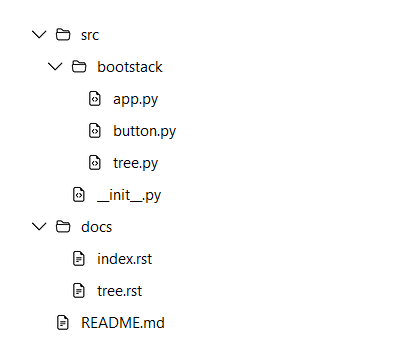
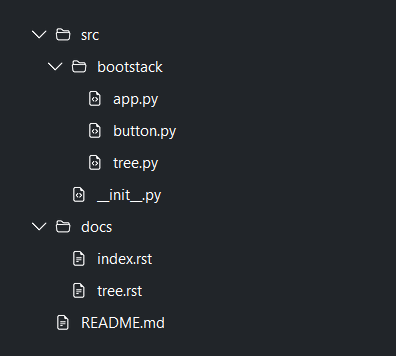
Tree displays nested data as expandable rows.
Usage#
Reach for a tree when the hierarchy itself is the point — file trees, outlines,
settings navigation, grouped pickers; use a DataTable for flat records with
columns, sorting, and paging. Every node is an object handle: add() returns
a TreeNode you hold and pass back to expand(), select(), remove()
— there are no string ids to track. Each node also carries an open-ended data
bag for your own attributes.
Building the tree#
The quickest way to populate a tree is the nodes argument — a nested list of
specs, where each spec is a label string or a dict. The recognized display
keys are label, icon (plus open_icon / closed_icon),
expanded, and children; any other key is kept on the node’s
data bag.
bs.Tree(nodes=[
    {
        "label": "src",
        "icon": "folder-fill",
        "expanded": True,
        "children": [
            {"label": "app.py", "icon": "file-earmark-code"},
            {"label": "tree.py", "icon": "file-earmark-code"},
        ],
    },
    {"label": "README.md", "icon": "file-earmark-text"},
])
A row shows an optional icon followed by its label — the same content a
ttk.Treeview row gives you, rendered as real widgets. (Richer per-row content
via a custom node renderer is planned for a future release.)
To build the tree imperatively, call add(). It returns a TreeNode handle
you keep; pass parent= to nest, or call node.add() to add a child to a
node you already hold:
tree = bs.Tree()
src = tree.add("src", icon="folder-fill", expanded=True)
tree.add("app.py", parent=src, icon="file-earmark-code")
button = src.add("button.py", icon="file-earmark-code")   # via the handle
Rearrange the tree at runtime with insert(), move(), remove(), and
clear():
tree.insert(0, "first.py", parent=src)   # at a specific sibling position
tree.move(button, parent=None)           # promote to a root node
tree.remove(src)                         # removes the node and its subtree
Each handle knows its place in the hierarchy through node.children,
node.parent, node.depth, node.ancestors(), node.descendants(),
node.is_leaf, and node.expandable. Declarative construction doesn’t hand
back any handles, so recover them from the tree with roots, walk() (every
node, depth-first), or find(predicate):
tree = bs.Tree(nodes=PROJECT)
readme = tree.find(lambda n: n.label == "README.md")
Carrying extra data#
The display keys (label, icon …) are a view over the node, not the node
itself. Whatever you don’t spend on a display key rides along on the node’s
data dict — passed as data=, as extra keyword arguments to add(), or
as extra keys in a nodes= spec. Nothing is stripped, so a handler always gets
your own domain object back:
node = tree.add("invoice.pdf", icon="file-earmark", record_id=42, status="paid")
node.data["record_id"]   # 42

tree.on_activate(lambda n: open_record(n.data["record_id"]))
A tree is always in-memory, so data can hold any Python object — the same
principle DataTable and ListView records follow
(see Carrying extra data).
Expanding and lazy loading#
A node with children shows a chevron. Drive expansion programmatically, or
reveal() a deep node to open its ancestors and scroll it into view:
tree.expand(node)
tree.collapse(node)
tree.expand_all()
tree.collapse_all()
tree.reveal(deep_node)   # opens ancestors + scrolls into view
Give a node open_icon and closed_icon to swap its icon with expansion
state — the classic open/closed folder:
tree.add("src", open_icon="folder2-open", closed_icon="folder-fill")
When a branch is expensive to build, pass a loader instead of children.
It runs the first time the node is expanded, receives the node, and returns child
specs (the same format as nodes=); the result is cached. Child specs can
carry their own loader, so deep trees load level by level, and
reload_children() drops and re-fetches a branch:
def load_children(node):
    records = fetch_from_db(node.data["id"])
    return [{"label": r.name, "icon": "file-earmark"} for r in records]

tree.add("Reports", icon="folder-fill", loader=load_children)
tree.reload_children(reports_node)   # later, to refresh
Selection#
selection_mode sets how many nodes can be selected at once: 'single'
(default), 'multi', or 'none' for a display-only tree. Set
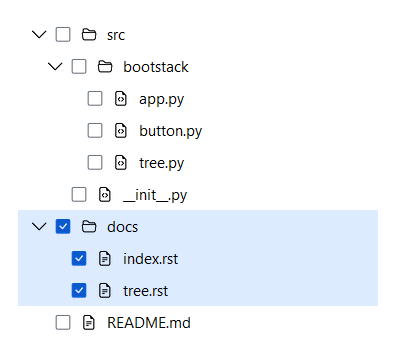
show_selection_controls=True to show a per-node affordance — a checkbox in
multi mode, a radio in single mode — mirroring ListView and
DataTable.
bs.Tree(nodes=PROJECT, selection_mode="single")
bs.Tree(nodes=PROJECT, selection_mode="multi", show_selection_controls=True)
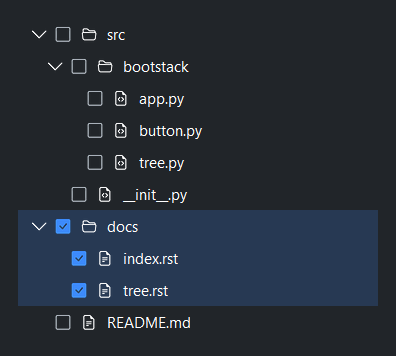
In multi mode the selection cascades: checking a parent checks all of its descendants, and a partially-checked parent shows a mixed (dash) marker.
Read the selection through the selection property — a single
TreeNode (or None) in single mode, a list
of nodes in multi mode; each node’s data bag is at node.data. Or change it in
code:
tree.select(node)
tree.deselect(node)
tree.select_all()        # multi mode only
tree.clear_selection()
By default a row click selects the row. Pair select_on_click=False with
show_selection_controls=True when a click should open a node (via
on_activate) rather than select it, leaving the control as the only way to
select — the file-explorer pattern.
Events#
All on_* methods return a Subscription when called with a handler, or a
Stream when called without one; call .cancel() on the subscription to
unsubscribe. on_select delivers a
TreeSelectionEvent (with nodes); on_activate,
on_expand, and on_collapse pass the affected TreeNode; and
on_right_click carries enough to position your own menu.
tree.on_select(lambda e: print([n.label for n in e.nodes]))
tree.on_activate(lambda node: open_file(node))          # double-click / Enter
tree.on_expand(lambda node: print("opened", node.label))
tree.on_collapse(lambda node: print("closed", node.label))
tree.on_right_click(lambda e: print(e["node"], e["x_root"], e["y_root"]))
Once focused, the tree is fully keyboard driven: arrow keys move the cursor,
Left / Right collapse and expand, Home / End jump to the first
and last node, Enter activates, Space toggles selection, and typing
runs a type-ahead search.
Appearance#
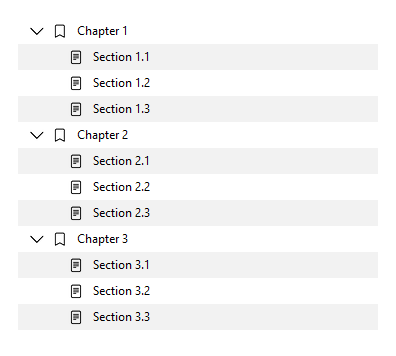
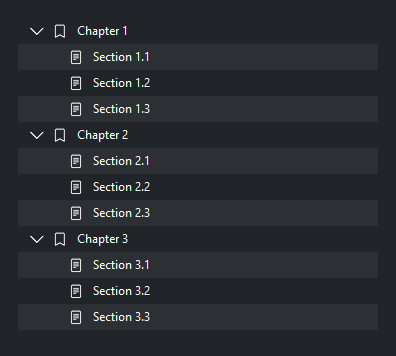
indent sets the per-level indent in pixels, striped=True alternates row
backgrounds, density='compact' tightens row height, and accent colors the
selection. The vertical scrollbar shows by default; pass show_scrollbar=False
to hide it (mousewheel scrolling still works).
bs.Tree(nodes=PROJECT, indent=24, striped=True, density="compact", accent="success")
Widget sizing#
All widgets accept self-placement kwargs via **kwargs. The parent
container determines which options apply — Column / Row parents use
the layout kwargs below, grid-based parents use grid kwargs.
Column (vertical layout)
Used inside a Column, App, or any other container with a column layout.
Children are arranged top-to-bottom, so horizontal aligns each child across
the width and grow shares the vertical space. (vertical does not apply —
the order of the children sets their top-to-bottom position.)
|
Cross-axis placement of the widget: |
|
Claim and fill a share of the leftover vertical space (the layout
direction). |
|
External spacing in pixels. Accepts an integer (equal on all
sides), a 2-tuple |
|
Horizontal external spacing (left and right). Accepts an integer
or a 2-tuple |
|
Vertical external spacing (top and bottom). Accepts an integer
or a 2-tuple |
Row (horizontal layout)
Used inside a Row or any other container with a row layout. Children are
arranged left-to-right, so vertical aligns each child across the height and
grow shares the horizontal space. (horizontal does not apply — the order
of the children sets their left-to-right position.)
|
Cross-axis placement of the widget: |
|
Claim and fill a share of the leftover horizontal space (the layout
direction). |
|
External spacing in pixels. Accepts an integer (equal on all
sides), a 2-tuple |
|
Horizontal external spacing (left and right). Accepts an integer
or a 2-tuple |
|
Vertical external spacing (top and bottom). Accepts an integer
or a 2-tuple |
Grid
Used inside a Grid container.
|
Zero-based row and column indices. |
|
Number of rows or columns to span. |
|
Horizontal placement within the grid cell: |
|
Vertical placement within the grid cell: |
|
External spacing in pixels. Accepts an integer, a 2-tuple
|
|
Horizontal external spacing. Accepts an integer or |
|
Vertical external spacing. Accepts an integer or |
See also#
API#
The complete reference for Tree and its
TreeNode row handles lives on the
Widgets API page. At a glance:
Full Example#
 1
 2# A declarative file tree. Folders use open/closed icon variants.
 3PROJECT = [
 4    {
 5        "label": "src",
 6        "open_icon": "folder2-open",
 7        "closed_icon": "folder-fill",
 8        "expanded": True,
 9        "children": [
10            {
11                "label": "bootstack",
12                "open_icon": "folder2-open",
13                "closed_icon": "folder-fill",
14                "expanded": True,
15                "children": [
16                    {"label": "app.py", "icon": "file-earmark-code"},
17                    {"label": "button.py", "icon": "file-earmark-code"},
18                    {"label": "tree.py", "icon": "file-earmark-code"},
19                ],
20            },
21            {"label": "__init__.py", "icon": "file-earmark-code"},
22        ],
23    },
24    {
25        "label": "docs",
26        "open_icon": "folder2-open",
27        "closed_icon": "folder-fill",
28        "children": [
29            {"label": "index.rst", "icon": "file-earmark-text"},
30            {"label": "tree.rst", "icon": "file-earmark-text"},
31        ],
32    },
33    {"label": "README.md", "icon": "file-earmark-text"},
34]
35
36# An outline — every undisplayed attribute rides along in node.data.
37OUTLINE = [
38    {"label": f"Chapter {i}", "icon": "bookmark", "expanded": True, "page": i * 10,
39     "children": [
40         {"label": f"Section {i}.{j}", "icon": "file-text", "page": i * 10 + j}
41         for j in range(1, 4)
42     ]}
43    for i in range(1, 4)
44]
45
46
47def load_users(node):
48    """Lazy loader — children fetched on first expand."""
49    return [
50        {"label": f"User {i}", "icon": "person-fill", "user_id": 100 + i}
51        for i in range(1, 6)
52    ]
53
54
55with bs.App(title="Tree Demo", padding=20, gap=16, minsize=(900, 640)) as app:
56    with bs.Grid(columns=2, rows=[1], gap=20, grow=True, horizontal="stretch"):
57
58        # Column 1: file tree with open/closed folder icons
59        with bs.Column(gap=6):
60            bs.Label("Icons + Nesting", font="heading-sm")
61            bs.Tree(nodes=PROJECT, grow=True, horizontal="stretch")
62
63        # Column 2: multi-select with tri-state cascade controls
64        with bs.Column(gap=6):
65            bs.Label("Multi-Select + Cascade", font="heading-sm")
66            bs.Tree(
67                nodes=PROJECT,
68                selection_mode="multi",
69                show_selection_controls=True,
70                accent="primary",
71                grow=True, horizontal="stretch",
72            )
73
74        # Column 3: striped + compact density (data rides in node.data)
75        with bs.Column(gap=6):
76            bs.Label("Striped + Compact", font="heading-sm")
77            outline = bs.Tree(
78                nodes=OUTLINE, striped=True, density="compact",
79                accent="success", grow=True, horizontal="stretch",
80            )
81            outline.on_activate(lambda n: print("page", n.data.get("page")))
82
83        # Column 4: lazy loading + context menu
84        with bs.Column(gap=6):
85            bs.Label("Lazy Loading + Menu", font="heading-sm")
86            lazy = bs.Tree(grow=True, horizontal="stretch")
87            lazy.add("Team", icon="people-fill", loader=load_users)
88            lazy.add("Guests", icon="people", loader=load_users)
89
90            def build_menu(node, menu):
91                menu.add_item("Reveal", icon="eye", on_click=lambda: lazy.reveal(node))
92                menu.add_item("Remove", icon="trash", on_click=lambda: lazy.remove(node))
93
94            lazy.set_context_menu(build_menu)
95
96app.run()