

Spacer#
A flexible break that pushes its neighbors apart inside a
Row or Column. By default it
absorbs the leftover space along the stacking axis, so items before it cluster at
the start and items after it cluster at the end.


Usage#
Where horizontal_items / vertical_items arrange the whole group, a
Spacer opens a gap at a single point — drop one into a toolbar to send the
trailing buttons to the far edge, no nesting required.
Pushing items apart#
with bs.Row(gap=4, horizontal="stretch"):
    bs.Button("New")
    bs.Button("Open")
    bs.Spacer()                       # everything after is pushed right
    bs.Button("Settings")
    bs.Button("Profile")
Fixed gaps#
Spacer(size=N) is a rigid N-pixel gap rather than flexible slack — use it for
a deliberate, fixed separation between clusters.
with bs.Row(gap=4):
    bs.Button("One")
    bs.Spacer(size=48)                # a fixed 48 px gap
    bs.Button("Two")
    bs.Spacer(size=48)
    bs.Button("Three")


Sharing space by weight#
Several flexible spacers split the leftover space in proportion to their
weight=. With weight=1 and weight=2, the second gap is twice the
first.
with bs.Row(gap=4, horizontal="stretch"):
    bs.Button("Left")
    bs.Spacer(weight=1)
    bs.Button("Center")
    bs.Spacer(weight=2)               # twice the slack of the first
    bs.Button("Right")


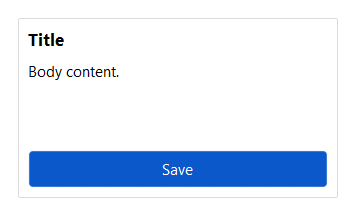
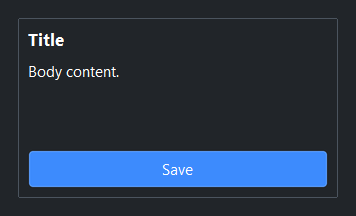
Pushing a footer down#
In a Column, a Spacer drives a footer to the bottom without fixing the column height.
with bs.Column(gap=6, horizontal_items="stretch"):
    bs.Label("Title", font="heading-md")
    bs.Label("Body content.")
    bs.Spacer()                       # pushes the footer to the bottom
    bs.Button("Save", accent="primary")
Widget sizing#
All widgets accept self-placement kwargs via **kwargs. The parent
container determines which options apply — Column / Row parents use
the layout kwargs below, grid-based parents use grid kwargs.
Column (vertical layout)
Used inside a Column, App, or any other container with a column layout.
Children are arranged top-to-bottom, so horizontal aligns each child across
the width and grow shares the vertical space. (vertical does not apply —
the order of the children sets their top-to-bottom position.)
|
Cross-axis placement of the widget: |
|
Claim and fill a share of the leftover vertical space (the layout
direction). |
|
External spacing in pixels. Accepts an integer (equal on all
sides), a 2-tuple |
|
Horizontal external spacing (left and right). Accepts an integer
or a 2-tuple |
|
Vertical external spacing (top and bottom). Accepts an integer
or a 2-tuple |
Row (horizontal layout)
Used inside a Row or any other container with a row layout. Children are
arranged left-to-right, so vertical aligns each child across the height and
grow shares the horizontal space. (horizontal does not apply — the order
of the children sets their left-to-right position.)
|
Cross-axis placement of the widget: |
|
Claim and fill a share of the leftover horizontal space (the layout
direction). |
|
External spacing in pixels. Accepts an integer (equal on all
sides), a 2-tuple |
|
Horizontal external spacing (left and right). Accepts an integer
or a 2-tuple |
|
Vertical external spacing (top and bottom). Accepts an integer
or a 2-tuple |
Grid
Used inside a Grid container.
|
Zero-based row and column indices. |
|
Number of rows or columns to span. |
|
Horizontal placement within the grid cell: |
|
Vertical placement within the grid cell: |
|
External spacing in pixels. Accepts an integer, a 2-tuple
|
|
Horizontal external spacing. Accepts an integer or |
|
Vertical external spacing. Accepts an integer or |
See also#
Row and
Column — the containers a Spacer lives
in; their horizontal_items / vertical_items arrange the whole group,
where a Spacer opens a gap at one point.
API#
The complete reference for Spacer lives on the
Widgets API page. At a glance:
A composable break that pushes neighbors apart in a Row or Column. |
Full Example#
 1
 2with bs.App(title="Spacer Demo", size=(640, 560), padding=20, gap=16) as app:
 3
 4    # Flexible — pushes the trailing group to the right edge
 5    bs.Label("Toolbar (flexible spacer)", font="heading-sm")
 6    with bs.Row(gap=4, show_border=True, padding=8, horizontal="stretch"):
 7        bs.Button("New")
 8        bs.Button("Open")
 9        bs.Spacer()
10        bs.Button("Settings")
11        bs.Button("Profile")
12
13    # Fixed-size gaps between clusters
14    bs.Label("Fixed gaps (size=)", font="heading-sm")
15    with bs.Row(gap=4, show_border=True, padding=8):
16        bs.Button("One")
17        bs.Spacer(size=48)
18        bs.Button("Two")
19        bs.Spacer(size=48)
20        bs.Button("Three")
21
22    # Weighted spacers share the leftover space 1:2
23    bs.Label("Weighted spacers (weight=)", font="heading-sm")
24    with bs.Row(gap=4, show_border=True, padding=8, horizontal="stretch"):
25        bs.Button("Left")
26        bs.Spacer(weight=1)
27        bs.Button("Center")
28        bs.Spacer(weight=2)
29        bs.Button("Right")
30
31    # In a column — push the footer to the bottom
32    bs.Label("Footer (column spacer)", font="heading-sm")
33    with bs.Column(gap=6, show_border=True, padding=8, grow=True,
34                   horizontal="stretch", horizontal_items="stretch"):
35        bs.Label("Body content.")
36        bs.Spacer()
37        bs.Button("Save", accent="primary")
38
39app.run()