

Picture#
Displays an image, scaled to fit the space it is given.


Usage#
Picture is the display widget — the counterpart to an Image, which is only a source handle. Hand it an image (a
handle, a file path, or a PIL image) and it renders into a resizable area with a
chosen fit policy, rounded corners, and automatic playback for animated GIF or
WebP sources.
Showing an image#
Pass an Image handle, or a file path as a
convenience (it is opened for you):
from bootstack.images import Image

bs.Picture("logo.png")                 # a path is opened for you
bs.Picture(Image.open("photo.jpg"))    # or an explicit handle
A Picture is not a text widget with an image bolted on — it is sizing-aware,
filling the space it is given and re-fitting the picture as that space changes.
Give it a fixed width and height, or let it fill its container with
grow=True.
Fit modes#
fit controls how the picture is scaled into the display area. The vocabulary
follows CSS object-fit:
bs.Picture(photo, fit="contain", width=150, height=150)   # default
bs.Picture(photo, fit="cover",   width=150, height=150)
bs.Picture(photo, fit="fill",    width=150, height=150)
'contain'(default) — scale to fit inside, preserving aspect ratio (letterboxing any remainder).'cover'— scale to fill, preserving aspect ratio (cropping the overflow).'fill'— stretch to fill, ignoring aspect ratio.'none'— natural size, no scaling.'scale-down'— like'contain', but never enlarge past natural size.
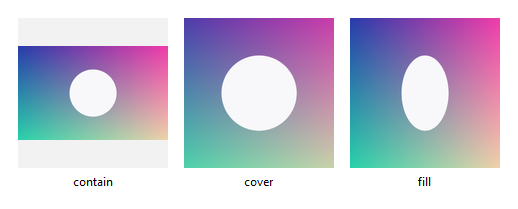
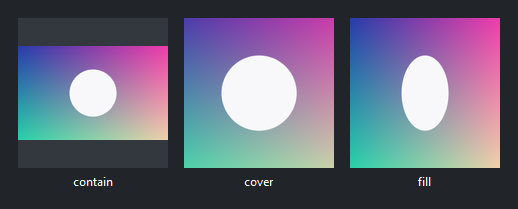
fit is a live property — assign to it to re-fit an existing picture. The
surface token sets the letterbox color shown behind a 'contain' picture.
Rounded corners#
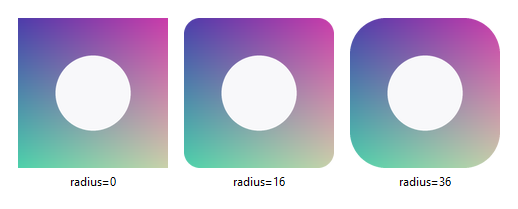
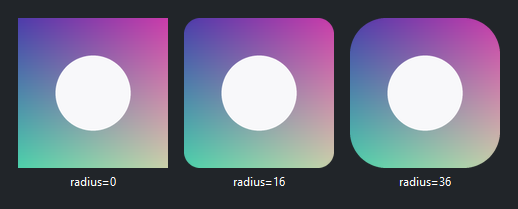
corner_radius rounds the corners with an antialiased edge — useful for
avatars and thumbnails:
bs.Picture(photo, fit="cover", width=150, height=150, corner_radius=0)
bs.Picture(photo, fit="cover", width=150, height=150, corner_radius=16)
bs.Picture(photo, fit="cover", width=150, height=150, corner_radius=36)
Animation#
Animated GIF and WebP sources play automatically and loop. Control playback with
play, pause, and stop, and read is_playing:
clip = bs.Picture(Image.open("spinner.gif"))   # autoplay, loops
clip.pause()
clip.play()
clip.stop()                                     # reset to the first frame

bs.Picture(Image.open("intro.gif"), autoplay=False, loop=False)
Responsive sizing#
Without a fixed width/height, a Picture fills its container and
re-fits as the container resizes:
with bs.Column(grow=True):
    bs.Picture(photo, fit="contain", grow=True, horizontal="stretch")
Reacting to load and errors#
on_load fires when the image is decoded and displayed, carrying its natural
size and frame count; on_error fires when a source fails to load:
pic = bs.Picture("photo.jpg")
pic.on_load(lambda e: print(f"{e.width}x{e.height}, {e.frames} frame(s)"))
pic.on_error(lambda e: print("could not load:", e.message))
Widget sizing#
All widgets accept self-placement kwargs via **kwargs. The parent
container determines which options apply — Column / Row parents use
the layout kwargs below, grid-based parents use grid kwargs.
Column (vertical layout)
Used inside a Column, App, or any other container with a column layout.
Children are arranged top-to-bottom, so horizontal aligns each child across
the width and grow shares the vertical space. (vertical does not apply —
the order of the children sets their top-to-bottom position.)
|
Cross-axis placement of the widget: |
|
Claim and fill a share of the leftover vertical space (the layout
direction). |
|
External spacing in pixels. Accepts an integer (equal on all
sides), a 2-tuple |
|
Horizontal external spacing (left and right). Accepts an integer
or a 2-tuple |
|
Vertical external spacing (top and bottom). Accepts an integer
or a 2-tuple |
Row (horizontal layout)
Used inside a Row or any other container with a row layout. Children are
arranged left-to-right, so vertical aligns each child across the height and
grow shares the horizontal space. (horizontal does not apply — the order
of the children sets their left-to-right position.)
|
Cross-axis placement of the widget: |
|
Claim and fill a share of the leftover horizontal space (the layout
direction). |
|
External spacing in pixels. Accepts an integer (equal on all
sides), a 2-tuple |
|
Horizontal external spacing (left and right). Accepts an integer
or a 2-tuple |
|
Vertical external spacing (top and bottom). Accepts an integer
or a 2-tuple |
Grid
Used inside a Grid container.
|
Zero-based row and column indices. |
|
Number of rows or columns to span. |
|
Horizontal placement within the grid cell: |
|
Vertical placement within the grid cell: |
|
External spacing in pixels. Accepts an integer, a 2-tuple
|
|
Horizontal external spacing. Accepts an integer or |
|
Vertical external spacing. Accepts an integer or |
See also#
Image— the source handle aPicturedisplays; build one withImage.open,from_bytes, orfrom_pil.get_icon— a theme-aware icon image.Images and Icons — the images and icons guide.
API#
The complete reference for Picture lives on the
Widgets API page. At a glance:
Displays an image, scaled to fit, with optional animation. |
Full Example#
 1from bootstack.images import Image
 2
 3
 4def _make_photo() -> str:
 5    """A simple gradient 'photo' (wide aspect) written to a temp PNG."""
 6    w, h = 320, 200
 7    img = PILImage.new("RGB", (w, h))
 8    px = img.load()
 9    for y in range(h):
10        for x in range(w):
11            px[x, y] = (int(255 * x / w), int(160 * y / h), 140)
12    # Supersample the subject so its edge is antialiased (ellipse is jagged at 1x).
13    ss = 4
14    layer = PILImage.new("RGBA", (w * ss, h * ss), (0, 0, 0, 0))
15    ImageDraw.Draw(layer).ellipse(
16        [120 * ss, 60 * ss, 200 * ss, 140 * ss], fill=(250, 250, 250, 255)
17    )
18    layer = layer.resize((w, h), Resampling.LANCZOS)
19    img = img.convert("RGBA")
20    img.alpha_composite(layer)
21    img = img.convert("RGB")
22    path = os.path.join(tempfile.gettempdir(), "bs_picture_photo.png")
23    img.save(path)
24    return path
25
26
27def _make_gif() -> str:
28    """A 4-frame animated GIF (a sweeping wedge) written to a temp file."""
29    frames = []
30    for i in range(8):
31        f = PILImage.new("RGB", (120, 120), (20, 24, 40))
32        d = ImageDraw.Draw(f)
33        start = i * 45
34        d.pieslice([10, 10, 110, 110], start, start + 90, fill=(90, 200, 250))
35        frames.append(f)
36    path = os.path.join(tempfile.gettempdir(), "bs_picture_anim.gif")
37    frames[0].save(path, save_all=True, append_images=frames[1:], duration=90, loop=0)
38    return path
39
40
41photo = _make_photo()
42anim = _make_gif()
43
44with bs.App(title="Picture", size=(560, 800), padding=16, gap=12) as app:
45    bs.Label("Fit modes (same wide photo in a fixed square box)", font="heading-md")
46    with bs.Row(gap=12):
47        for mode in ("contain", "cover", "fill"):
48            with bs.Column(gap=4):
49                bs.Picture(photo, fit=mode, width=150, height=150, surface="card")
50                bs.Label(mode, font="caption", horizontal="center")
51
52    bs.Divider()
53
54    with bs.Row(gap=16):
55        with bs.Column(gap=4):
56            bs.Label("Rounded corners", font="heading-md")
57            bs.Picture(photo, fit="cover", width=150, height=150, corner_radius=20)
58        with bs.Column(gap=4):
59            bs.Label("Animated GIF (autoplay)", font="heading-md")
60            bs.Picture(Image.open(anim), width=140, height=140, surface="card")
61
62    bs.Divider()
63
64    bs.Label("Responsive — resize the window", font="heading-md")
65    bs.Picture(photo, fit="contain", surface="card", grow=True, horizontal="stretch")
66
67app.run()