

TextField#
Single-line text input with optional label, helper text, placeholder, validation, and reactive signal binding.


Usage#
A field keeps three things distinct: the label beside it, the value you
read and write in code, and the display text the user sees. Read the current
input with field.value, or bind a Signal with
textsignal= to keep a variable and the field in lockstep. Input events fire in
two beats — on_input on every keystroke, on_change once the value is
committed (on blur or Enter) — so you choose live feedback or settled value per
handler.
Basic#
bs.TextField(placeholder="Type something…")
Label and message#
Use label= for a field title and message= for helper text below.
bs.TextField(
    label="Email address",
    placeholder="you@example.com",
    message="We'll never share your email.",
)
Required#
Set required=True to mark the field visually and prevent empty submission.
bs.TextField(label="Username",     required=True, placeholder="Required field")
bs.TextField(label="Email address", placeholder="Optional field")


Value formatting#
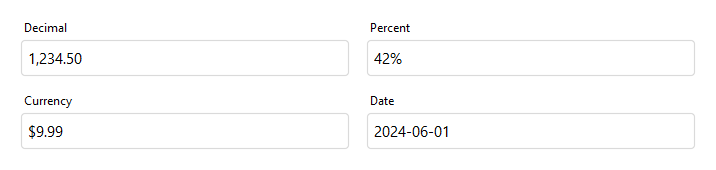
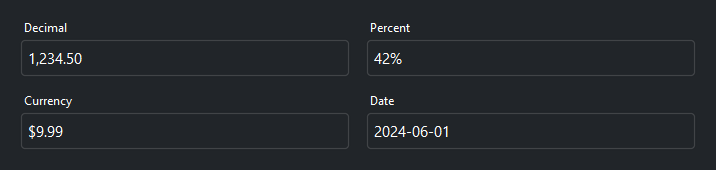
Use value_format= to display the value with a locale-aware ICU pattern.
The raw string value is preserved internally; only the display changes.
Requires localization to be enabled.
bs.TextField(value="1234.5",     value_format="#,##0.00",  label="Decimal")
bs.TextField(value="0.42",       value_format="percent",   label="Percent")
bs.TextField(value="9.99",       value_format="currency",  label="Currency")
bs.TextField(value="2024-06-01", value_format="yyyy-MM-dd", label="Date")
States#
bs.TextField(value="Editable",  label="Normal")
bs.TextField(value="Read only", label="Read only", read_only=True)
bs.TextField(value="Disabled",  label="Disabled",  disabled=True)


Reactive binding#
Bind a Signal[str] with textsignal=. The field and signal stay in
sync automatically — typing updates the signal, setting the signal updates
the field.
name = bs.Signal("World")
bs.TextField(label="Name", textsignal=name)
bs.Label(textsignal=name, accent="secondary")   # updates as you type
Live input events#
on_input() fires on every keystroke. Use it for real-time feedback,
character counting, or live search — anything that needs to respond to
typing, not just field exit.
count = bs.Label("0 / 100", accent="secondary", font="caption")
field = bs.TextField(placeholder="Type…")

def _update_count(e):
    count.text = f"{len(field.value)} / 100"

field.on_input(_update_count)

# Or as a debounced Stream
field.on_input().debounce(300).listen(lambda e: search(field.value))
Committed changes#
on_change() fires once the value is committed — when the field loses focus
or the user presses Enter — not on every keystroke. Reach for it when the work
is expensive or should run on the settled value (saving, recomputing a total).
The handler receives a ChangeEvent with the parsed
value and the previous one.
bs.TextField(label="Display name").on_change(lambda e: save(e.value))
Submit on Enter#
field = bs.TextField(placeholder="Search…")
field.on_submit(lambda e: run_search(field.value))
Validation#
Attach rules with add_validation_rule(). Rules run on the configured
trigger ('blur', 'key', or 'manual'), and validate the field’s
typed value — for a plain text field that is the string itself.
field = bs.TextField(label="Username")
field.add_validation_rule(
    "stringLength",
    message="Must be at least 3 characters.",
    min=3,
    trigger="blur",
)

is_valid = field.validate()   # run every rule on demand


Validity is reactive state. field.valid is a Signal[bool] and
field.error a Signal[str] (the current message, "" when valid) — bind
the error straight to a label and it keeps itself in sync, or drive a submit
button off field.valid:
bs.Label(textsignal=field.error, accent="danger") # shows and clears itself
Note
This is the field-level slice. The rule taxonomy (text rules vs value rules),
the range rule, compare and custom rules, how the typed value is
resolved, and aggregating a whole form’s validity all live in the
Validation guide.
Widget sizing#
All widgets accept self-placement kwargs via **kwargs. The parent
container determines which options apply — Column / Row parents use
the layout kwargs below, grid-based parents use grid kwargs.
Column (vertical layout)
Used inside a Column, App, or any other container with a column layout.
Children are arranged top-to-bottom, so horizontal aligns each child across
the width and grow shares the vertical space. (vertical does not apply —
the order of the children sets their top-to-bottom position.)
|
Cross-axis placement of the widget: |
|
Claim and fill a share of the leftover vertical space (the layout
direction). |
|
External spacing in pixels. Accepts an integer (equal on all
sides), a 2-tuple |
|
Horizontal external spacing (left and right). Accepts an integer
or a 2-tuple |
|
Vertical external spacing (top and bottom). Accepts an integer
or a 2-tuple |
Row (horizontal layout)
Used inside a Row or any other container with a row layout. Children are
arranged left-to-right, so vertical aligns each child across the height and
grow shares the horizontal space. (horizontal does not apply — the order
of the children sets their left-to-right position.)
|
Cross-axis placement of the widget: |
|
Claim and fill a share of the leftover horizontal space (the layout
direction). |
|
External spacing in pixels. Accepts an integer (equal on all
sides), a 2-tuple |
|
Horizontal external spacing (left and right). Accepts an integer
or a 2-tuple |
|
Vertical external spacing (top and bottom). Accepts an integer
or a 2-tuple |
Grid
Used inside a Grid container.
|
Zero-based row and column indices. |
|
Number of rows or columns to span. |
|
Horizontal placement within the grid cell: |
|
Vertical placement within the grid cell: |
|
External spacing in pixels. Accepts an integer, a 2-tuple
|
|
Horizontal external spacing. Accepts an integer or |
|
Vertical external spacing. Accepts an integer or |
See also#
Validation — the full rule set, typed-value model, and form-level validity.
Customizing Fields — add buttons or icons inside a field, and subclass it into a reusable type.
PasswordField — a text field with a built-in mask and reveal toggle.
NumberField, DateField — typed siblings for numeric and date input.
Signals — the reactive binding behind
textsignal=.
API#
The complete reference for TextField lives on the
Widgets API page. At a glance:
Single-line text input with optional label, message, and validation. |
Full Example#
 1
 2with bs.App(title="TextField Demo", padding=20, gap=16) as app:
 3
 4    # Basic
 5    bs.Label("Basic", font="heading-sm")
 6    basic = bs.TextField(value="Hello, bootstack!", horizontal="stretch")
 7
 8    # Label and message
 9    bs.Label("Label and Message", font="heading-sm")
10    bs.TextField(
11        label="Email address",
12        placeholder="you@example.com",
13        message="We'll never share your email.",
14        horizontal="stretch",
15    )
16
17    # Required
18    bs.Label("Required", font="heading-sm")
19    bs.TextField(label="Username", placeholder="Choose a username", required=True, horizontal="stretch")
20
21    # States
22    bs.Label("States", font="heading-sm")
23    with bs.Row(gap=8, horizontal="stretch", grow_items=True):
24        bs.TextField(value="Editable",  label="Normal")
25        bs.TextField(value="Read only", label="Read only", read_only=True)
26        bs.TextField(value="Disabled",  label="Disabled", disabled=True)
27
28    # Reactive binding
29    bs.Label("Reactive Binding", font="heading-sm")
30    with bs.Column(gap=6, horizontal="stretch"):
31        name = bs.Signal("bootstack")
32        bs.TextField(label="Name", textsignal=name, horizontal="stretch")
33        bs.Label(textsignal=name, accent="secondary", font="caption")
34
35    # Live character count via on_input
36    bs.Label("Live Character Count (on_input)", font="heading-sm")
37    with bs.Column(gap=4, horizontal="stretch"):
38        count_lbl = bs.Label("0 / 50", accent="secondary", font="caption")
39        field = bs.TextField(placeholder="Type to count…", horizontal="stretch")
40
41        def _update_count(e):
42            count_lbl.text = f"{len(field.value)} / 50"
43
44        field.on_input(_update_count)
45
46    # on_submit
47    bs.Label("Submit on Enter (on_submit)", font="heading-sm")
48    with bs.Column(gap=4, horizontal="stretch"):
49        result_lbl = bs.Label("", accent="success", font="caption")
50        submit_field = bs.TextField(placeholder="Type and press Enter…", horizontal="stretch")
51        def _on_submit(e):
52            result_lbl.text = f"Submitted: {submit_field.value}"
53
54        submit_field.on_submit(_on_submit)
55
56    # Validation
57    bs.Label("Validation", font="heading-sm")
58    vf = bs.TextField(label="Min 3 characters", placeholder="Enter text…",
59                      required=True, horizontal="stretch")
60    vf.add_validation_rule(
61        "stringLength",
62        message="Must be at least 3 characters.",
63        min=3,
64        trigger="blur",
65    )
66
67app.run()