

HStack#
A container that places children left-to-right using the pack geometry manager.
Use gap= for even spacing, anchor_items='center' to vertically center
mixed-height widgets, and fill_items='y' to stretch children to the full
row height.


Usage#
Gap#
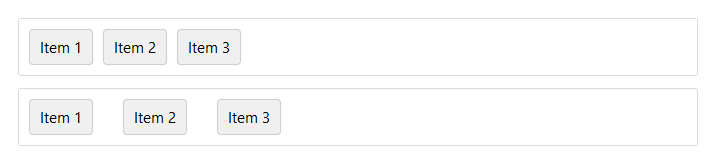
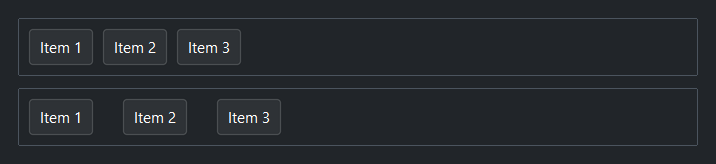
gap= sets uniform spacing in pixels between children.
# gap=4 — items close together
with bs.HStack(gap=4, show_border=True, padding=8, fill="x"):
    for i in range(1, 4):
        bs.Button(f"Item {i}")

# gap=24 — items spread apart
with bs.HStack(gap=24, show_border=True, padding=8, fill="x"):
    for i in range(1, 4):
        bs.Button(f"Item {i}")
Child alignment#
anchor_items= controls vertical alignment of children within the row.
Use 'center' to align mixed-height widgets (e.g. a label next to a text
field), 'n' for top, or 's' for bottom.
with bs.HStack(gap=8, anchor_items="n",      show_border=True, padding=8, height=80):
    bs.Button("A"); bs.Button("B")

with bs.HStack(gap=8, anchor_items="center", show_border=True, padding=8, height=80):
    bs.Button("A"); bs.Button("B")

with bs.HStack(gap=8, anchor_items="s",      show_border=True, padding=8, height=80):
    bs.Button("A"); bs.Button("B")


Child fill#
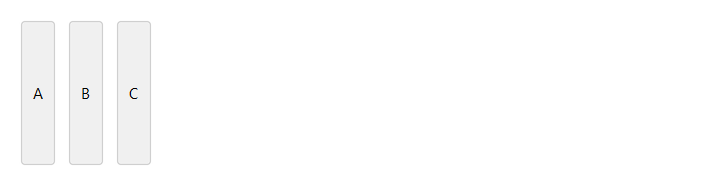
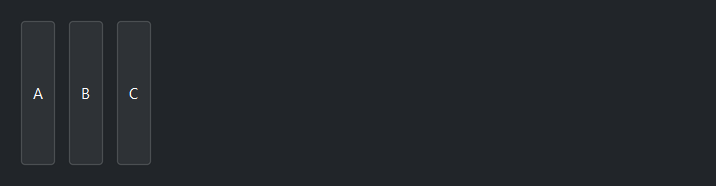
fill_items='y' stretches every child to the full row height. Useful for
making buttons or panels match the height of the tallest sibling.
with bs.HStack(gap=8, fill_items="y", height=60):
    bs.Button("A")   # stretches to 60 px tall
    bs.Button("B")
    bs.Button("C")
Fixed height#
Note
height= and width= fix the container size and prevent children
from resizing it. Setting both is the simplest path — the frame is
fully constrained and works without any extra kwargs:
with bs.HStack(height=200, width=300, show_border=True):
    bs.Button("Fully fixed", anchor="center")
When only one dimension is set, the other axis collapses to zero.
Add fill= and expand= to let the parent control the open axis:
# height only — width comes from parent
with bs.HStack(height=80, fill="x", expand=True, gap=8):
    bs.Button("Fixed height, flexible width")
Background#
surface= sets the container background. It accepts a surface token
('content', 'card', 'chrome', 'overlay') or any accent token
('primary', 'success', etc.) with optional modifiers:
with bs.HStack(surface="card", padding=12, gap=8):
    bs.Label("Sits on card surface")

with bs.HStack(surface="primary[subtle]", padding=12, gap=8):
    bs.Label("Accent-tinted background")
Border#
show_border=True draws a 1 px border along the inside edge of the frame.
Without padding, children render flush against it. Use at least padding=1
to give the border visual clearance.
with bs.HStack(gap=8, show_border=True, padding=8):
    bs.Button("A")
    bs.Button("B")
    bs.Button("C")


Self-placement#
fill=, expand=, and anchor= control how the HStack itself is placed
within its parent — separate from how it arranges its own children.
# Command bar row that fills the window width
with bs.HStack(gap=8, fill="x", anchor_items="center"):
    bs.Button("File")
    bs.Button("Edit")
    bs.Button("View")
Widget sizing#
All widgets accept self-placement kwargs via **kwargs. The parent
container determines which options apply — stack-based parents use stack
kwargs, grid-based parents use grid kwargs. Unrecognised keys are
silently ignored.
Stack#
Used inside VStack, HStack, App, and other stack containers.
|
Fill direction: |
|
Grow to consume extra space in the parent. |
|
Alignment when the widget does not fill the available slot:
|
|
External spacing in pixels. Accepts an integer (equal on all
sides), a 2-tuple |
|
Horizontal external spacing (left and right). Accepts an integer
or a 2-tuple |
|
Vertical external spacing (top and bottom). Accepts an integer
or a 2-tuple |
Grid#
Used inside a Grid container.
|
Zero-based row and column indices. |
|
Number of rows or columns to span. |
|
Alignment and fill within the grid cell. Any combination of
|
|
External spacing in pixels. Accepts an integer, a 2-tuple
|
|
Horizontal external spacing. Accepts an integer or |
|
Vertical external spacing. Accepts an integer or |
See also#
VStack — vertical equivalent.
Grid — row and column layout.
Card and
GroupBox — VStack/HStack with
an elevated background or labelled border.
API#
The complete reference for HStack lives on the
Widgets API page. At a glance:
Horizontal stack — lays out children left-to-right with optional gap and alignment. |
Full Example#
 1
 2with bs.App(title="HStack Demo", minsize=(720, 600), padding=20, gap=16) as app:
 3
 4    # Gap
 5    bs.Label("gap", font="heading-sm")
 6    with bs.HStack(gap=16):
 7        with bs.VStack(gap=4):
 8            bs.Label("gap=8", font="caption")
 9            with bs.HStack(show_border=True, gap=8, padding=2):
10                [bs.Button(lbl) for lbl in ("A", "B", "C")]
11        with bs.VStack(gap=4):
12            bs.Label("gap=16", font="caption")
13            with bs.HStack(show_border=True, gap=16, padding=2):
14                [bs.Button(lbl) for lbl in ("A", "B", "C")]
15
16    # anchor_items
17    bs.Label("anchor_items", font="heading-sm")
18    with bs.HStack(gap=16):
19        with bs.HStack(padding=8, show_border=True, height=100, width=150):
20            bs.Button("anchor='n'", anchor="n", expand=True)
21        with bs.HStack(padding=8, show_border=True, height=100, width=150):
22            bs.Button("anchor='center'", anchor="center", expand=True)
23        with bs.HStack(padding=8, show_border=True, height=100, width=150):
24            bs.Button("anchor='s'", anchor="s", expand=True)
25
26    # expand vs fill
27    bs.Label("expand and fill", font="heading-sm")
28    with bs.VStack(gap=12, fill="x"):
29
30        bs.Label("Neither — all natural width", font="caption")
31        with bs.HStack(gap=8, show_border=True, padding=8, fill="x", anchor_items="center"):
32            bs.Label("Search:")
33            bs.TextField()
34            bs.Button("Go", accent="primary")
35
36        bs.Label("expand=True only — field claims space but doesn't stretch", font="caption")
37        with bs.HStack(gap=8, show_border=True, padding=8, fill="x", anchor_items="center"):
38            bs.Label("Search:")
39            bs.TextField(expand=True)
40            bs.Button("Go", accent="primary")
41
42        bs.Label("fill='x', expand=True — field claims and fills", font="caption")
43        with bs.HStack(gap=8, show_border=True, padding=8, fill="x", anchor_items="center"):
44            bs.Label("Search:")
45            bs.TextField(fill="x", expand=True)
46            bs.Button("Go", accent="primary")
47
48app.run()