Validation
This guide shows how to validate user input in bootstack — declaring rules, wiring them to fields, surfacing errors, and validating whole forms.
How validation works
Validation in bootstack is a small two-piece system:
- A rule asks one question of a value: is this OK?
- A result is the answer: a boolean plus a message.
Field widgets (TextEntry, NumericEntry, PasswordEntry, DateEntry,
SelectBox, …) carry a list of rules. As the user types, blurs, or submits,
each relevant rule runs and emits a <<Valid>> or <<Invalid>> event with the
result. The field's message area updates automatically.
You write the rules. The framework handles timing, event plumbing, and the default error UI.
Quick start
The most common case — a required field with a format constraint:
import bootstack as bs

app = bs.App(title="Sign up", minsize=(400, 200))

email = bs.TextEntry(app, label="Email", required=True)
email.add_validation_rule("email", message="Enter a valid email address.")
email.pack(fill="x", padx=20, pady=10)

app.mainloop()
Three things happen automatically:
- The label gets an asterisk because
required=True. - While the user types, the email rule runs (debounced) and the field shows the error message inline if the value isn't a valid email.
- The error clears the moment the value becomes valid.
Built-in rules
bootstack ships five rule types. Add them with
field.add_validation_rule(rule_type, **options).
required
The value must not be empty or whitespace-only.
name = bs.TextEntry(app, label="Name")
name.add_validation_rule("required", message="Name is required.")
TextEntry(required=True) is shorthand for this rule plus the * label
decoration.
email
The value must look like an email address.
email = bs.TextEntry(app, label="Email")
email.add_validation_rule("email")  # uses the default message
stringLength
The value's length must fall in a range.
username = bs.TextEntry(app, label="Username")
username.add_validation_rule(
    "stringLength",
    min=3,
    max=20,
    message="Username must be 3–20 characters.",
)
min and max are both optional. Omit max for "at least N", omit min for
"at most N".
pattern
The value must match a regular expression.
zipcode = bs.TextEntry(app, label="ZIP code")
zipcode.add_validation_rule(
    "pattern",
    pattern=r"^\d{5}(-\d{4})?$",
    message="Use 12345 or 12345-6789.",
)
custom
The value passes a callable you provide. The callable returns True for valid.
def is_even(value: str) -> bool:
    try:
        return int(value) % 2 == 0
    except ValueError:
        return False

count = bs.TextEntry(app, label="Count")
count.add_validation_rule("custom", func=is_even, message="Must be even.")
custom rules default to manual trigger — they only run when something
calls validate(). See Triggers below to fire them on key
or blur instead.
When rules run
Each rule has a trigger that controls when it fires:
| Trigger | Fires on | Default for |
|---|---|---|
always |
every keystroke and on blur | required, email, pattern |
blur |
only when the field loses focus | stringLength |
manual |
only when code calls validate() |
custom |
key |
only on keystroke | (none — opt-in) |
The defaults are tuned so that cheap, immediate feedback (required, format) fires while the user types, while length checks (which are noisy mid-word) wait for blur. Override the trigger to suit your form:
# Run the custom rule live instead of waiting for submit
count.add_validation_rule("custom", func=is_even, trigger="always")

# Defer email checking until the user moves on
email.add_validation_rule("email", trigger="blur")
Tune triggers to match user expectation
email and pattern default to always, which means they start checking
while the user is still composing. That can feel aggressive — showing
"invalid email" the moment someone types a. Consider switching them to
trigger="blur" so the check waits until the field loses focus. required
stays always because it has a clear, immediate answer at every keystroke.
Reacting to validation events
Validation emits virtual events you can subscribe to. The convenience methods take a callback that receives the event payload directly:
def on_valid(payload):
    print(f"OK: {payload['value']}")

def on_invalid(payload):
    print(f"Bad: {payload['message']}")

email.on_valid(on_valid)
email.on_invalid(on_invalid)
email.on_validated(lambda p: ...)  # fires for both
The payload is a dict with value, is_valid, and message.
You can also listen to the underlying virtual events directly if you need
access to the full event object:
<<Valid>><<Invalid>><<Validate>>(fires after either of the above)
email.bind("<<Invalid>>", lambda e: print(e.data["message"]))
Surfacing errors in the UI
Field widgets handle the common case for you: when a rule fails, the message area below the field shows the error in the danger color; when validation passes, it returns to the original message text.
email = bs.TextEntry(
    app,
    label="Email",
    message="We'll never share it.",   # default helper text
    required=True,
)
email.add_validation_rule("email", message="Enter a valid email address.")
While the value is invalid, the field shows the rule's message. As soon as it becomes valid, the helper text returns.
If you want to drive your own UI off validation results — disabling a submit
button, marking a non-Field widget, surfacing an error elsewhere — use
on_validated:
submit = bs.Button(app, text="Submit", state="disabled")

def update_submit(payload):
    submit.configure(state="normal" if payload["is_valid"] else "disabled")

email.on_validated(update_submit)
Custom rules with context
A rule's callable only sees the value being validated. For checks that depend on other state (another field's value, a server response, application settings), capture the dependency in a closure:
password = bs.PasswordEntry(app, label="Password", required=True)
confirm  = bs.PasswordEntry(app, label="Confirm password", required=True)

def matches_password(value: str) -> bool:
    return value == password.value

confirm.add_validation_rule(
    "custom",
    func=matches_password,
    message="Passwords must match.",
    trigger="always",
)

# Re-run the confirm rule when the original password changes
password.on_changed(lambda _: confirm.validation(confirm.value, "manual"))
The closure reads password.value each time it runs, so the comparison is
always against the current password. The on_changed callback re-validates
confirm whenever the source changes — without it, fixing the password
wouldn't clear the mismatch error on confirm.
Form-level validation
bs.Form aggregates field validation for you. Call form.validate() to run
every field's rules and return a single boolean.
form = bs.Form(
    app,
    items=[
        {"key": "name",  "label": "Name",  "editor": "textentry"},
        {"key": "email", "label": "Email", "editor": "textentry"},
        {"key": "age",   "label": "Age",   "editor": "numericentry"},
    ],
    buttons=["Cancel", "Submit"],
)
form.field("name").add_validation_rule("required")
form.field("email").add_validation_rule("email", message="Invalid email.")
form.field("age").add_validation_rule(
    "custom", func=lambda v: int(v or 0) >= 18, message="Must be 18+."
)

def on_submit():
    if form.validate():
        print("submitted:", form.value)

form.pack(fill="both", expand=True, padx=20, pady=20)
form.validate() runs every field's always and manual rules, fires the
matching events (so the inline error UI updates), focuses the first invalid
field, and returns True only if every field passed.
For ad-hoc forms not built with bs.Form, run the same thing manually by
calling each field's validation(value, "manual") and combining results.
Worked example: signup form
A complete signup form combining everything above:
import bootstack as bs

app = bs.App(title="Create account", minsize=(420, 360))
form = bs.Card(app, padding=20)
form.pack(fill="both", expand=True, padx=20, pady=20)

email = bs.TextEntry(form, label="Email", required=True)
email.add_validation_rule("email", message="Enter a valid email address.")
email.pack(fill="x", pady=4)

username = bs.TextEntry(form, label="Username", required=True)
username.add_validation_rule(
    "stringLength", min=3, max=20,
    message="Username must be 3–20 characters.",
)
username.add_validation_rule(
    "pattern", pattern=r"^[a-zA-Z0-9_]+$",
    message="Letters, numbers, and underscores only.",
)
username.pack(fill="x", pady=4)

password = bs.PasswordEntry(form, label="Password", required=True)
password.add_validation_rule(
    "stringLength", min=8,
    message="At least 8 characters.",
)
password.pack(fill="x", pady=4)

confirm = bs.PasswordEntry(form, label="Confirm password", required=True)
confirm.add_validation_rule(
    "custom",
    func=lambda v: v == password.value,
    message="Passwords must match.",
    trigger="always",
)
confirm.pack(fill="x", pady=4)
password.on_changed(lambda _: confirm.validation(confirm.value, "manual"))

fields = [email, username, password, confirm]

def submit():
    results = [f.validation(f.value, "manual") for f in fields]
    if all(results):
        print("creating account for", username.value)

bs.Button(form, text="Create account", accent="primary", command=submit)\
    .pack(fill="x", pady=(12, 0))

app.mainloop()
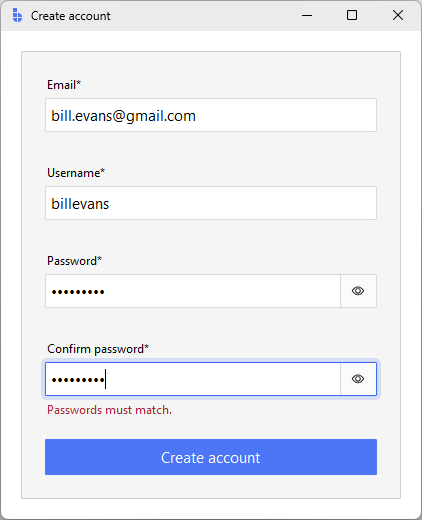
Each field reports its own errors inline. Submit re-runs validation synchronously so a user who clicks Submit on an empty form sees every error at once instead of having to tab through to discover them.
Common pitfalls
Validating too eagerly. Defaulting every rule to always makes the form
flash errors for input the user is still composing. Match the trigger to the
rule.
Forgetting to re-validate dependents. A rule on field B that reads field
A's value won't re-fire when A changes. Wire A.on_changed to call
B.validation(B.value, "manual") (see the password-confirm example).
Putting UI behavior in rules. Rules return ValidationResult objects;
they don't touch widgets. Keep "show a toast", "disable the button", "scroll
to error" in event handlers, not inside the rule's callable.
Calling validation() inside an on_validated handler. validation()
fires more validation events, which call your handler again — infinite
recursion. Inside on_validated, read the result from the payload you already
have (payload["is_valid"]) rather than re-running validation:
# Wrong — causes infinite recursion
field.on_validated(lambda p: field.validation(field.value, "manual"))

# Right — use the payload that's already there
field.on_validated(lambda p: do_something(p["is_valid"]))
Over-engineering custom rules. If you find yourself writing the same
custom rule across files, lift it into a small helper that returns a
configured ValidationRule, but don't build a rule-composition mini-language.
The five built-in types plus custom cover almost everything.
Related
- Forms & Input — picking input widgets, layout, and submit handling
- TextEntry — primary text field with built-in validation surface
- Form — declarative form with
validate() - FormDialog — modal form flow
- Reactivity — events, signals, and callbacks
ValidationRule— API referenceValidationResult— API reference