Forms & Input
This guide shows how to assemble input widgets into working forms — picking the right widget for each field, wiring values, laying things out, validating, and handling submit.
It builds on the Validation and Reactivity guides; cross-link rather than re-read.
Quick start
A two-field login form:
import bootstack as bs

app = bs.App(title="Sign in", minsize=(360, 220))
form = bs.Card(app)
form.pack(fill="both", expand=True, padx=20, pady=20)

email = bs.TextEntry(form, label="Email", required=True)
email.add_validation_rule("email", message="Enter a valid email address.")
email.pack(fill="x")

password = bs.PasswordEntry(form, label="Password", required=True)
password.pack(fill="x", pady=(8, 12))

def submit():
    if email.validation(email.value, "manual") and password.value:
        print("signing in:", email.value)

bs.Button(form, text="Sign in", accent="primary", command=submit)\
    .pack(fill="x")

app.mainloop()
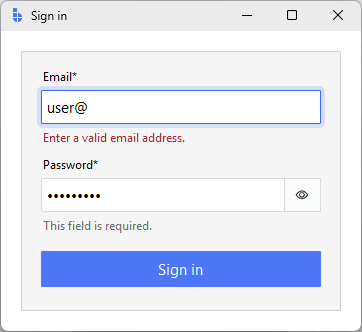
The interesting bits:
required=Trueadds the asterisk and therequiredrule.- The email field validates on every keystroke; the password is only checked for emptiness on submit.
submit()re-runs validation manually so the user sees errors even if they click submit without typing.
Picking the right input
Most fields fit one of these patterns. Match the data shape to the widget before reaching for the kitchen sink.
| Data shape | Use this |
|---|---|
| Free-form text (name, email, query) | bs.TextEntry |
| Secret (password, PIN) | bs.PasswordEntry |
| Number with bounds and parsing | bs.NumericEntry |
| Number adjusted by feel | bs.Scale / bs.LabeledScale |
| Number with prominent steppers | bs.SpinnerEntry |
| Calendar date | bs.DateEntry |
| Time of day | bs.TimeEntry |
| Filesystem path | bs.PathEntry |
| Multi-line text | bs.ScrolledText |
| One value from a list (long) | bs.SelectBox (enable_search=True) |
| One value from a list (short menu) | bs.OptionMenu |
| One value from visible options | bs.RadioGroup |
| Independent on/off options | bs.CheckButton |
| Single binary setting | bs.Switch |
| Connected option set (segmented) | bs.ToggleGroup |
Each entry-style widget (TextEntry, NumericEntry, PasswordEntry,
DateEntry, TimeEntry, SelectBox) ships with a label, optional helper
message, validation surface, and consistent events. Reach for the lower-level
bs.Entry only when you're building a custom
composite.
Don't mix masking with value_format
Numeric inputs commit their parsed value on blur. If you need a display
mask while typing (currency on every keystroke), drop to bs.Entry with a
Tk validatecommand. value_format is commit-time formatting.
Reading and writing values
Every entry-style field exposes the same shape:
email = bs.TextEntry(form, label="Email")

# Read
current = email.value           # committed value
raw     = email.get()           # current text, even mid-edit

# Write
email.value = "ada@example.com" # commits and fires <<Changed>>

# Subscribe
email.on_input(lambda e: print("typing:", e.data["text"]))
email.on_changed(lambda e: print("commit:", e.data["value"]))
on_inputfires on every keystroke. Use it for live preview.on_changedfires when the committed value changes (blur or Enter). Use it for the value you'd save or send.
Binding to signals
For shared state — the same value driving multiple widgets, or a value
computed from other widgets — bind to a Signal:
query = bs.Signal("")

bs.TextEntry(app, label="Search", textsignal=query).pack(fill="x")
bs.Label(app, textsignal=query, font="body[muted]").pack(anchor="w")
Both widgets stay in sync without a callback. See Reactivity for the full signals model.
Layout patterns
Pick the simplest layout that fits — most forms don't need a grid.
Stacked single column
The most common form. Each field already includes its own label, so just pack them vertically:
form = bs.Card(app, padding=20)
form.pack(fill="both", expand=True, padx=20, pady=20)

bs.TextEntry(form, label="Name", required=True).pack(fill="x", pady=4)
bs.TextEntry(form, label="Email", required=True).pack(fill="x", pady=4)
bs.NumericEntry(form, label="Age", value=18, minvalue=0).pack(fill="x", pady=4)
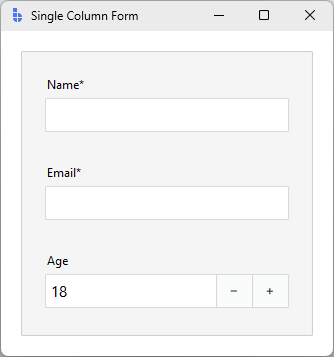
bs.Card gives you the padding and surface; pady=4 between fields is enough
breathing room.
Two columns with bs.Form
When you have eight fields and the form would otherwise be a tall scroll,
declare it instead and let Form lay it out:
form = bs.Form(
    app,
    col_count=2,
    items=[
        {"key": "first",    "label": "First name", "editor": "textentry"},
        {"key": "last",     "label": "Last name",  "editor": "textentry"},
        {"key": "email",    "label": "Email",      "editor": "textentry",
         "columnspan": 2},
        {"key": "city",     "label": "City",       "editor": "textentry"},
        {"key": "zip",      "label": "ZIP",        "editor": "textentry"},
        {"key": "verified", "label": "Email verified",
         "editor": "checkbutton", "columnspan": 2},
    ],
    buttons=["Cancel", "Save"],
)
form.pack(fill="both", expand=True, padx=20, pady=20)
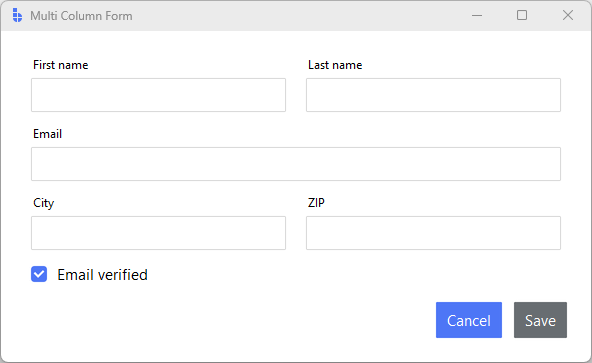
Form handles the grid, the variable wiring, and the footer buttons. Use
columnspan for fields that should stretch full-width, and group related
fields with {"type": "group", ...} when sections start to matter.
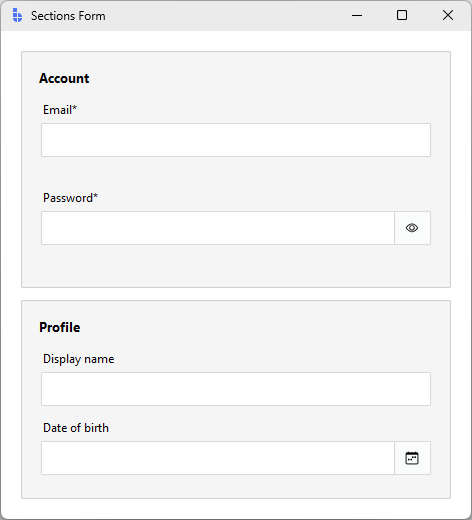
Sections with bs.Card
For longer ad-hoc forms, group fields into Cards instead of one big container:
container = bs.PackFrame(app, gap=12, padding=20)
container.pack(fill="both", expand=True)

account = bs.Card(container)
account.pack(fill="x")
bs.Label(account, text="Account", font="heading-sm").pack(anchor="w", pady=(0, 8))
bs.TextEntry(account, label="Email", required=True).pack(fill="x", pady=4)
bs.PasswordEntry(account, label="Password", required=True).pack(fill="x", pady=4)

profile = bs.Card(container)
profile.pack(fill="x")
bs.Label(profile, text="Profile", font="heading-sm").pack(anchor="w", pady=(0, 8))
bs.TextEntry(profile, label="Display name").pack(fill="x", pady=4)
bs.DateEntry(profile, label="Date of birth").pack(fill="x", pady=4)
Submit handling
The end-to-end pattern: validate, gather, act.
Manual layouts
When you packed the fields yourself, drive submit explicitly:
fields = [email, password]

def submit():
    results = [f.validation(f.value, "manual") for f in fields]
    if not all(results):
        return
    payload = {"email": email.value, "password": password.value}
    create_account(payload)
Calling field.validation(value, "manual") on each field re-runs every rule
(including ones that default to manual trigger), updates the inline error UI,
and returns True only when the field passes.
bs.Form layouts
bs.Form aggregates the same loop for you:
def on_save():
    if form.validate():
        save(form.value)

bs.Button(parent, text="Save", accent="primary", command=on_save).pack()
form.validate() runs every field's always and manual rules, fires the
appropriate events (so inline errors update), focuses the first invalid
field, and returns a single boolean.
Disabling submit until valid
For short forms, react to <<Validated>> and gate the button:
submit = bs.Button(form, text="Submit", state="disabled")
submit.pack(fill="x", pady=(12, 0))

def refresh():
    ok = email.value and password.value and email.validation(email.value, "manual")
    submit.configure(state="normal" if ok else "disabled")

email.on_validated(lambda _: refresh())
password.on_input(lambda _: refresh())
For long forms, prefer the opposite — keep the button enabled, and surface errors on click. A user who can't see why submit is greyed out gets stuck.
Async submit and a busy state
Network calls block the UI loop. Push them to a worker and re-enable the
button with app.after():
from concurrent.futures import ThreadPoolExecutor
pool = ThreadPoolExecutor(max_workers=2)

def on_save():
    if not form.validate():
        return
    submit.configure(state="disabled", text="Saving…")
    future = pool.submit(api.save, form.value)
    def done():
        if future.done():
            submit.configure(state="normal", text="Save")
            if future.exception():
                bs.Toast.show(app, "Save failed", accent="danger")
            else:
                bs.Toast.show(app, "Saved", accent="success")
            return
        app.after(50, done)
    app.after(50, done)
See Performance → Background work for the full off-loop pattern.
Surfacing errors
Field widgets handle inline errors automatically: a failing rule paints the field's message area in the danger color and shows the rule's message; a passing value restores the default helper text.
For form-level problems (a server says the email is taken, a network call failed), show a banner above the form:
banner = bs.Label(form, surface="danger", padding=8, foreground="on-danger")
# don't pack yet

def show_error(msg):
    banner.configure(text=msg)
    banner.pack(fill="x", pady=(0, 8), before=email)

def clear_error():
    banner.pack_forget()
Two rules of thumb:
- Field-level errors stay at the field. The user reads them while editing.
- Form-level errors live at the top so they're visible after submit, and they shouldn't duplicate the per-field messages.
Worked example: signup form
A complete signup form combining everything: layout, validation, dependent fields, submit handling, and disabled-until-valid.
import bootstack as bs

app = bs.App(title="Create account", minsize=(440, 460))
card = bs.Card(app, padding=20)
card.pack(fill="both", expand=True, padx=20, pady=20)

bs.Label(card, text="Create your account", font="heading-md")\
    .pack(anchor="w", pady=(0, 12))

email = bs.TextEntry(card, label="Email", required=True)
email.add_validation_rule("email", message="Enter a valid email address.")
email.pack(fill="x", pady=4)

username = bs.TextEntry(card, label="Username", required=True)
username.add_validation_rule(
    "stringLength", min=3, max=20,
    message="Username must be 3–20 characters.",
)
username.add_validation_rule(
    "pattern", pattern=r"^[a-zA-Z0-9_]+$",
    message="Letters, numbers, and underscores only.",
)
username.pack(fill="x", pady=4)

password = bs.PasswordEntry(card, label="Password", required=True)
password.add_validation_rule(
    "stringLength", min=8, message="At least 8 characters.",
)
password.pack(fill="x", pady=4)

confirm = bs.PasswordEntry(card, label="Confirm password", required=True)
confirm.add_validation_rule(
    "custom",
    func=lambda v: v == password.value,
    message="Passwords must match.",
    trigger="always",
)
confirm.pack(fill="x", pady=4)
password.on_changed(lambda _: confirm.validation(confirm.value, "manual"))

terms = bs.CheckButton(card, text="I agree to the Terms of Service")
terms.pack(anchor="w", pady=(8, 12))

fields = [email, username, password, confirm]
submit = bs.Button(card, text="Create account", accent="primary",
                   state="disabled")
submit.pack(fill="x")

valid_state = {f: False for f in fields}

def refresh_submit():
    submit.configure(state="normal" if all(valid_state.values()) and terms.value else "disabled")

for f in fields:
    def make_handler(field):
        def handler(data):
            valid_state[field] = data["is_valid"]
            refresh_submit()
        return handler
    f.on_validated(make_handler(f))

terms.configure(command=refresh_submit)

def on_submit():
    if all(valid_state.values()):
        print("creating account for", username.value)

submit.configure(command=on_submit)
app.mainloop()
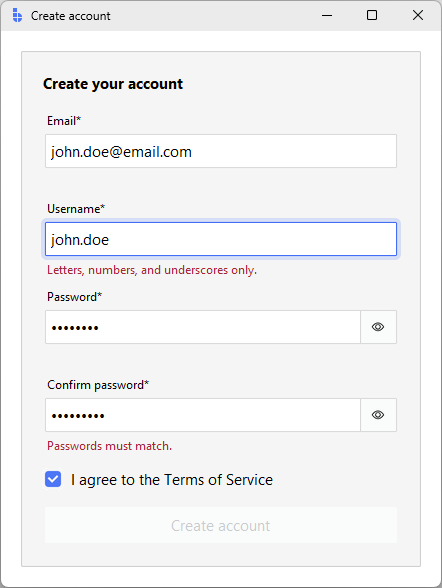
Key patterns this combines:
required=Trueon every field gives both the asterisk and an inline required rule.- The
confirmfield is re-validated when the sourcepasswordchanges — theon_changedline wires that loop. Without it, fixing the password wouldn't clear the mismatch error. valid_statetracks each field's last validation outcome.on_validatedreceivesdata["is_valid"]directly — re-runningvalidation()inside the callback would cause infinite recursion since validation fires more events.on_submitguards against the button being enabled while terms is unchecked via keyboard between events.
Modal forms with FormDialog
When a form is part of a workflow ("New connection…", "Edit user…") and not
the main view, use bs.FormDialog:
dlg = bs.FormDialog(
    app,
    title="New connection",
    items=[
        {"key": "host", "label": "Host", "editor": "textentry"},
        {"key": "port", "label": "Port", "editor": "numericentry",
         "editor_options": {"value": 5432, "minvalue": 1, "maxvalue": 65535}},
        {"key": "user", "label": "User", "editor": "textentry"},
    ],
    buttons=["Cancel", "Connect"],
)
dlg.show()
if dlg.result:
    connect(**dlg.result)
dlg.show() blocks until the dialog closes; afterwards dlg.result is the
form data dict on accept, or None on cancel. For one-value prompts use
QueryBox; for multi-step flows reach for a
PageStack.
Common pitfalls
Reading field.get() on submit. get() returns the raw text, including
mid-edit content for fields where parsing happens on commit (numeric, date).
Use field.value for the parsed/committed value.
Forgetting to re-validate on submit. A user who clicks Submit without
touching a field never triggered any always or blur rules. Call
field.validation(field.value, "manual") (or form.validate()) before acting
on the data.
Storing widgets in a state dict, then never reading them. If you're
copying field values into a state = {} on every keystroke, you've reinvented
bs.Form. Use it instead.
Showing the same error twice. Inline field errors and a banner that lists every field's error is noise. Keep field errors at the field; reserve the banner for form-level failures (server rejected the request).
Putting submit logic in a rule. Validation rules are pure: value in, result out. Network calls, navigation, toasts — those go in the submit handler.
Related
- Validation — rules, triggers, and form-level validation
- Reactivity — signals, callbacks, and events
- Layout — Frame, PackFrame, GridFrame, Card
- Formatting — locale-aware
value_formatpatterns - TextEntry — the most-used input widget
- Form — declarative form builder
- FormDialog — modal form flow