Localization
bootstack apps localize at the framework level. Set a locale on your App,
drop translation catalogs into locales/, and widgets re-render their text
when the locale changes. Numbers, currencies, and dates pick up regional
formatting from the same locale setting.
This guide covers the practical path: framework strings, your own strings, locale-aware value formatting, and runtime language switching.
How localization works
bootstack uses gettext catalogs (.po source files compiled to .mo
binary files). Three pieces fit together:
MessageCatalogowns the active locale, looks up translations, and emits<<LocaleChanged>>on the root window when the locale switches.- Widget mixins subscribe to
<<LocaleChanged>>and re-resolve any text or value spec they hold. You don't wire this up yourself —bs.Label,bs.Button,bs.Field, etc. all participate. L()andLV()are the two spec constructors.L("key")produces a translatable text spec;LV(value, format_spec)produces a locale-aware value-formatting spec (currency, decimal, percent, date).
Catalogs live at locales/<lang>/LC_MESSAGES/<domain>.mo (the standard
gettext layout that msgfmt and Babel produce).
Built-in language support
bootstack ships translations for its own widget strings (dialog buttons,
calendar months, validation defaults) in 22 languages — including de,
es, fr, it, ja, ko, nl, pl, pt, pt_BR, zh_CN, zh_TW,
and more. These live under the framework's bootstack gettext domain and
are loaded automatically.
To use them, set the locale on App:
import bootstack as bs

app = bs.App(title="Hello", minsize=(400, 200), settings=bs.AppSettings(locale="es_ES"))

bs.Button(app, text="OK").pack(pady=20)
bs.Label(app, text="Saludos").pack()

app.mainloop()
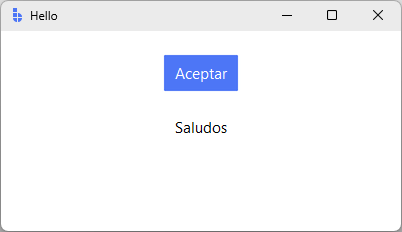
Built-in dialogs, calendar widgets, and validation messages will appear in
Spanish without further configuration. If you omit locale from settings,
bootstack auto-detects the system locale (falling back to en_US).
Adding your own translations
For application-specific strings, use the bootstack add i18n scaffold:
bootstack add i18n --languages en es de
This creates:
locales/
├── en/LC_MESSAGES/messages.po
├── es/LC_MESSAGES/messages.po
└── de/LC_MESSAGES/messages.po
Edit each .po file with your translations:
msgid "Welcome"
msgstr "Bienvenido"

msgid "Save"
msgstr "Guardar"

msgid "Hello, %s!"
msgstr "¡Hola, %s!"
Compile to .mo files:
msgfmt locales/es/LC_MESSAGES/messages.po -o locales/es/LC_MESSAGES/messages.mo
Or, if you have Babel installed:
pybabel compile -d locales -D messages
Pointing the catalog at your domain
The scaffold uses the gettext domain messages (the Babel default). The
framework's auto-init uses domain bootstack so its built-in strings load.
To make your own catalog active, re-initialize after creating the App:
import bootstack as bs
from bootstack import MessageCatalog

app = bs.App(title="MyApp", minsize=(600, 400), settings=bs.AppSettings(locale="es_ES"))

# Switch to your application's domain
MessageCatalog.init(
    locales_dir="locales",
    domain="messages",
    default_locale="es_ES",
)

bs.Label(app, text="Welcome").pack(pady=20)  # → "Bienvenido"
bs.Button(app, text="Save").pack()            # → "Guardar"

app.mainloop()
After this re-init, MessageCatalog.translate("Welcome") consults your
locales/es/LC_MESSAGES/messages.mo. The built-in bootstack domain is
no longer active — built-in dialogs revert to English. If you need both,
the simplest path is to copy the strings you care about into your own
catalog.
Auto-translation of widget text
Widgets with text accept a localize= parameter that controls whether
plain string literals are wrapped into translation specs:
# Auto: literal strings become translation lookups (default)
bs.Label(app, text="Welcome")  # equivalent to text=L("Welcome")

# Force on: same as auto for strings; lets you be explicit
bs.Label(app, text="Welcome", localize=True)

# Off: pass through verbatim
bs.Label(app, text="Welcome", localize=False)
localize="auto" is the project-wide default. Override per-widget when a
string is intentionally untranslatable (a user-entered name, a code
identifier, etc.).
Application-wide override:
# Disable auto-localization globally; opt in per widget with localize=True
app = bs.App(localize=False)
When auto-localization is on, an empty catalog falls back to the literal string itself, so undeveloped translations still display sensibly.
Explicit translations with L()
Use L() when you need format arguments or a key that differs from the
displayed fallback:
import bootstack as bs
from bootstack import L

app = bs.App(title="Greeter", minsize=(400, 200), settings=bs.AppSettings(locale="es_ES"))

# Positional %-style formatting
bs.Label(app, text=L("Hello, %s!", "Alice")).pack(pady=20)

# Multiple args
bs.Label(app, text=L("%d items in %s", 5, "cart")).pack()

app.mainloop()
L(key, *fmtargs) returns a LocalizedTextSpec. Widgets that accept
text= resolve specs automatically. Format placeholders use Python's
%-style operators (%s, %d, %.2f) — not f-string {name}
braces. The catalog entry must use the same placeholder style:
msgid "Hello, %s!"
msgstr "¡Hola, %s!"

msgid "%d items in %s"
msgstr "%d artículos en %s"
If the key is missing from the catalog, L() falls back to the key
itself (formatted with the args), so partial translations still render
something useful.
Locale-aware value formatting with LV()
L() is for text translation. LV() is for value formatting —
showing a number, date, or currency in the active locale's conventions:
import bootstack as bs
from bootstack import LV
from datetime import date

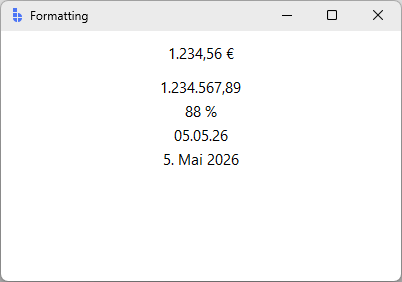
app = bs.App(title="Formatting", minsize=(400, 250), settings=bs.AppSettings(locale="de_DE"))

# Currency (uses locale's currency symbol and conventions)
bs.Label(app, text=LV(1234.56, "currency")).pack(pady=10)
# → "1.234,56 €" in de_DE; "$1,234.56" in en_US

# Decimal (locale-aware separators)
bs.Label(app, text=LV(1234567.89, "decimal")).pack()
# → "1.234.567,89" in de_DE

# Percent
bs.Label(app, text=LV(0.875, "percent")).pack()
# → "87,5 %" in de_DE

# Short date
bs.Label(app, text=LV(date.today(), "shortDate")).pack()
# → "05.05.26" in de_DE; "5/5/26" in en_US

# Long date
bs.Label(app, text=LV(date.today(), "longDate")).pack()
# → "5. Mai 2026" in de_DE; "May 5, 2026" in en_US

app.mainloop()
Common format presets:
| Preset | Use for | Example output (en_US) |
|---|---|---|
"decimal" |
Plain numbers with grouping | 1,234,567.89 |
"currency" |
Money values | $1,234.56 |
"percent" |
Ratios as percentages | 87.5% |
"thousands" / "millions" |
Compact magnitudes | 1.5K / 2.3M |
"shortDate" / "longDate" |
Calendar dates | 5/5/26 / May 5, 2026 |
"shortTime" / "longTime" |
Times of day | 2:15 PM / 2:15:30 PM |
"shortDateShortTime" |
Combined date and time | 5/5/26 2:15 PM |
For finer control, pass a dict instead of a preset name:
LV(0.875, {"type": "percent", "precision": 2}). See the
Formatting guide for the full spec catalog.
Switching locale at runtime
Call MessageCatalog.locale("de_DE"). This fires <<LocaleChanged>> on the
root window — every widget holding a translation or value-format spec
re-resolves itself immediately.
value_format= is the easiest way to see this live, because number and date
formatting reacts to locale without any catalog setup:
import bootstack as bs
from bootstack import MessageCatalog
from datetime import date

app = bs.App(title="Switcher", minsize=(400, 200), settings=bs.AppSettings(locale="en_US"))

bs.Label(app, text=1234.56,      value_format="currency", font="heading-md").pack(pady=10)
bs.Label(app, text=date.today(), value_format="longDate").pack()

bar = bs.PackFrame(app, direction="horizontal", gap=8)
bar.pack(pady=10)
bs.Button(bar, text="English", command=lambda: MessageCatalog.locale("en_US")).pack(side="left")
bs.Button(bar, text="Español", command=lambda: MessageCatalog.locale("es_ES")).pack(side="left")
bs.Button(bar, text="Deutsch", command=lambda: MessageCatalog.locale("de_DE")).pack(side="left")

app.mainloop()
Click a button and the currency symbol, decimal separator, and date order
all update immediately. Translated strings (L() specs) re-resolve the same
way, but you won't see a change unless a catalog with the target translations
is loaded — see Pointing the catalog at your domain
for that setup.
To listen for locale changes yourself:
def refresh_my_view(event):
    print(f"locale is now {MessageCatalog.locale()}")

app.bind("<<LocaleChanged>>", refresh_my_view, add="+")
Reactive signals with value_format=
Widgets that take a Signal for their value also accept a value_format=
kwarg. The signal stays in its raw type (a number, a date) and the widget
displays it formatted for the current locale:
import bootstack as bs

app = bs.App(title="Live price", minsize=(400, 200), settings=bs.AppSettings(locale="fr_FR"))

price = bs.Signal(0.0)

# Display the signal as currency in the active locale
bs.Label(app, textsignal=price, value_format="currency").pack(pady=20)
#   price=12.5 → "12,50 €" in fr_FR; "$12.50" in en_US

bs.Button(app, text="Add 5", command=lambda: price.set(price.get() + 5)).pack()

app.mainloop()
When the locale switches, the displayed string re-formats automatically; when the signal updates, it formats with the current locale. This is the right tool for live-updating numeric displays (prices, counters, percentages).
Locale-aware widgets
Several input widgets honor the locale settings out of the box:
| Widget | What honors locale |
|---|---|
bs.DateEntry |
Display format (settings.date_format), first day of week |
bs.TimeEntry |
Display format (settings.time_format), 12/24-hour |
bs.NumericEntry |
Decimal separator, thousands separator |
bs.Calendar |
Month and weekday names |
These pick up format strings from app.settings (auto-derived from the
locale via Babel), so setting the locale typically gives you correct
formatting without further config. Override individual format strings via
bs.AppSettings if you need to:
app = bs.App(settings=bs.AppSettings(locale="en_GB", date_format="d MMM yyyy"))
Patterns
Language switcher in the title bar
The switcher calls MessageCatalog.locale() — but you need locale-sensitive
content on the page to see it work. LV() date and number formatting responds
immediately without any catalog setup:
import bootstack as bs
from bootstack import MessageCatalog
from datetime import date

app = bs.AppShell(title="Languages", minsize=(600, 300), settings=bs.AppSettings(locale="en_US"))

page = app.add_page("main", text="Main", icon="house")
app.navigate("main")

bs.Label(page, text=1234.56,      value_format="currency", font="heading-md").pack(pady=10)
bs.Label(page, text=date.today(), value_format="longDate",  font="body").pack()

LANGS = [("English", "en_US"), ("Español", "es_ES"), ("Deutsch", "de_DE")]
for label, code in LANGS:
    app.toolbar.add_button(text=label, command=lambda c=code: MessageCatalog.locale(c))

app.mainloop()
Clicking a language button re-formats the amount and date immediately — the
currency symbol, decimal separator, and date order all update. For translated
strings (L() specs), you also need MessageCatalog.init() pointing at your
.mo files (see Pointing the catalog at your domain).
Localized form
With localize="auto" in effect (the default), every label and text
string in a declarative form becomes a translation lookup. No L()
needed on the labels — your catalog msgids match the literals:
import bootstack as bs

app = bs.App(title="Sign up", minsize=(420, 320), settings=bs.AppSettings(locale="es_ES"))

form = bs.Form(
    app,
    col_count=2,
    items=[
        {"key": "username", "label": "Username"},
        {"key": "password", "label": "Password", "editor": "passwordentry"},
        {"key": "email", "label": "Email"},
    ],
    buttons=[{"text": "Sign up", "command": lambda f: print(f.value)}],
)
form.pack(fill="both", expand=True, padx=20, pady=20)

app.mainloop()
messages.po for Spanish:
msgid "Username"
msgstr "Usuario"

msgid "Password"
msgstr "Contraseña"

msgid "Email"
msgstr "Correo"

msgid "Sign up"
msgstr "Registrarse"
Switch locale at runtime via MessageCatalog.locale("en_US") and every
label, plus the button, re-renders together.
Pitfalls
Domain mismatch. If bootstack add i18n scaffolded messages.po and
your translations don't show up, you probably haven't re-initialized
MessageCatalog with domain="messages". App auto-init uses the framework's
bootstack domain. Re-init after bs.App(...) (see the section above).
Format placeholders are positional. L("Hello, %s!", name) works;
L("Hello, {name}!", name=name) does not. Catalog msgid and msgstr
must use the same placeholder style.
L() vs LV(). L() is for translatable text. LV() is for
formatting values (numbers, dates) per locale. They are not
interchangeable — passing a number to L() won't format it, and passing
a string key to LV() won't translate it.
Compile your .po files. Editing .po is not enough — gettext reads
.mo. Re-run msgfmt or pybabel compile after every edit.
Empty translations. If a catalog has no translation for a key, the
key itself is displayed (formatted, if L() had args). This is by design
— it means partial catalogs degrade gracefully — but it also means typos
in your msgid show through as untranslated text in production.
localize=False for proper nouns. A literal string that should never
be translated (a user's name, a product code, an environment label)
should pass localize=False so the auto-wrap doesn't accidentally try
to look it up.
Next steps
- Formatting — number, date, and currency format specs in detail
- Reactivity — signals and reactive bindings
- Forms & Input — pairing translated labels with input widgets
- App Structure — where locale fits into App settings