Typography
This guide shows how to use bootstack's typography system—font tokens, modifiers, and the Font class for creating reusable named fonts.
Font Tokens
bootstack defines semantic font tokens rather than raw font tuples. Tokens represent typographic roles:
| Token | Purpose |
|---|---|
caption |
Small supporting text |
label |
Bold label text (form labels, field labels) |
body-sm |
Compact body text |
body |
Default body text |
body-lg |
Larger body text |
body-xl |
Extra large body text |
heading-md |
Medium heading |
heading-lg |
Large heading |
heading-xl |
Extra large heading |
display-lg |
Large display text |
display-xl |
Extra large display text |
code |
Monospace code text |
hyperlink |
Underlined link text |
Using Tokens Directly
Tokens are registered as named Tk fonts, so you can use them directly:
import bootstack as bs

app = bs.App()

bs.Label(app, text="Body text", font="body").pack()
bs.Label(app, text="Large heading", font="heading-lg").pack()
bs.Label(app, text="Code snippet", font="code").pack()

app.mainloop()
Tokens adapt to the platform—using Segoe UI on Windows, SF Pro on macOS, and DejaVu Sans on Linux.
The Font Class
The Font class provides a powerful way to create fonts with modifiers:
from bootstack import Font

# Create a font from a token
body_font = Font("body")

# Create a font with modifiers
bold_body = Font("body[bold]")

# Use in widgets
bs.Label(app, text="Bold text", font=bold_body)
The Font class:
- Parses a string syntax for tokens and modifiers
- Creates and caches named Tk fonts
- Can be passed directly to any widget's
fontparameter
Modifier Syntax
Modifiers are specified in chained brackets after the token name:
Consistent Syntax
Font modifiers use the same chained bracket syntax as color modifiers. This consistency makes both systems easy to learn together.
# Single modifier
Font("body[bold]")
Font("body[italic]")
Font("body[underline]")

# Multiple modifiers (chained brackets)
Font("body[bold][italic]")
Font("body[14][bold][underline]")
Font("heading-lg[18][bold][italic]")
Available modifiers:
| Modifier | Effect |
|---|---|
bold |
Bold weight |
normal |
Normal weight |
italic |
Italic style |
roman |
Remove italic |
underline |
Underlined text |
overstrike |
Strikethrough text |
14 |
Absolute size (14pt) |
16px |
Absolute size in pixels |
Size in Brackets
Specify absolute size as a bracketed modifier:
Font("body[14]")              # Force 14pt
Font("body[16][bold]")        # 16pt bold
Font("body[16px]")            # Force 16 pixels
Font("heading-lg[24][italic]") # 24pt italic heading
Size Delta with +/-
Adjust size relative to the token's base size using + or - before the brackets:
Font("body+1")              # 1 point larger than body
Font("body-2")              # 2 points smaller than body
Font("heading-lg+2[bold]")  # 2 points larger than heading-lg, bold
Font("caption-1[italic]")   # 1 point smaller than caption, italic
Modifier Pipeline
Modifiers are applied left-to-right as a pipeline. For the same property, later values override earlier ones:
Font("body[bold][normal]")   # Results in normal weight
Font("body[14][16]")         # Results in 16pt
Complete Examples
from bootstack import Font

# Common patterns
title_font = Font("heading-xl")
subtitle_font = Font("heading-lg[normal]")  # Heading size, normal weight
body_font = Font("body")
emphasis_font = Font("body[bold][italic]")
code_font = Font("code")
small_caption = Font("caption[italic]")

# Size variations using +/-
large_body = Font("body+2")
compact_label = Font("body-1")

# Size with modifiers
large_bold = Font("body+2[bold]")
custom_heading = Font("heading-lg[18][italic]")

# Decoration
link_text = Font("body[underline]")
deleted_text = Font("body[overstrike]")
emphasized_link = Font("body[bold][underline]")
Using Fonts in Widgets
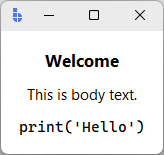
Pass Font objects directly to widgets:
import bootstack as bs
from bootstack import Font

app = bs.App()
frm = bs.PackFrame(app, gap=8, padding=16)
frm.pack(fill='both')

# Define fonts
title = Font("heading-xl")
body = Font("body")
code = Font("code")

# Apply to widgets
bs.Label(frm, text="Welcome", font=title).pack()
bs.Label(frm, text="This is body text.", font=body).pack()
bs.Label(frm, text="print('Hello')", font=code).pack()

app.mainloop()
Inline Font Strings
Many widgets also accept the font string directly:
bs.Label(app, text="Bold heading", font="heading-lg[bold]")
bs.Label(app, text="Italic caption", font="caption[italic]")
Creating Named Fonts
For fonts you'll reuse across your application, create them once and reference by name:
from bootstack import Font

# Create reusable fonts at app startup
class AppFonts:
    title = Font("heading-xl")
    subtitle = Font("heading-lg[normal]")
    body = Font("body")
    body_bold = Font("body[bold]")
    caption = Font("caption[italic]")
    code = Font("code")

# Use throughout the application
bs.Label(app, text="Title", font=AppFonts.title)
bs.Label(app, text="Description", font=AppFonts.body)
Accessing the Underlying Tk Font
The Font class wraps a Tk named font:
font = Font("body[bold]")

# Get the Tk font object
tk_font = font.tkfont

# Get the registered font name
name = font.name  # e.g., "bootstack.font.abc123"

# Font can be used as a string (returns name)
str(font)  # Same as font.name
Font Measurement
The Font class provides measurement utilities:
from bootstack import Font

font = Font("body")

# Measure text width in pixels
width = font.measure("Hello, World!")

# Get font metrics
metrics = font.metrics()
# Returns: {'ascent': 12, 'descent': 3, 'linespace': 15, 'fixed': 0}

# Get actual font properties
actual = font.actual()
# Returns: {'family': 'Segoe UI', 'size': 11, 'weight': 'normal', ...}
Practical Uses
# Calculate required widget width
text = "This is a long label"
font = Font("body")
required_width = font.measure(text) + 20  # Add padding

bs.Label(app, text=text, font=font, width=required_width)

# Get line height for layout calculations
line_height = font.metrics()["linespace"]
Typography Registry
For advanced use, access the typography system directly:
import bootstack as bs

# Get a token's specification
spec = bs.Typography.get_token("heading-lg")
print(spec.font, spec.size, spec.weight)

# Update a token globally
bs.Typography.update_font_token("body", size=12)

# Change the global font family
bs.Typography.set_global_family("Arial")
Available Token Names
from bootstack.style.typography import FontTokenNames

# Access token name constants
FontTokenNames.body       # "body"
FontTokenNames.heading_lg # "heading-lg"
FontTokenNames.code       # "code"
Common Patterns
Consistent Headings
from bootstack import Font

# Define heading hierarchy
h1 = Font("heading-xl")
h2 = Font("heading-lg")
h3 = Font("heading-md")
h4 = Font("body-lg[bold]")

bs.Label(app, text="Main Title", font=h1).pack()
bs.Label(app, text="Section", font=h2).pack()
bs.Label(app, text="Subsection", font=h3).pack()
bs.Label(app, text="Minor Heading", font=h4).pack()
Form Labels and Values
label_font = Font("body[bold]")
value_font = Font("body")

grid = bs.GridFrame(app, columns=2, gap=10, padding=20)

bs.Label(grid, text="Name:", font=label_font).grid()
bs.Label(grid, text="Alice", font=value_font).grid()

bs.Label(grid, text="Email:", font=label_font).grid()
bs.Label(grid, text="alice@example.com", font=value_font).grid()
Code Display
code_font = Font("code")
line_number_font = Font("code[bold]")

# Code editor style
bs.Label(app, text="1", font=line_number_font)
bs.Label(app, text="def hello():", font=code_font)
Status Messages
normal_status = Font("caption")
error_status = Font("caption[bold]")
success_status = Font("caption[italic]")

def show_status(message, level="normal"):
    fonts = {
        "normal": normal_status,
        "error": error_status,
        "success": success_status,
    }
    status_label.configure(text=message, font=fonts[level])
Summary
- Use font tokens (
body,heading-lg,code) for semantic typography - Use the
Fontclass to create fonts with modifiers - Specify modifiers in brackets:
Font("body[bold][italic]") - Adjust size with +/-:
Font("body+2")orFont("body[14]") - Reuse fonts by creating them once and referencing throughout
- Use
measure()andmetrics()for layout calculations
Design System
See Design System → Typography for the design philosophy.
Next Steps
- Color & Theming — accent and surface tokens, themes, runtime switching
- Layout — building layouts with containers
- App Structure — how applications are organized