

Arranging Widgets#
bootstack arranges widgets with container widgets. A container both holds
its children and decides how they are placed; a widget is parented to the nearest
enclosing container — the with block it is created in. There is no parent=
wiring in the common case and no manual coordinates.
Three containers do most of the work:
Columnstacks its children top to bottom.Rowstacks them left to right.Gridplaces them in rows and columns.
Nest them to build any layout — a toolbar (Row) above a body (Column), a
form laid out in a Grid, and so on.
with bs.Column(gap=8, padding=16, horizontal_items="stretch"):
    bs.Label("Name")
    bs.TextField()
    with bs.Row(gap=8):
        bs.Button("OK", grow=True)
        bs.Button("Cancel")
The screen axes#
Placement is described against the screen, not the flow direction: the
horizontal axis runs left–right and the vertical axis runs top–bottom, in
every container. You never flip axes when you switch from a Row to a Column —
horizontal always means horizontal.
Each axis takes a concrete edge value:
horizontal:
'left'·'center'·'right'·'stretch'vertical:
'top'·'center'·'bottom'·'stretch'
'stretch' makes a child fill that axis; the edge values size it to its
content and pin it to that edge.
Self versus items#
Two layers of placement share these words, distinguished by a suffix:
Bare keys (
horizontal,vertical,grow) place the widget itself within its parent.The ``_items`` keys (
horizontal_items,vertical_items,grow_items) set the default for a container’s children. Any child overrides the default with its own bare key.
Because a container is also a widget, it can set both — how it sits in its parent and how it arranges its own children:
# This Column fills its parent's width (self), and stretches every
# child to its own width (items).
with bs.Column(horizontal="stretch", horizontal_items="stretch", gap=8):
    bs.TextField()
    bs.TextField()
Arranging the group#
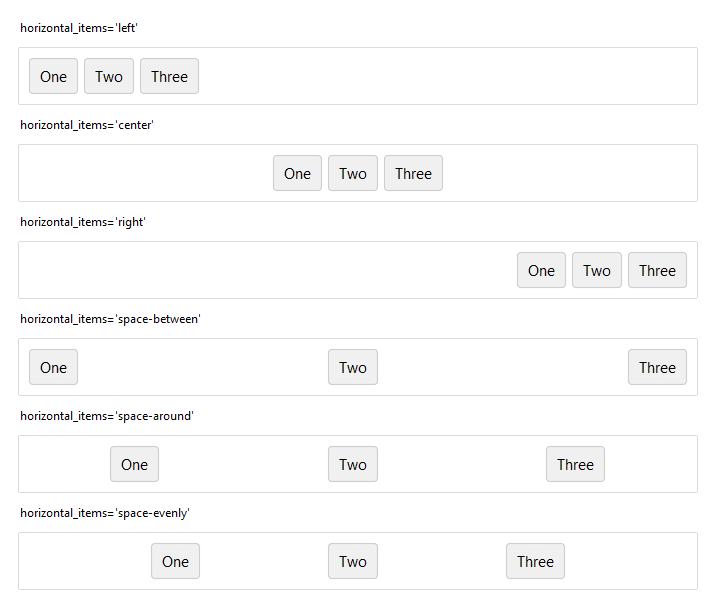
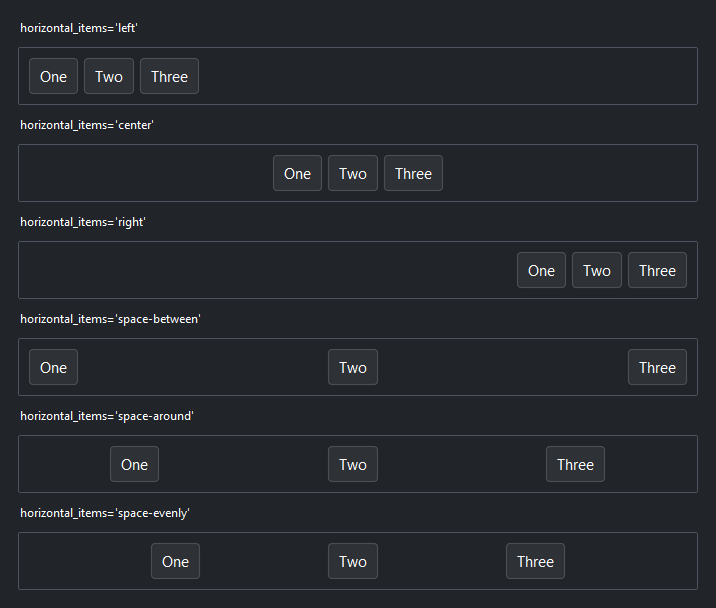
On a stack’s stacking axis (vertical for a Column, horizontal for a Row),
the _items key arranges the whole group: cluster it at an edge
('top'/'center'/'bottom' or 'left'/'center'/'right') or
distribute it with 'space-between', 'space-around', or
'space-evenly'.
# Push a group to the right end of a toolbar
with bs.Row(horizontal_items="right", gap=8):
    bs.Button("Cancel")
    bs.Button("Save", accent="primary")
On the cross axis, the _items key aligns each child — 'center' (the
default) lines up mixed-height widgets, 'stretch' makes them fill, and
'left'/'right' (or 'top'/'bottom') pin to an edge:
with bs.Row(gap=8, vertical_items="center"):   # label and field share a center line
    bs.Label("Search:")
    bs.TextField(grow=True)
Growing children#
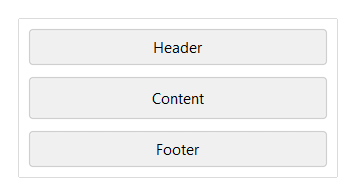
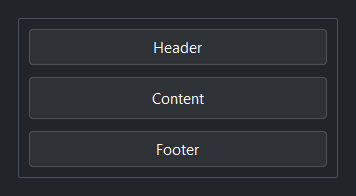
grow lets a child claim and fill the leftover space along the stacking axis
while its siblings keep their natural size — the equivalent of a flexible region.
grow=True takes one share, grow=N takes N shares.
with bs.Column(gap=6, height=150, horizontal_items="stretch"):
    bs.Button("Header")
    bs.Button("Content", grow=True)   # fills the leftover height
    bs.Button("Footer")               # stays its natural size
Note
Data and canvas widgets — ListView, DataTable, Tree,
Gallery, Carousel, Picture, CodeEditor — have no natural size
of their own and collapse without a directive. Give them grow=True (and
horizontal="stretch" in a Column) to claim space.
For a fixed ratio rather than a single flexible child, set weights= on the
container instead: weights=[1, 2, 1] sizes three children 1:2:1 across the
stacking axis.
Spacer#
A Spacer is a composable break that pushes its neighbors
apart. Where horizontal_items/vertical_items move the whole group, a
Spacer opens a gap at one point — ideal for clustered toolbars and pinned
footers, with no nesting:
with bs.Row(gap=4):
    bs.Button("New"); bs.Button("Open")
    bs.Spacer()                 # everything after is pushed to the right
    bs.Button("Settings")


Spacer(size=N) is instead a fixed gap, and Spacer(weight=N) shares slack
with other spacers in proportion.
Spacing: padding versus gap versus margin#
Three knobs control whitespace, and keeping them straight removes most layout fiddling:
padding— space inside a container, between its edge and its children. Set it on the container.gap— space between a container’s children. Set it on the container.margin(andmargin_x/margin_y) — extra space around one child, overriding the container’sgapfor that widget. Set it on the child.
with bs.Column(padding=16, gap=8):     # 16px inset, 8px between rows
    bs.Label("Settings", font="heading-md")
    bs.Switch("Dark mode", margin_y=12)   # extra breathing room around this one
When a widget needs different spacing on each axis, use margin_x for left/right
and margin_y for top/bottom; each also accepts a (before, after) pair for
asymmetric spacing.
Grids#
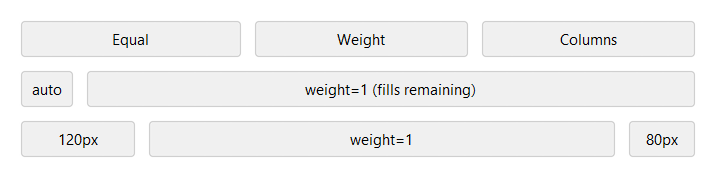
Grid places children in cells. The columns= argument sets
the column sizing: a list of weights ([1, 2] makes the second column twice as
wide), or the shorthand columns=3 for three equal columns ("auto" sizes a
column to its content, "120px" fixes a pixel width). Children flow into cells
automatically, or you can pin them with row=/column= and span with
rowspan=/columnspan=.
with bs.Grid(columns=["auto", 1], gap=8):
    bs.Label("Name");  bs.TextField()
    bs.Label("Email"); bs.TextField()
In-cell alignment uses the same axis words: horizontal_items and
vertical_items set how every child sits in its cell (both default to
'stretch', so children fill their cells), overridable per child with
horizontal/vertical.
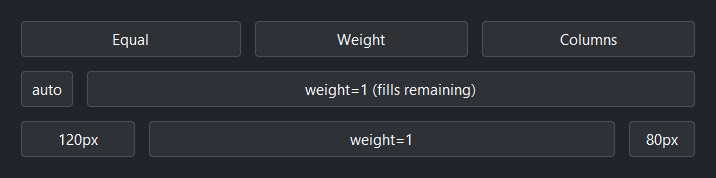
with bs.Grid(columns=[1, 1, 1], gap=8, vertical_items="center"):
    for label in ("Equal", "Weight", "Columns"):
        bs.Button(label)
Bordered containers#
For a visually grouped region, use Card (an elevated panel)
or GroupBox (a labeled border). Both lay out their children
like a Column by default (pass layout="row" or layout="grid" to switch).
Give them padding — a border drawn flush against its content looks cramped:
with bs.GroupBox("Account", padding=16, gap=8, horizontal_items="stretch"):
    bs.TextField(label="Username")
    bs.PasswordField(label="Password")
Common quirks#
A handful of behaviors trip people up the first time:
Children center on the cross axis by default. A Column centers its children horizontally and a Row centers them vertically, so a label and a field in a Row line up on a center line with no kwarg. For a full-width form column set
horizontal_items="stretch"; to left-align,horizontal_items="left". The stacking axis still starts at the top/left — usehorizontal_items/vertical_itemsor aSpacerto move the whole group.Input fields top-align in a Row instead. A field grows taller the moment it carries a validation rule, because it reserves a row for the message. Centering would then drop its unvalidated neighbors by half a message row, so fields ask for
'top'on their own and a row of them lines up regardless of which ones are validated. Passingvertical_itemsyourself applies to every child, fields included.Data and canvas widgets collapse without `grow`. A
ListVieworTreewith nogrow/stretchshrinks to nothing — give itgrow=True(andhorizontal="stretch"in a Column).Setting `width=`/`height=` on a stack fixes that size. Use
growandhorizontal/vertical="stretch"for the axes you still want to flex rather than a hard size.A bordered container needs `padding`. Without it,
Card/GroupBoxdraw their border directly against the content.Legacy placement kwargs raise. Passing
fill=/expand=/anchor=/sticky=to a child raises a clear error instead of silently collapsing it. The replacement depends on how the container places its children: in a Row or Column, usegrow/horizontal/vertical; in a grid cell — a Grid child, a page or pane, or any container built withlayout="grid"— usehorizontal/verticaland weight the row or column on the container, sincegrowdoes not apply there.
Placement options reference#
Every widget accepts these self-placement options as keyword arguments. Which ones apply depends on the parent container.
All widgets accept self-placement kwargs via **kwargs. The parent
container determines which options apply — Column / Row parents use
the layout kwargs below, grid-based parents use grid kwargs.
Column (vertical layout)
Used inside a Column, App, or any other container with a column layout.
Children are arranged top-to-bottom, so horizontal aligns each child across
the width and grow shares the vertical space. (vertical does not apply —
the order of the children sets their top-to-bottom position.)
|
Cross-axis placement of the widget: |
|
Claim and fill a share of the leftover vertical space (the layout
direction). |
|
External spacing in pixels. Accepts an integer (equal on all
sides), a 2-tuple |
|
Horizontal external spacing (left and right). Accepts an integer
or a 2-tuple |
|
Vertical external spacing (top and bottom). Accepts an integer
or a 2-tuple |
Row (horizontal layout)
Used inside a Row or any other container with a row layout. Children are
arranged left-to-right, so vertical aligns each child across the height and
grow shares the horizontal space. (horizontal does not apply — the order
of the children sets their left-to-right position.)
|
Cross-axis placement of the widget: |
|
Claim and fill a share of the leftover horizontal space (the layout
direction). |
|
External spacing in pixels. Accepts an integer (equal on all
sides), a 2-tuple |
|
Horizontal external spacing (left and right). Accepts an integer
or a 2-tuple |
|
Vertical external spacing (top and bottom). Accepts an integer
or a 2-tuple |
Grid
Used inside a Grid container.
|
Zero-based row and column indices. |
|
Number of rows or columns to span. |
|
Horizontal placement within the grid cell: |
|
Vertical placement within the grid cell: |
|
External spacing in pixels. Accepts an integer, a 2-tuple
|
|
Horizontal external spacing. Accepts an integer or |
|
Vertical external spacing. Accepts an integer or |