

Workspaces#
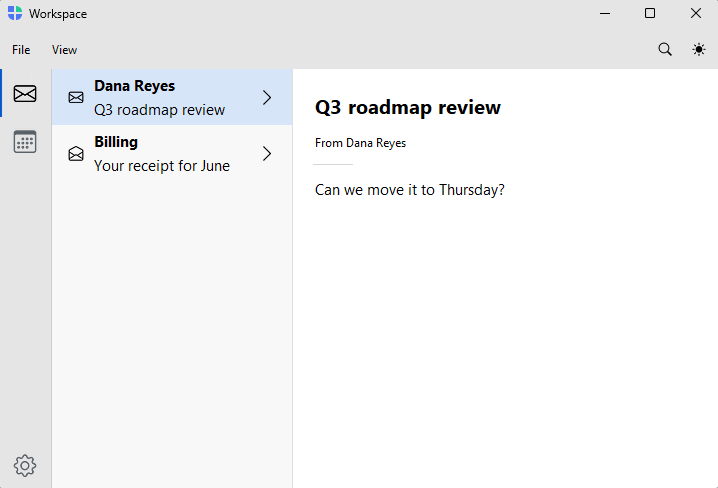
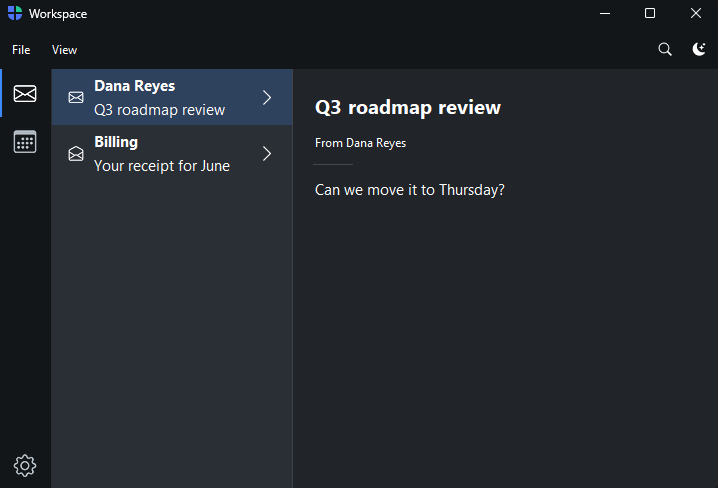
Several distinct areas behind a VS Code-style icon rail — a mail + calendar + contacts suite, an IDE, a creative tool. Each area is a workspace with its own sidebar, and each can use a different navigation pattern.
How it works#
The two-tier shell is Workbench.
add_workspace(key, *, text, icon) adds a rail icon and returns a workspace that
exposes the same sidebar front doors as a single-tier app — page_nav,
list_nav, tree_nav, and custom_nav. So a workspace is authored just like an
AppShell; the rail appears once there is more than
one workspace. pin_to_footer=True pins a workspace (Settings, Account) to the
rail bottom.
with bs.Workbench(title="Suite") as shell:
    with shell.add_workspace("mail", text="Mail", icon="envelope") as ws:
        ws.list_nav(inbox)
        @ws.detail
        def read(message): ...

    with shell.add_workspace("calendar", text="Calendar", icon="calendar3") as ws:
        with ws.page_nav() as nav:
            with nav.add_page("today", text="Today", icon="calendar-day", padding=20):
                ...
Clicking the active rail icon hides the sidebar; clicking a different one
switches workspace and shows it (the VS Code gesture). navigate(workspace, page)
jumps to a page in a specific workspace. Each workspace remembers its own active
page, so switching back and forth is lossless.
Example#
 1"""Workspaces — multiple sections behind an icon rail (a mail + calendar suite).
 2
 3A ``Workbench`` is the two-tier shell: each ``add_workspace`` adds a rail icon and
 4its own sidebar, and each workspace is a sidebar host authored with the same front
 5doors as an ``AppShell``. Here Mail is a master–detail list, Calendar is a page
 6nav, and Contacts is another list. ``pin_to_footer=True`` pins Settings to the
 7rail bottom; ``navigate(workspace, page)`` jumps to a page.
 8"""
 9import bootstack as bs
10from bootstack.data import MemoryDataSource
11
12inbox = MemoryDataSource().load([
13    {"id": 1, "title": "Dana Reyes", "text": "Q3 roadmap review", "icon": "envelope", "body": "Can we move it to Thursday?"},
14    {"id": 2, "title": "Billing", "text": "Your receipt for June", "icon": "envelope-open", "body": "Thanks for your payment."},
15])
16contacts = MemoryDataSource().load([
17    {"id": 1, "title": "Dana Reyes", "text": "dana@acme.io", "icon": "person-circle", "phone": "555-0142"},
18    {"id": 2, "title": "Sam Okonkwo", "text": "sam@acme.io", "icon": "person-circle", "phone": "555-0177"},
19])
20
21with bs.Workbench(title="Workspace", size=(980, 620)) as shell:
22    with shell.add_toolbar() as bar:
23        with bar.add_menu("File") as file:
24            file.add_action("New", shortcut="Mod+N", on_click=lambda: None)
25            file.add_action("Open", shortcut="Mod+O", on_click=lambda: None)
26            file.add_divider()
27            file.add_action("Quit", shortcut="Mod+Q", on_click=shell.close)
28        with bar.add_menu("View") as view:
29            view.add_action("Refresh", shortcut="Mod+R", on_click=lambda: None)
30        bar.add_spacer()
31        bar.add_button(icon="search", on_click=lambda: None)
32        bar.add_theme_toggle()
33
34    # Mail — a master–detail list.
35    with shell.add_workspace("mail", text="Mail", icon="envelope") as ws:
36        ws.list_nav(inbox, chevron=True)
37
38        @ws.detail
39        def read(message):
40            with bs.Column(horizontal_items="left", gap=12, padding=(16, 10)):
41                bs.Label(message["text"], font="heading-lg")
42                bs.Label(f"From {message['title']}", font="caption")
43                bs.Divider()
44                bs.Label(message["body"])
45
46    # Calendar — a page nav (authored pages).
47    with shell.add_workspace("calendar", text="Calendar", icon="calendar3") as ws:
48        with ws.page_nav() as nav:
49            with nav.add_page("today", text="Today", icon="calendar-day", padding=20, gap=8):
50                bs.Label("Today", font="heading-lg")
51                bs.Label("No events.")
52            with nav.add_page("week", text="Week", icon="calendar-week", padding=20, gap=8):
53                bs.Label("This week", font="heading-lg")
54
55    # Contacts — another list.
56    with shell.add_workspace("contacts", text="Contacts", icon="people") as ws:
57        ws.list_nav(contacts, chevron=True)
58
59        @ws.detail
60        def card(person):
61            with bs.Column(grow=True, horizontal="stretch", gap=12, padding=20):
62                bs.Label(person["title"], font="heading-lg")
63                bs.Label(person["text"], font="caption")
64                bs.Label(f"Phone: {person['phone']}")
65
66    with shell.add_workspace("settings", text="Settings", icon="gear", pin_to_footer=True) as ws:
67        with ws.page_nav() as nav:
68            with nav.add_page("general", text="General", icon="sliders", padding=20, gap=8):
69                bs.Label("Settings", font="heading-lg")
70
71    # Mail is the first workspace, so it opens active with its first message
72    # selected — no explicit navigate needed.
73
74shell.run()
When to use#
Use a Workbench when the app has several distinct areas, each warranting its own
sidebar — especially when those areas want different navigation shapes (a list
here, authored pages there). With a single area, skip the rail and use a
single-tier app (AppShell) instead.