

Grouped sidebar#
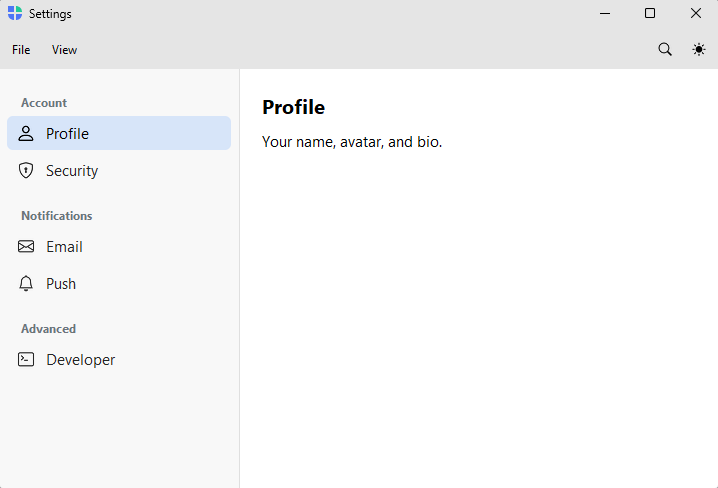
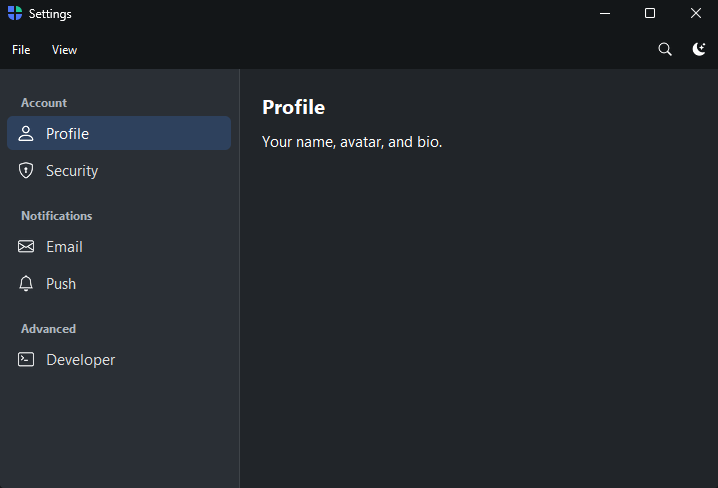
Authored pages chunked into labeled sections — the Settings window. The pages work exactly like a single-tier app; section labels and dividers add visual structure when the destinations fall into categories.
How it works#
On the page_nav() handle, add_header(text) adds a quiet, non-interactive
section label and add_divider() adds a divider. The pages added after a header
read as belonging to it — the label’s color and the extra top margin carry the
grouping, so the items stay flush (no indentation).
with shell.page_nav() as nav:
    nav.add_header("Account")
    with nav.add_page("profile", text="Profile", icon="person"):
        ...
    nav.add_header("Notifications")
    with nav.add_page("email", text="Email", icon="envelope"):
        ...
Group consistently — put everything under headers, rather than sprinkling loose top-level items among sections. A pinned footer item is the conventional exception.
Example#
 1"""Grouped sidebar — pages chunked into labeled sections (a Settings window).
 2
 3``nav.add_header`` adds a quiet section label and ``nav.add_divider`` a divider;
 4the pages between read as a group. Each page IS a column, so its ``padding`` /
 5``gap`` go on ``add_page`` — no inner wrapper. Settings screens are the canonical
 6case: related panes gathered under Account, Notifications, Advanced. Group
 7*consistently*: everything under a header.
 8"""
 9import bootstack as bs
10
11with bs.AppShell(title="Settings", size=(860, 580)) as shell:
12    with shell.add_toolbar() as bar:
13        with bar.add_menu("File") as file:
14            file.add_action("New", shortcut="Mod+N", on_click=lambda: None)
15            file.add_action("Open", shortcut="Mod+O", on_click=lambda: None)
16            file.add_divider()
17            file.add_action("Quit", shortcut="Mod+Q", on_click=shell.close)
18        with bar.add_menu("View") as view:
19            view.add_action("Refresh", shortcut="Mod+R", on_click=lambda: None)
20        bar.add_spacer()
21        bar.add_button(icon="search", on_click=lambda: None)
22        bar.add_theme_toggle()
23
24    with shell.page_nav() as nav:
25        nav.add_header("Account")
26        with nav.add_page("profile", text="Profile", icon="person", padding=20, gap=8):
27            bs.Label("Profile", font="heading-lg")
28            bs.Label("Your name, avatar, and bio.")
29        with nav.add_page("security", text="Security", icon="shield-lock", padding=20, gap=8):
30            bs.Label("Security", font="heading-lg")
31            bs.Label("Password and two-factor authentication.")
32
33        nav.add_header("Notifications")
34        with nav.add_page("email", text="Email", icon="envelope", padding=20, gap=8):
35            bs.Label("Email notifications", font="heading-lg")
36        with nav.add_page("push", text="Push", icon="bell", padding=20, gap=8):
37            bs.Label("Push notifications", font="heading-lg")
38
39        nav.add_header("Advanced")
40        with nav.add_page("developer", text="Developer", icon="terminal", padding=20, gap=8):
41            bs.Label("Developer options", font="heading-lg")
42
43    shell.navigate("profile")
44
45shell.run()
When to use#
Use a grouped sidebar when authored pages fall into a few clear categories. If
you find yourself wanting a section that collapses to hide its items, that is a
content concern rather than navigation — compose an
Accordion inside a
custom sidebar. If a “section” is really a long list of
records, use Master–detail (list).