

Plotting your data#
Draw a chart from your data and let it theme itself — the starting point for everything else in this set.
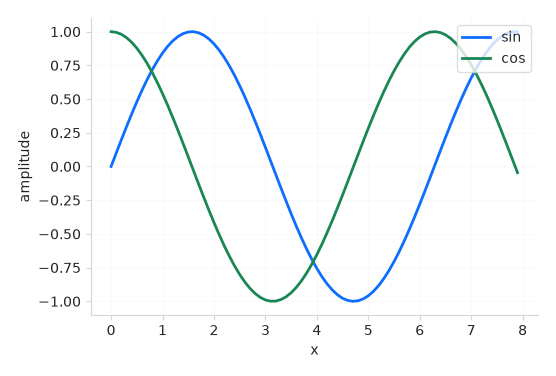
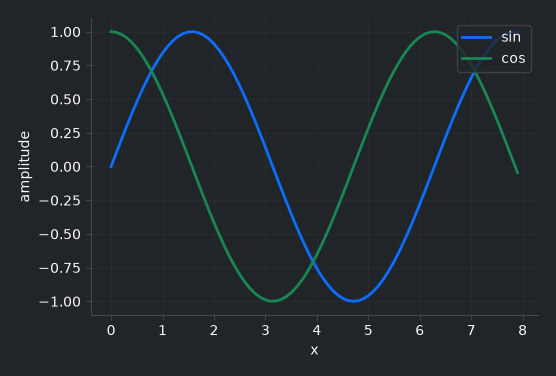
How it works#
Chart embeds a matplotlib figure as a first-class widget. The
recommended way to use it is the managed render path: you pass a render
callback and the chart owns the rest — each redraw clears the axes, applies the
theme, calls your render(ax), and draws. You just plot:
import math

def render(ax):
    xs = [i / 10 for i in range(80)]
    ax.plot(xs, [math.sin(x) for x in xs], label="sin")
    ax.plot(xs, [math.cos(x) for x in xs], label="cos")
    ax.legend()

bs.Chart(render=render, grow=True, horizontal="stretch")
You draw with plain matplotlib — Chart is not a plotting API, so you keep its
full expressive power. It owns embedding, theming, and the redraw.
Multiple series are themed automatically: the first line is primary, the
second success, and so on, drawn from the theme’s accent colors. The chrome —
figure and axes backgrounds, spines, ticks, text — matches the active surface and
flips with light/dark, so a bs.toggle_theme() recolors the whole chart with
the rest of the app.
Note
matplotlib is an optional dependency. Install it with
pip install bootstack[viz]. Build figures with matplotlib’s object API
(Figure), never pyplot — an embedded figure
must be a standalone object.
Drawing your own figure#
If you already have a Figure — or want full control
over the styling — hand it over directly. The chart embeds it and recolors only
its chrome to the theme; the data series are yours:
from matplotlib.figure import Figure

fig = Figure()
fig.add_subplot(111).plot([1, 2, 3], [4, 5, 6])
bs.Chart(fig, grow=True)
Reach for the managed render path whenever the plot reflects live state — it
is what makes the next two guides (signals and data sources) reactive.
Example#
 1
 2
 3def render(ax):
 4    """Draw two themed series — colors come from the accent cycle."""
 5    xs = [i / 10 for i in range(80)]
 6    ax.plot(xs, [math.sin(x) for x in xs], label="sin", linewidth=2)
 7    ax.plot(xs, [math.cos(x) for x in xs], label="cos", linewidth=2)
 8    ax.set_xlabel("x")
 9    ax.set_ylabel("amplitude")
10    ax.grid(True, alpha=0.3)
11    ax.legend(loc="upper right")
12
13
14with bs.App(title="Plotting your data", size=(640, 460), padding=16, gap=12) as app:
15    bs.Label("Two series, themed to match the app", font="heading-md")
16    bs.Chart(render=render, grow=True, horizontal="stretch")
17    bs.Button("Toggle theme", on_click=bs.toggle_theme)
18
19app.run()
When to use#
This is the foundation. When the plot should update as your state changes, bind a
Signal or a data source — see Live and data-driven charts. For
statistical plots (bars, boxes, distributions) reach for seaborn —
Statistical plots with seaborn. For continuous motion, Real-time and animated charts. The full
widget reference is the Chart guide.