

Live and data-driven charts#
Bind a chart to reactive state so it redraws itself — from a Signal, or from a
data source it shares with a table.
How it works#
The managed render path becomes reactive the moment you bind a source. Two
ways to do it.
From a signal#
Pass a Signal and render receives its value; the chart
re-renders whenever the signal changes — so any control bound to that signal
drives the chart:
count = bs.Signal(20)

def render(ax, n):
    ax.plot(range(n), [i * i for i in range(n)])

bs.Chart(render=render, signal=count, grow=True)
bs.Slider(signal=count, min_value=5, max_value=80)   # drag → chart redraws
From a data source#
Pass a data_source and render receives the source’s records (a list of
dicts). The chart re-renders whenever the source changes — so a chart and a
DataTable on the same source stay in lockstep:
from bootstack.data import MemoryDataSource

ds = MemoryDataSource()
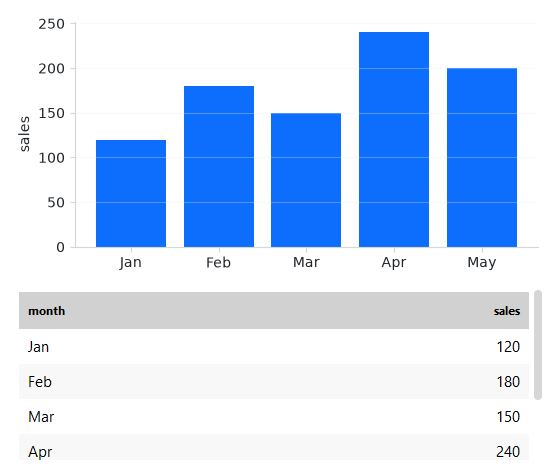
ds.load([{"month": "Jan", "sales": 120}, {"month": "Feb", "sales": 180}])

def render(ax, rows):
    ax.bar([r["month"] for r in rows], [r["sales"] for r in rows])

bs.Chart(render=render, data_source=ds, grow=True)
bs.DataTable(data_source=ds, columns=["month", "sales"])
Insert a record into the source and both views update. The chart reads the
source’s current filtered and sorted view, so calling ds.where(...) or
ds.order(...) reshapes the plot too:
from bootstack.data import col

ds.where(col("sales") >= 150)   # both the chart and the table follow
Note
matplotlib’s draw() is not free. For a high-frequency source or signal,
pass debounce=<ms> to coalesce a burst of changes into one redraw; the
chart also skips redraws while it is off-screen.
Example#
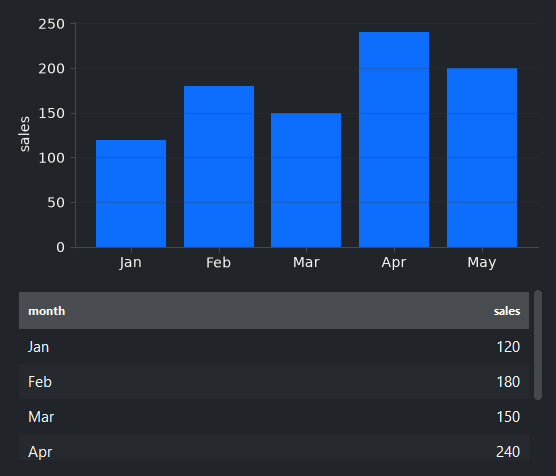
A chart and a table on one source, with a filter toggle and an “add” button — every change flows to both views:
 1
 2
 3def render(ax, rows):
 4    """Bar chart of sales by month — `rows` is the source's (filtered) records."""
 5    ax.bar([r["month"] for r in rows], [r["sales"] for r in rows])
 6    ax.set_ylabel("sales")
 7    ax.grid(True, axis="y", alpha=0.3)
 8
 9
10with bs.App(title="Live charts", min_size=(680, 620), padding=16, gap=12) as app:
11    sales = MemoryDataSource()
12    sales.load([
13        {"month": "Jan", "sales": 120},
14        {"month": "Feb", "sales": 180},
15        {"month": "Mar", "sales": 150},
16        {"month": "Apr", "sales": 240},
17        {"month": "May", "sales": 200},
18    ])
19
20    bs.Label("One source, two views — they stay in sync", font="heading-md")
21    bs.Chart(render=render, data_source=sales, grow=True, horizontal="stretch")
22    bs.DataTable(data_source=sales, columns=["month", "sales"],
23                 searchable=False, grow=True, horizontal="stretch")
24
25    high_only = bs.Signal(False)
26
27    def apply_filter(checked):
28        # Filtering the SOURCE updates both the chart and the table.
29        sales.where(col("sales") >= 180 if checked else None)
30
31    high_only.subscribe(apply_filter)
32
33    state = {"n": 6}
34
35    def add_month():
36        n = state["n"]
37        state["n"] = n + 1
38        sales.insert({"month": f"M{n}", "sales": 100 + (n * 43) % 180})
39
40    with bs.Row(gap=8, horizontal="stretch"):
41        bs.Switch("High months only (>= 180)", signal=high_only)
42        bs.Spacer()
43        bs.Button("Add month", accent="primary", on_click=add_month)
44
45app.run()
When to use#
Use signal= when the chart reflects a single reactive value (a control, a
computed result); use data_source= when it visualizes records you also show
elsewhere. For the data-source model in depth, see
Displaying Data and Data Sources. For continuous,
high-rate motion, Real-time and animated charts is the better tool than a fast signal.